Meeting and transcription tools for agencies · Updated 4 November 2026
Otter.ai Review for Small Agencies
A buying review of Otter.ai for 2 to 20 person agencies, covering free minutes, retention, seats, consent, plan pricing and value.
- 19 min read
- Otter.ai review for small agencies
- Verified against vendor pricing
The short answer
Otter Pro is the best value for an agency with five or fewer billed users that needs searchable transcripts, at $8.33 per user per month billed annually or $16.99 monthly, read 4 November 2026. Otter Business is the practical step for six to 20 people, at $19.99 annually or $30 monthly per user, because Pro is capped at five billed users.
| If you need | Choose |
|---|---|
| The lowest verified paid seat price for five or fewer people | Otter Pro (opens in a new tab) |
| A plan for six to 20 billed users | Otter Business (opens in a new tab) |
| A free test for occasional short meetings | Otter Basic (opens in a new tab) |
| A controlled enterprise rollout | Otter Enterprise (opens in a new tab) |
| Bot-free client-call capture | Check another tool |
Get started with the tools in this guide
These links go to the vendor's own site. We may earn a commission if you sign up, at no extra cost to you. How we fund the site. Every figure in this guide was read from the vendor's pricing page on the date stamped above, so confirm the number before you commit.
- Cheapest paid seat
- $8.33
- Basic monthly minutes
- 300
- Pro billed-user cap
- 5
- Business billed-user cap
- 25
Overview
For most 2 to 20 person agencies, Otter Pro is the value choice for five or fewer billed users, while Otter Business is the realistic plan for a six to 20 person team. That is the central conclusion of this Otter.ai review for small agencies. Pro costs $8.33 per user per month billed annually or $16.99 monthly, read 4 November 2026, but the pricing page caps it at five billed users. Business costs $19.99 per user per month billed annually or $30 monthly and raises the published cap to 25 billed users.
Otter is a meeting transcription and note-taking service. It can join Zoom, Microsoft Teams and Google Meet meetings, record in its apps, identify speakers, produce live transcripts, and make conversations searchable. The buying decision is not whether those features exist. It is whether the team can fit its meeting length, call volume, client-consent process, archive needs and individual user count inside the plan it can actually buy.
Basic is more constrained than a casual glance at the word free suggests. It gives 300 transcription minutes per month, 3 lifetime audio or video file imports, a 30-minute maximum per conversation and the 25 most recent conversations in history. Pro improves the working archive and increases the limits, but its five-user ceiling creates a sharp decision point. Business is not simply a larger version of Pro. It changes the meeting allowance, concurrent meeting limit, administrator controls and team size.
Every price and limit in this article was checked against Otter's official pricing or help pages on 4 November 2026. The review also separates a published archive count from a time-based retention guarantee, and a notification setting from legal consent. For the wider category, start with the meeting and transcription tools hub. The Fireflies vs Otter client calls comparison, Granola vs Otter guide for consultants and Otter.ai alternatives guide cover the nearby choices.
How we chose
The first test is usable capacity. A transcription service can be inexpensive per seat and still fail if a normal client workshop exceeds the conversation cap or if the team's archive disappears from the practical workflow. The second test is purchasability. A price only matters when the plan's published user limit covers the headcount that needs access.
The third test is the client-call process. An agency should know who starts Otter, whether a notetaker joins the meeting, how guests are informed, whether the transcript is shared automatically, and who reviews the output. Otter's settings can send a pre-recording email and control sharing, but the terms put notice and consent duties on the user. Those are workflow responsibilities, not features to outsource.
The fifth test is total recurring cost. This review shows annual-billing monthly equivalents and month-to-month prices separately. Five seats at the annual Pro rate cost $41.65 per month, while five seats at the monthly rate cost $84.95. Six people cannot be priced on Pro because the plan lists a maximum of five billed users, so the six-person Business cost is $119.94 monthly at the annual rate or $180 monthly.
Otter Basic: a real free test, not an agency archive
Best free test Otter Basic 300 monthly transcription minutes and 25 recent conversations
Otter Basic is a sensible way for a small agency to test whether transcripts will be used. The plan is free, and the pricing page lists live transcription, speaker identification, audio playback, multi-language support, iOS and Android apps, AI Chat within and across meetings, and connections to Zoom, Microsoft Teams and Google Meet. It is enough to answer operational questions such as who owns the recording, whether clients accept the meeting assistant, and whether the summary is checked before it becomes a client record.
The cap is 300 monthly transcription minutes. Otter marks the limit as per user and says it is a shared pool across transcription types. Monthly minutes do not roll over. Imported-file transcription also has a 300-minute monthly limit per user with no rollover. The plan includes 3 lifetime audio or video file imports, not 3 imports every month. That distinction matters for an agency that wants to bring in a back catalogue of recorded calls.
Basic limits a single conversation to 30 minutes. A 45-minute discovery call therefore does not fit the published per-conversation limit, even when the account has unused monthly minutes. The history row shows the 25 most recent conversations. That is a count limit, not a promise that recordings are deleted after a stated number of days. Otter's official pages read on 4 November 2026 do not publish a numeric day-based retention period for Basic.
The Basic workspace-size row lists a maximum of five members. That is not the same as five paid licences, and it should not be treated as permission for a five-person agency to share one login. Otter's terms say account owners are responsible for identifying and authenticating authorised users and controlling unauthorised access. The published free workspace can be a small pilot, but an agency should define individual access before placing client recordings in it.
Otter Pro: the value pick up to five billed users
Best paid value Otter Pro $8.33 per user monthly with annual billing, maximum five billed users
Otter Pro suits a solo consultant, a small account team or an agency with five or fewer people who need a searchable meeting record. Its annual-billing price is $8.33 per user per month, and the monthly price is $16.99 per user per month. Both figures were read on 4 November 2026. Pro lists 1,200 in-app recording minutes, 10 monthly audio or video file imports per user, unlimited storage and unlimited conversation history.
The conversation maximum rises to 90 minutes. That is a meaningful operational change for an agency running ordinary discovery calls, reviews and planning sessions. It does not make every meeting unlimited. A workshop longer than 90 minutes still needs a recording plan that fits the limit, and the published pricing page does not state a per-minute overage price. Do not budget an assumed surcharge or assume that excess time is silently included.
Pro also lists advanced search, export and playback, team vocabulary and taggable speakers, advanced meeting templates, and Salesforce, HubSpot and Zapier integrations. The integrations may be useful when notes need to travel into an existing client workflow. HubSpot is an integration listed by Otter, not a monetisable recommendation in this review. A team should confirm which user limits and permissions apply before promising a client-record sync.
The hard boundary is five billed users. A one-person consultancy and a five-person account can use the published Pro ceiling. A six-person agency cannot simply add one more Pro user at the same rate. It must move to Business, so the annual seat price should never be quoted without the cap beside it.
A five-person agency on Pro pays $41.65 per month at the annual-billing rate, calculated as five users at $8.33. The same five users cost $84.95 per month on the monthly rate, calculated as five users at $16.99. The annual equivalent is cheaper only if the agency accepts the annual billing term. If the tool is needed for a short campaign, the monthly figure is the more relevant budget.
Pro is good value when the team uses searchable transcripts, stays within 1,200 in-app recording minutes per user, and can live with a 90-minute conversation ceiling. It is poor value when the agency needs six or more individual users, requires an archive policy based on days rather than the published limits, or wants client calls captured without a visible notetaker. The official information checked here does not establish an Otter bot-free capture route.
Otter Business: the practical plan for six to 20 people
Best for a growing team Otter Business $19.99 per user monthly with annual billing, maximum 25 billed users
Business is the plan to price when a team outgrows Pro. It costs $19.99 per user per month with annual billing or $30 per user per month month to month. The pricing page lists a maximum of 25 billed users, unlimited meetings and in-app recordings, unlimited audio or video imports, a four-hour maximum per conversation, and three concurrent meetings.
For a six-person agency, Business costs $119.94 per month at the annual rate, calculated as six users at $19.99. At the monthly rate, the same six users cost $180 per month. The annual figure is not a six-person Pro comparison because six people cannot buy Pro under its published five-user cap. That difference is the hidden cost of using a headline entry-tier price for a larger team.
Business adds enhanced administration features, including activity logs and usage analytics, and offers prioritised support. The plan lists 6,000 imported-file transcription minutes per user with no rollover. The meeting and recording transcription row is unlimited, while the four-hour per-conversation limit remains. A team should therefore distinguish live or in-app meeting volume from a large archive of imported recordings.
Business is also the plan where the seat process matters most. Otter's help page says one seat is used by one user. An invited user counts against the available seats, and an additional user triggers a prorated charge if the available seats are exhausted. Deactivating or deleting a user frees a seat. The workspace owner should therefore keep the member list current rather than buying a shared credential and losing an auditable access trail.
Business is not automatically good value for a six-person team. If five people do all the work and the sixth person only wants occasional access, the owner should decide whether that person needs to record, edit, export or view conversations. If all six need regular access, budget six individual users and compare the $119.94 annual-rate monthly cost with alternatives in the meeting transcription software for consultancies guide.
Enterprise: controls without a published small-agency price
Otter Enterprise is a custom quote. The official pricing page read on 4 November 2026 does not publish a price, minimum spend or per-user rate, so this review does not assign one. It lists unlimited custom AI workflows, Otter Sales Notetaker, custom integrations, SSO, SCIM, domain capture, enterprise security and controls, an API and webhooks, video replay for Zoom and Google Meet, and a customer success programme.
Enterprise also lists HIPAA compliance as an add-on and custom data retention. Those labels should not be read as a guarantee that any agency's client workflow is compliant. A team handling regulated information needs the relevant agreement, configuration and client requirements confirmed in writing. The 100-user minimum shown for SSO and SCIM is a material boundary for a 2 to 20 person agency. It means an enterprise security feature can have a licence condition that is larger than the team's headcount.
Otter pricing compared
The table below keeps the vendor's annual and monthly prices separate. Annual figures are monthly equivalents under annual billing. A dash means Otter did not publish a numeric price rather than a zero price.
| Plan | Price read 4 November 2026 | Published limits that change the buying decision |
|---|---|---|
| Basic | Free | 300 monthly transcription minutes, 3 lifetime imports, 30 minutes per conversation, 25 most recent conversations, up to 5 workspace members |
| Pro | $8.33/user/month annual; $16.99/user/month monthly | 1,200 in-app recording minutes, 10 monthly imports per user, 90 minutes per conversation, unlimited storage, maximum 5 billed users |
| Business | $19.99/user/month annual; $30/user/month monthly | Unlimited meetings and in-app recordings, unlimited imports, 4 hours per conversation, 3 concurrent meetings, maximum 25 billed users |
| Enterprise | Custom | Unlimited workspace size, custom retention, SSO and SCIM, API and webhooks, HIPAA compliance add-on |
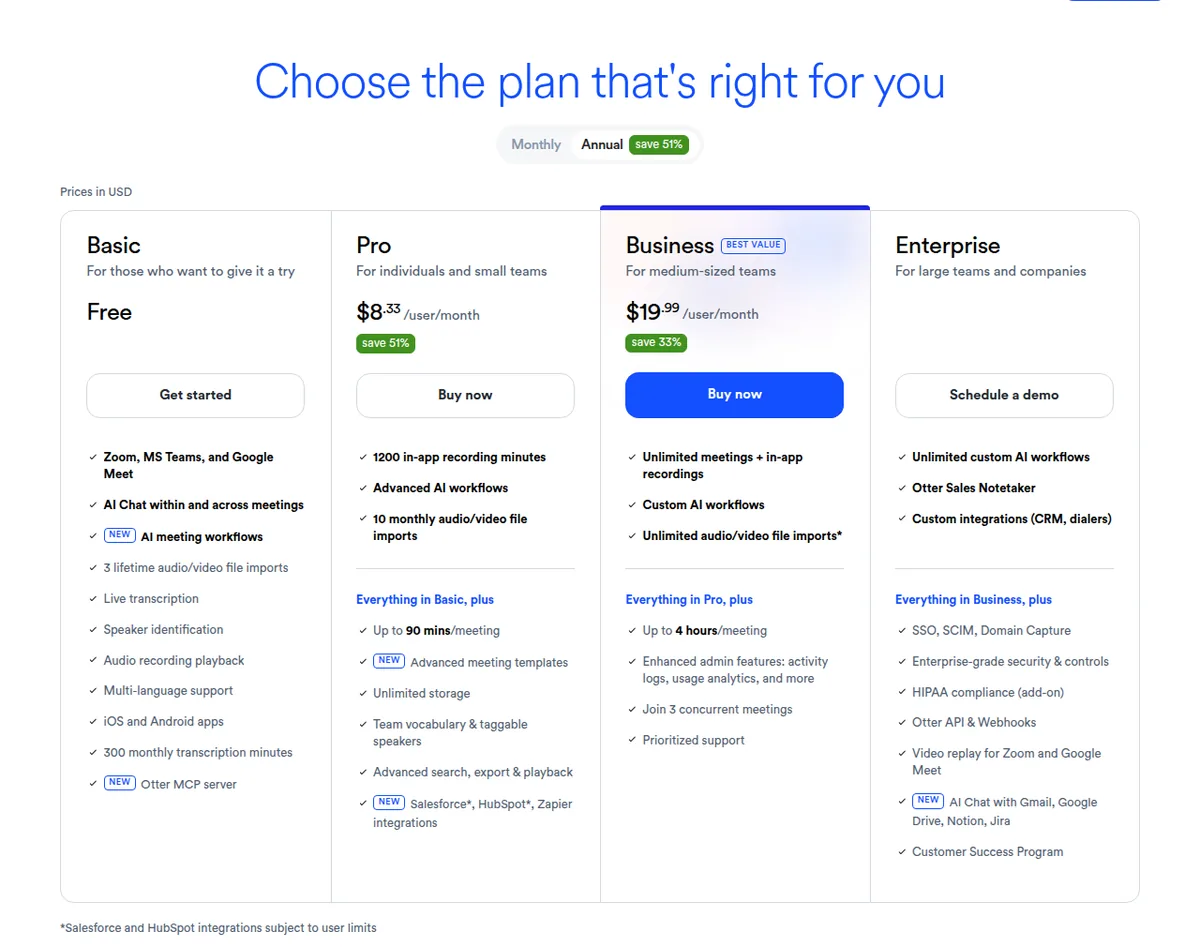
A six-person team changes the comparison. Business costs $119.94 monthly at the annual rate. The unavailable Pro arithmetic would be $49.98, but that is not a valid plan purchase because Pro is capped at five billed users. The correct comparison is Business against another tool's purchasable six-person plan, not Business against an imaginary six-seat Pro account.
The meeting notes hidden fees guide covers the broader category's traps. Otter's own traps are the five-user Pro ceiling, the 25-conversation free history and the different imported-file limit.
What the Otter free plan actually includes
The free plan is Otter Basic. It costs $0, but it is not an unlimited archive or a full agency workspace. The exact published allowance read on 4 November 2026 is 300 monthly transcription minutes per user, with the pricing matrix noting that the minutes are a shared pool across all transcription types and do not roll over. Imported files also have a 300-minute monthly transcription limit per user, with no rollover.
Basic includes 3 lifetime audio or video file imports per user. Lifetime means the allowance is not refreshed monthly. It also sets a 30-minute maximum per conversation. This matters for client discovery sessions and workshops because unused monthly minutes cannot turn a 31-minute conversation into a supported Basic recording.
Basic history is the 25 most recent conversations. Otter does not publish a number of days for Basic retention on the official pages read on the date above. An agency should describe this as a 25-conversation history limit, not as a promise that all older recordings are deleted after a particular period. The pricing page lists unlimited conversation history for Pro and Business, and Pro lists unlimited storage, but those labels do not create a numeric deletion guarantee either.
The free plan also lists live transcription, speaker identification, playback, multi-language support, mobile apps, AI Chat and meeting connections for Zoom, Microsoft Teams and Google Meet. Those features make Basic useful for a controlled pilot. A good pilot records only approved internal or client-safe calls, assigns an owner, checks the transcript, and measures actual minutes and history needs before a paid decision.
Basic stops being a good agency default when calls regularly exceed 30 minutes, monthly usage approaches 300 minutes per user, more than 3 imported files are required, or the 25 most recent conversations do not provide a workable record. It also stops being a sensible shared workspace when the team has not decided whose account owns the recordings and who can export them.
The AI meeting notes for small agencies guide gives the category-level choice. Otter Basic is a bounded test, not a free promise that every client call remains available indefinitely.
Seats, licences and account sharing
Otter's plan cards use per-user pricing for Pro and Business. The pricing page shows a maximum of five billed users for Pro and 25 billed users for Business. Otter's help article explains the Business seat rule directly: one seat is a licence assigned to one user, and a user counts when invited and joined to the account.
That means a two-person agency on Pro pays $16.66 monthly at the annual rate or $33.98 monthly on month-to-month billing. A five-person agency pays $41.65 or $84.95. A six-person agency must use Business, paying $119.94 or $180. The difference is not an optional add-on for a sixth person. It is a change of plan.
The help page says Otter automatically charges a prorated amount when a new member joins after the available seats are in use. Deactivating or deleting a user frees a seat, and the initial seat commitment renews on the same monthly or yearly term unless cancelled. An owner should therefore remove leavers promptly and review the seat count before renewal.
Can an agency share one account instead? The official pages read for this review do not publish permission to use one login as a substitute for individual licences. The help page defines a Business seat as one user. The terms make the account owner responsible for identifying and authenticating authorised users, approving access, controlling unauthorised access and activity under user accounts. The safer operational conclusion is to use named access for people who need the workspace, not a shared password.
The AI meeting notes client confidentiality guide covers the policy questions an agency should settle before inviting staff.
Client confidentiality and recording consent
Otter's privacy policy says an audio recording may contain personal information belonging to third parties and asks users to have the necessary permissions before sharing it with Otter. For a Business or enterprise service agreement, the customer can be the data controller and Otter can process personal information on that customer's instructions. That distinction may matter in a client contract or data-processing review.
The terms say the customer retains ownership rights in user content, while granting Otter a licence to host, store, transfer, display, process and distribute that content as needed to provide the service. The terms also describe user-content hosting on Amazon Web Services, encryption and access controls. Pricing lists TLS encryption, AES-256 encryption for real-time content, two-factor authentication, sharing permissions and export controls. These are useful controls, but they do not mean that every use is suitable for every client.
Retention needs careful wording. Basic publishes 25 most recent conversations. Pro, Business and Enterprise publish unlimited conversation history, and Pro publishes unlimited storage. Otter's privacy policy says personal information is stored as long as necessary for the policy purposes or as required by law or a regulatory obligation. The official pages read on 4 November 2026 do not publish a numeric day-based retention duration for Basic, Pro or Business. Enterprise lists custom data retention, but no numeric period is shown.
Recording consent is a separate issue. Otter's terms place responsibility for required notices and consent on the user because laws differ by location. The help settings let an account send calendar guests a pre-recording email 5 to 10 minutes before a scheduled meeting. The settings also control auto-join, auto-share, viewer and collaborator permissions, and whether collaborators can share a conversation onward.
A pre-recording email is a useful process step, not proof that every participant has consented. An agency should tell the client what is recorded, why the transcript is needed, who can access it and how it will be shared. If a client refuses an AI notetaker, do not treat an automated capture setting as permission.
Where Otter stops being good value
Otter stops being good value when the plan's primary limit creates more work than the subscription removes. Basic is poor value at $0 when the team loses a complete call because it exceeded 30 minutes or cannot rely on more than 25 recent conversations. Paying is not automatically the fix for a consent problem.
Pro stops being good value for a six-person team because it is not a purchasable six-person plan. Business is the real Otter price at that headcount. Pro can also be the wrong plan when the agency runs long workshops, needs more than 1,200 in-app recording minutes per user, imports more than 10 files per user each month, or wants more than one person handling concurrent meetings.
Business stops being good value when the team does not need unlimited in-app meetings, four-hour conversations, three concurrent meetings, usage analytics or the 25-user ceiling. A five-person agency that only needs searchable transcripts may pay $99.95 monthly at the annual Business rate when Pro costs $41.65. The higher tier is justified by the workflow, not by the presence of a longer feature list.
Otter also stops being the right fit when client-facing calls require a documented bot-free capture method. The official pages read for this review describe Notetaker joining Zoom, Microsoft Teams and Google Meet, and let the account control auto-join and notifications. They do not establish a bot-free Otter route. The Fireflies review and the comparison pages linked above are better places to examine other capture methods.
Enterprise stops being good value when an agency is attracted to security labels without a defined requirement. SSO and SCIM show a minimum 100-user licence, which is larger than the stated agency size. HIPAA compliance is an add-on, and Enterprise pricing is custom.
Who should not buy Otter
An agency should stay on Basic when meetings are occasional, normally fit inside 30 minutes, imports are rare, and 300 monthly minutes and 25 recent conversations are enough. The team should run a real but controlled pilot, not place unrestricted client recordings into a free account merely because no card is required.
A team should not buy Pro for a six-person rollout. The five billed-user maximum makes the plan unavailable for that headcount. Price Business, reduce the number of named users only if the access need genuinely differs, or compare another product that has a purchasable six-person plan.
Finally, do not buy any plan before the client-call policy is clear. If a client will not consent to recording, Otter should not join. If a client requires a deletion deadline that Otter's pages do not quantify, obtain a written answer or choose a workflow with a retention rule the agency can document.
Our verdict
For most 2 to 20 person agencies, choose Otter Pro when five or fewer billed users need searchable transcripts and the team can fit inside 1,200 in-app recording minutes per user and 90 minutes per conversation. The annual-billing price is $8.33 per user per month, or $16.99 monthly, read 4 November 2026. Five seats cost $41.65 monthly at the annual rate or $84.95 month to month.
Choose Otter Business for six to 20 billed users, longer meetings, unlimited in-app meetings and recordings, three concurrent meetings or stronger administration. The annual-billing price is $19.99 per user per month, and the monthly price is $30. Six seats therefore cost $119.94 monthly at the annual rate or $180 monthly. The 25-user maximum leaves room for a 20-person agency, but the seat is still assigned to one user.
Use Otter Basic for an honest free pilot. Its 300 monthly transcription minutes, 3 lifetime imports, 30-minute conversation cap and 25 most recent conversations are useful boundaries to test, not inconveniences to hide. No numeric day-based retention period was published on the official pages read on 4 November 2026.
Otter is not the best value when the agency needs a bot-free client-call method, a published numeric retention schedule, or an enterprise control whose licence minimum exceeds its headcount. The methodology explains the source and date standard behind the prices in this review.
Frequently asked questions
Is an Otter.ai review for small agencies positive?
Yes, with conditions. Otter Pro is strong value for five or fewer billed users that need searchable transcripts, while Business is the practical plan for six to 20 people. The recommendation weakens when a client requires bot-free capture, a published day-based retention period or a different consent workflow.
What does Otter Basic include for free?
Otter Basic is free and includes 300 monthly transcription minutes per user, 3 lifetime audio or video imports, a 30-minute maximum per conversation and the 25 most recent conversations. It also includes live transcription, speaker identification, playback, mobile apps and meeting connections. The minutes do not roll over, and imported-file transcription has a 300-minute monthly limit per user.
How much does Otter Pro cost for a small agency?
Otter Pro costs $8.33 per user per month with annual billing or $16.99 per user per month monthly, read 4 November 2026. Five users cost $41.65 monthly at the annual rate or $84.95 monthly. Pro is capped at five billed users, so a six-person agency must price Business instead.
How much does Otter Business cost for six people?
Otter Business costs $19.99 per user per month with annual billing or $30 monthly. Six users cost $119.94 monthly at the annual rate or $180 monthly. Business lists a maximum of 25 billed users, unlimited meetings and in-app recordings, and a four-hour maximum per conversation.
Does Otter use per-seat licences?
Yes. Otter's help article says a Business seat is a licence assigned to one user, and an invited user counts against the available seats. If all seats are occupied, adding a member triggers a prorated charge. The official pages read here do not publish account sharing as a substitute for individual user access.
Can an agency share one Otter account?
The official pages read on 4 November 2026 do not say that sharing one login is an allowed agency licensing method. Otter describes one seat as one user, and its terms make the account owner responsible for authorised-user access and account security. Named access is the safer approach for client confidentiality, exports and auditability.
Does Otter publish a retention period?
Not as a numeric day count for Basic, Pro or Business on the official pages read for this review. Basic publishes the 25 most recent conversations, while Pro, Business and Enterprise publish unlimited conversation history, and Pro lists unlimited storage. Enterprise lists custom data retention without a numeric period.
Does Otter handle recording consent for client calls?
Otter provides a setting that can email calendar guests 5 to 10 minutes before a scheduled meeting to say that Notetaker will join and record. Its terms still place responsibility for required notices and consent on the user because laws vary by location. The agency must decide whether the notice is sufficient for the call and client contract.
Is Otter good value for a 20-person agency?
Business can cover 20 billed users under its published maximum of 25. At $19.99 per user per month with annual billing, 20 users cost $399.80 monthly, or $600 at the monthly price. It is good value only if the agency needs the Business limits and controls, and if the team has a documented approach to consent, sharing and transcript review.
Official Otter sources checked
Prices and limits in this review were read from Otter's official pricing page on 4 November 2026. Seat rules were checked against Otter's official help article on seats and licences. Recording notifications and sharing controls were checked against Otter's official Notetaker settings help article. Privacy, content ownership, retention wording and consent responsibility were checked against Otter's official privacy policy and terms of service. Confirm current figures before subscribing.
Get started with the tools in this guide
These links go to the vendor's own site. We may earn a commission if you sign up, at no extra cost to you. How we fund the site. Every figure in this guide was read from the vendor's pricing page on the date stamped above, so confirm the number before you commit.
Related guides
-
 Head to head
AI Meeting Notes for Agencies
Fireflies vs Otter for Client Calls
Which of the two dominant AI meeting note tools fits a small agency, based on verified pricing, seat limits and how each behaves in a client call.
-
 Best overall
AI Meeting Notes for Agencies
Best AI Meeting Notes for Consultants
Four AI meeting note tools compared for consultancies on verified pricing, the free-tier limits that actually bite, and client confidentiality.
-
 Head to head
AI Meeting Notes for Agencies
Fathom vs Fireflies for Consultants
Fathom and Fireflies compared on verified pricing, the free-tier limits that decide real cost, and how each behaves in a client call.