AI Meeting Notes for Agencies · Updated 25 October 2026
Transcription Software for Consultancies
The minute allowances, per conversation caps, languages and export rules that decide which meeting transcription software suits a consultancy.
- 17 min read
- meeting transcription software for consultancies
- Verified against vendor pricing
The short answer
Otter meters transcription at 300 minutes a month per user on Basic and 1,200 on Pro, with a 30 minute cap per conversation on Basic. Fireflies, Fathom and Avoma advertise unlimited transcription, and MeetGeek gives three hours a month free before moving to 20 hours on Pro. Notta gives 120 minutes a month free but caps a free conversation at three minutes. The practical differences are the per conversation cap, the storage allowance and whether transcripts can be exported at all.
| If the consultancy needs | The platform to look at |
|---|---|
| The longest free conversation before paying | Fathom (opens in a new tab) |
| A predictable monthly minute allowance | Otter (opens in a new tab) |
| To pay only for the people who record | Avoma |
| A free tier with no per conversation cap worth worrying about | Fireflies (opens in a new tab) |
| Hours rather than minutes on the free tier | MeetGeek |
| A cheap paid tier for one consultant | Notta |
Get started with the tools in this guide
Where a vendor offers a free plan or a free trial, it is stated below, so you can try the tool before you pay for it.
-
Start free with Fireflies.ai (opens in a new tab)
Fireflies.ai
Free tier available
-
See Otter.ai pricing (opens in a new tab)
Otter.ai
-
See Fathom pricing (opens in a new tab)
Fathom
These links go to the vendor's own site. We may earn a commission if you sign up, at no extra cost to you. How we fund the site. Every figure in this guide was read from the vendor's pricing page on the date stamped above, so confirm the number before you commit.
- Platforms compared
- 6
- With unlimited transcription
- 3
- Shortest free conversation cap
- 3 minutes
- Limits checked
- 25 October 2026
Overview
Meeting transcription software for consultancies turns on four numbers that the plan pages state in four different units. The first is the monthly allowance, which some vendors express in minutes per user, some in hours per workspace and some not at all because they advertise unlimited. The second is the cap on a single conversation, which is the number that ends a transcript mid sentence and is the most common reason a consultant upgrades. The third is the storage allowance, which decides how long the transcript survives. The fourth is whether the transcript can be exported at all, because a transcript a consultant cannot export is a transcript that cannot be filed against a client engagement.
Those four numbers do not move together. Fathom gives unlimited transcription on its free plan but caps CRM syncs at three users per domain. Otter gives generous monthly minutes on Pro but caps a single conversation at 90 minutes. Notta gives the cheapest paid tier in this comparison at $8.17 a month but allows only three minutes per conversation on the free plan. An agency that reads only the headline price will pick the wrong one.
This page works through the six platforms a consultancy is most likely to shortlist and states, for each, what the vendor's own pricing page says today. Every allowance was read on 25 October 2026 and recorded with its source. The meetings hub holds the wider set of guides, including the comparison of AI meeting notes for consultancies and the five person cost scenarios.
What we compared
Six platforms were compared on the transcription allowance and the rules that surround it, rather than on the AI features that sit on top. Prices are the standing list prices on the date read, and no figure has been converted between currencies or carried over from an earlier review. Where a vendor publishes an annual and a monthly rate, both are given.
The five questions each platform was held to:
- What the monthly transcription allowance is. This is the number that decides whether a consultancy can record every client call or only the important ones.
- What the cap on a single conversation is. A 30 minute cap turns a 45 minute discovery call into a half transcript.
- What happens to the transcript afterwards. Storage duration and export rights decide whether the transcript is usable in a client file.
- Which languages are supported. A consultancy working with clients in more than one language needs to know this before it pays, not after.
- Who counts as a paid user. Some platforms charge per seat, some per recorder, and one charges only for the people who actually record.
Three of the platforms here are commercial partners of this site and three are not. That has no effect on any figure on this page and no vendor is ranked by it.
The monthly allowance, platform by platform
The clearest monthly allowance to budget against Otter 300 minutes per user on Basic, 1,200 on Pro
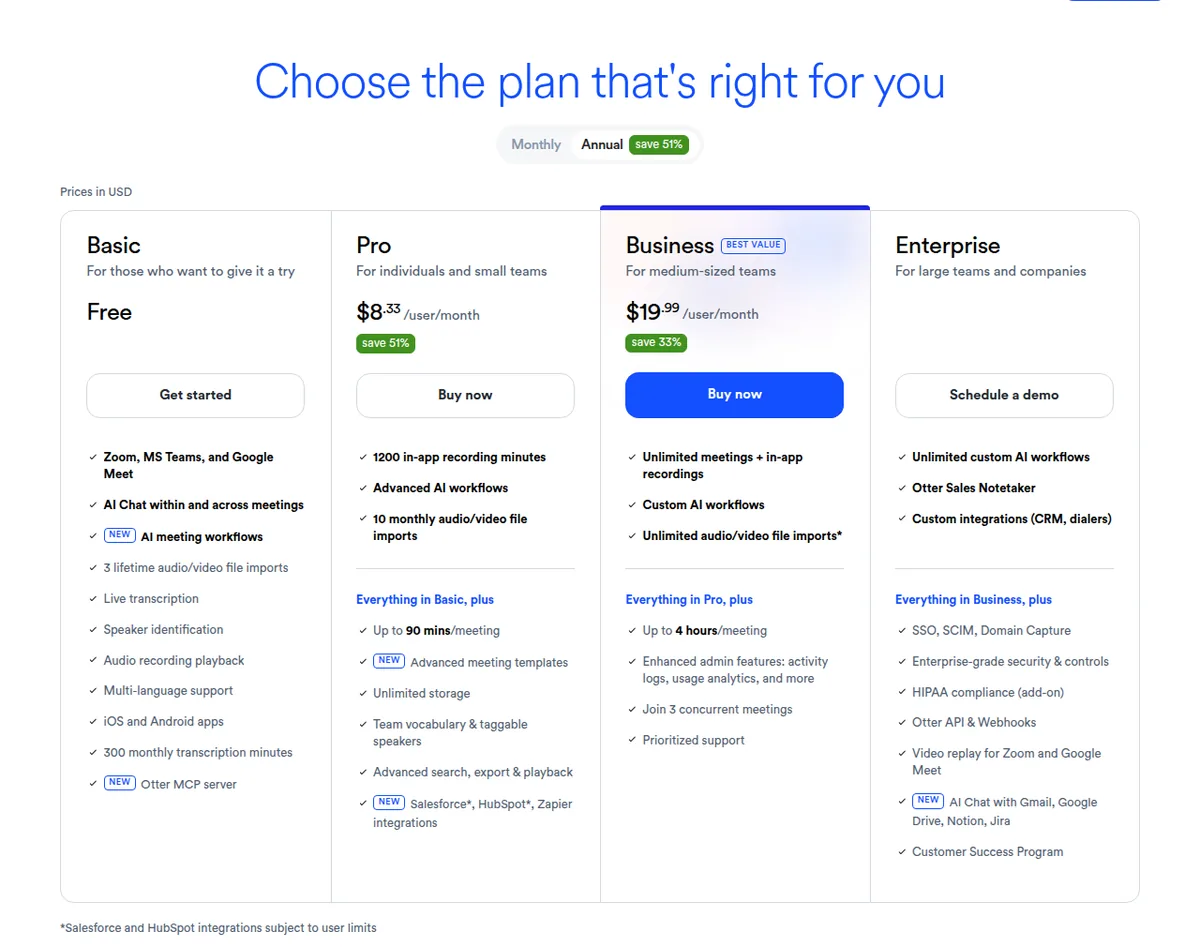
Otter publishes its allowance in minutes per user and states that the allowance is a shared pool across all transcription types with no rollover. Basic gives 300 minutes a month per user with a 30 minute cap per conversation. Pro gives 1,200 minutes a month per user with a 90 minute cap, at $16.99 per user per month or $8.33 billed annually. Business moves to unlimited meetings and in-app recordings with a four hour cap per conversation, at $30 per user per month or $19.99 billed annually, and caps the workspace at 25 billed users. The Otter page also meters imported files separately from meetings, at 300 minutes per user on Basic, 1,200 on Pro and 6,000 on Business.
Best paid tier for a single consultant Notta $8.17 a month for 1,800 minutes
Notta states 120 transcription minutes a month on the free plan, 1,800 minutes a month on Pro at $8.17 billed annually, and unlimited transcription on Business at $16.67 billed annually. The plan table labels the quota "no carryover", so unused minutes do not accumulate. What makes Notta worth a look for a one person consultancy is that 1,800 minutes is 30 hours of transcription for under $9 a month, which is more minutes per pound than any other paid tier here.
Fireflies and Fathom take the opposite approach and advertise unlimited transcription on every tier. Fireflies qualifies that with an asterisk, explained below. Fathom lists transcription, recordings and call storage all as unlimited on its free plan.
MeetGeek counts in hours rather than minutes: three hours of transcription a month on Basic, 20 hours on Pro at $15.99 a month with $0.50 per extra hour, and unlimited transcription on Business at $27 a month.
Avoma lists transcription minutes as unlimited on every plan including Startup at $19 per recorder seat per month billed annually, and charges only for the people who record rather than for everyone who reads the transcript.
What "unlimited transcription" actually means
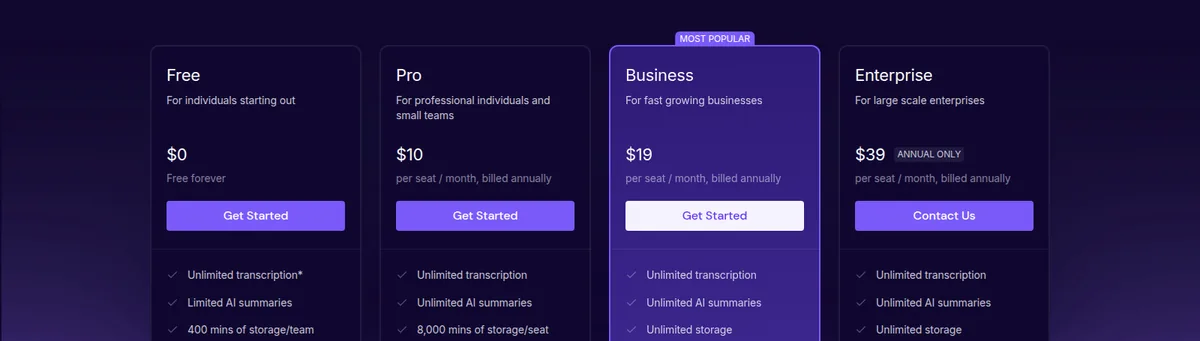
Three vendors here advertise unlimited transcription, and the word is doing slightly different work in each case. Reading the small print is worth the two minutes.
Fireflies prints "Unlimited transcription" on all four plans including Free, with an asterisk. The asterisk is explained in the vendor's own FAQ, which states: "Pro & Business tier users have access to meeting & audio file transcription. There are no rate limits for using the meeting bot or chrome extension on a monthly basis. There are rate limits for using certain features to transcribe like the API, Dialers, and bulk file uploads." For a consultancy that records through the bot, that means unlimited in practice. For a consultancy that pushes recordings in through the API or uploads bulk files, it does not. The same FAQ notes that the Free plan's transcript is marked "Limited" in the plan table, and that storage is 400 minutes per team on Free against 8,000 minutes per seat on Pro.
Fathom lists "Transcription (unlimited)" and "Recordings & call storage (unlimited)" on the free plan as well as every paid plan, which is the most generous free position in this comparison. The limits on Fathom are elsewhere: advanced summaries, Ask Fathom within a call and account wide Ask Fathom are all marked "Limited use" on Free, and CRM syncs are capped at three users per domain on every plan.
Avoma lists "Unlimited" under transcription minutes across Startup, Organization and Enterprise. The constraint on Avoma is not minutes but seats: only recorder seats are charged, viewers and collaborators are always free, and the entry tier caps at 25 paid recorder seats.
For a consultancy the practical reading is this. Unlimited transcription is genuine on all three for bot recorded meetings. The differences that will actually bite are the storage allowance, the per conversation cap where one exists, and whether the transcript can be exported.
Per conversation caps that end a transcript mid sentence
The cap on a single conversation is the number most likely to be discovered too late, because it only shows up on the call that runs long.
Otter caps a conversation at 30 minutes on Basic, 90 minutes on Pro and four hours on Business and Enterprise. A 45 minute client discovery call therefore produces a complete transcript on Pro and a partial one on Basic. Notta caps a free conversation at three minutes, which makes the free plan useful for testing the product rather than for recording real calls, and raises the cap to five hours on Pro and above. MeetGeek caps a meeting at two hours on Basic and Pro, three hours on Business and four hours on Enterprise. Avoma does not publish a per meeting duration cap alongside its unlimited minutes.
Fireflies publishes a recording limit rather than a transcription cap: two hours on Free and Pro, three hours on Business and four hours on Enterprise. Fathom does not publish a per conversation cap on its pricing page.
For a consultancy, a two hour ceiling is not a practical constraint on client calls. A 30 minute ceiling is. The distinction is worth checking against the longest meeting the consultancy routinely runs before choosing a tier, because upgrading for the cap alone is the most common reason a consultant pays more than they expected.
Languages and translation
Consultancies working across borders should check this before anything else, because it is the one limit that cannot be worked around.
Otter states that AI transcription supports English, Spanish, French, German, Japanese and Chinese, and the page lists multi-language support from the Basic plan upward.
Fireflies states: "Currently English is the primarily language that is supported. We also support Spanish, French, Portuguese, Italian, and 100+ other languages in beta." Multi-language mode is a Business tier feature, so a consultancy that needs two languages in one meeting should budget for that tier rather than Pro.
MeetGeek states transcription in 100+ languages with automatic language detection on every plan including the free one, which is the broadest free language position in this comparison.
Avoma states multi-language support across 70+ languages, with translation of the transcript and notes into another language starting at the Organization tier rather than Startup.
Notta includes transcript translation from Pro upward, and sells translation as metered add-ons: monolingual translation at $6 a month billed annually for up to 100 uses per account per month, and bilingual transcription and translation at $9 a month billed annually for up to 200 uses per account per month, both available only on paid plans. The free plan includes up to four bilingual uses and two monolingual real time translation uses a month.
Fathom does not publish a language list on its pricing page, so a consultancy that needs a specific language should confirm it directly before subscribing.
Seat rules: who pays and who does not
This is where an agency and a solo consultant diverge, and one vendor here has built its whole model around the difference.
Avoma charges only for recorder seats. The page states plainly: "Only pay for meeting recorder users. Viewers and Collaborators are always free." A consultancy where one person records client calls and three others read the transcripts pays for one seat. That is the single most useful pricing structure in this comparison for a small team, and it is the reason Avoma appears here despite having no free plan at all.
Otter charges per user and caps the workspace. Basic allows a maximum of five workspace members, Pro caps at five billed users and Business at 25. A five person consultancy sits exactly on the free ceiling, which means the sixth person forces an upgrade.
Fireflies charges per seat and defines the seat broadly. The FAQ states: "Any teammate you added in your Fireflies workspace would be counted as a seat." The same FAQ adds that meeting recap links can be shared with participants outside the team at no cost, which is the sensible way to give a client the notes without buying a licence for them.
Fathom charges per user with a two user minimum on Team and Business, and Premium is the individual plan. A solo consultant takes Premium at $20 a month monthly or $16 billed annually.
MeetGeek charges per user and includes unlimited free Basic licences alongside paid seats according to its team calculator, so a consultancy can give the free tier to people who only occasionally join calls.
Notta sells seats explicitly, with one seat on Free and Pro and a customisable seat count on Business, where transcription becomes unlimited.
What the free transcription tiers actually include
Four of the six platforms here have a genuinely free tier, and they are not equivalent.
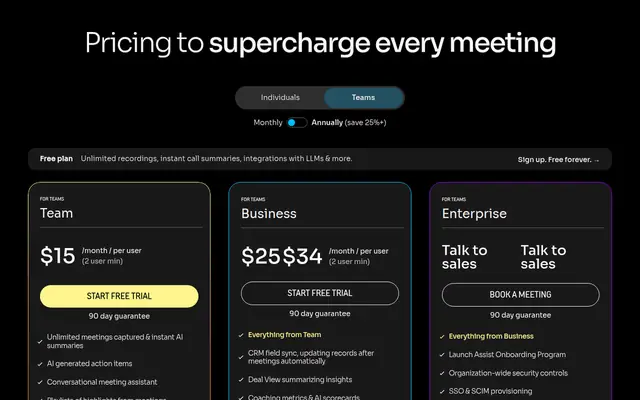
Fathom at $0 is the strongest free offer for transcription specifically, because recordings, transcription and call storage are all listed as unlimited on the free plan. The free plan also includes a choice of bot-free or bot capture, instant AI call summaries, clips, playlists and search across calls. What is limited is the intelligence layer: advanced summaries and both forms of Ask Fathom are marked "Limited use", and there is a 90 day guarantee on every plan including this one.
Fireflies at $0 gives unlimited transcription with a transcript marked "Limited" in the plan table, limited AI summaries, 400 minutes of storage per team and 20 AI credits. Storage is pooled at team level on Free, so a five person consultancy shares 400 minutes rather than holding 400 minutes each, which is the tightest free allowance here once a few calls have been recorded.
Otter at $0 gives 300 minutes a month per user, a 30 minute cap per conversation, three lifetime imported files per user, and a 25 conversation history. The workspace is capped at five members and the export format on Basic is limited to mp3 and txt, so a consultant who needs a pdf, docx or srt transcript is pushed to Pro.
MeetGeek at $0 gives three hours of transcription a month, three months of transcript storage and one month of audio storage, with a two hour cap per meeting. It includes transcription in 100+ languages, automatic language detection, speaker recognition, an AI summary for every meeting, and AI Chat across all meetings. The two things Basic does not include are the ones a consultancy is most likely to need: download assets and download transcripts are both marked as not included on Basic, so the free tier is for reading in the app rather than for filing.
Notta at $0 gives 120 minutes a month with a three minute cap per conversation, which makes it a trial rather than a working free tier.
Avoma has no free tier. It offers a 14 day unrestricted trial of the Organization plan with all add-ons enabled and no credit card required, which is a full product trial rather than a permanently free plan.
The export and storage traps
Exporting is a paid feature more often than the free tier suggests. MeetGeek marks download transcripts and download assets as not included on Basic. Otter limits Basic exports to mp3 and txt, adding pdf, docx and srt on Pro. Notta places export transcripts on Pro rather than Free. A consultancy that treats the transcript as a deliverable should check the export row rather than the transcription row.
What happens to a transcript after a cancellation is a separate question, covered in the comparison of cancellation and refund terms. That page sets out refund windows, downgrade rules and deletion schedules vendor by vendor.
Storage is metered separately from transcription. Fireflies gives 400 minutes of storage per team on Free, 8,000 minutes per seat on Pro and unlimited storage on Business. MeetGeek gives three months of transcript storage and one month of audio storage on Basic, one year and six months on Pro, and unlimited transcript storage with 12 months of video on Business. Otter gives unlimited storage from Pro upward. A consultancy recording 30 hours of client calls a month will exceed a free storage allowance quickly even where transcription itself is unlimited.
Downgrading can cost access to old transcripts. Notta states the position plainly: "you can only view the first 3 minutes of the transcript as a Free user" after cancelling a paid plan, and advises exporting to local storage before downgrading. That is the clearest warning in this comparison and it applies in spirit to every platform here, because none of them promise full transcript access on a free plan indefinitely.
Concurrent recordings are capped more often than the price suggests. Otter allows one concurrent meeting on Basic, two on Pro and three on Business. MeetGeek lists concurrent meetings as "Limited" on every plan including Business and Enterprise. A consultancy where two people record client calls at the same time should check this row.
Who should not buy this
A consultancy that records fewer than five client calls a month should not pay for transcription software. Fathom gives unlimited recordings and transcriptions for nothing, and MeetGeek gives three hours a month with 100+ language support. The upgrade is worth making when a storage allowance, an export right or a per conversation cap forces it.
A consultancy that needs the transcript as a client deliverable should not choose a free tier. MeetGeek withholds downloads on Basic, Otter restricts export formats on Basic and Notta puts export on Pro. Any of the three paid entry tiers here solves it for less than the cost of one billable hour.
A consultancy recording in a language other than English should not choose on price alone. Fireflies lists English as its primary language with others in beta and puts multi-language mode on Business, while MeetGeek claims 100+ languages including on the free plan and Avoma claims 70+. Confirm the specific language on the vendor's own page before subscribing.
A consultancy that already pays for a meeting notes platform should check whether transcription is already included before buying a second subscription. Our comparison of AI meeting notes for consultancies sets out which platforms bundle transcription with note taking, and the hidden fees guide covers the charges that sit outside the plan price.
Our verdict
For a consultancy that wants transcription to be unlimited and free while it decides, Fathom is the answer, because recordings, transcription and call storage are all listed as unlimited on a plan that costs nothing and carries a 90 day guarantee. The trade is that advanced summaries and both forms of Ask Fathom are limited, and CRM syncs cap at three users per domain.
For a consultancy that wants a predictable monthly allowance and the clearest upgrade path, Otter is the better structured product, because the allowance is stated in minutes per user on the pricing page and the tiers map neatly onto one consultant, a small team and a larger one. Budget on 1,200 minutes per user on Pro rather than on Basic, and check the per conversation cap against the longest call the consultancy runs.
For a consultancy where only one or two people record client calls, Avoma is worth the money despite having no free plan, because viewers and collaborators are always free and transcription is unlimited on the entry tier. For a solo consultant who simply wants the cheapest large allowance, Notta Pro at $8.17 a month for 1,800 minutes is the lowest cost per minute in this comparison, provided the consultancy can live without a free tier that is usable for real client work.
Frequently asked questions
How many transcription minutes does a consultancy actually need?
It depends on how many client calls are recorded. A 60 minute client call is 60 minutes of transcription, so a consultancy recording two calls a day for 20 working days needs roughly 2,400 minutes a month, which is above Otter Pro's 1,200 minutes per user and inside Notta Pro's 1,800 minutes only if usage is lighter. The platforms that advertise unlimited transcription remove the calculation entirely, and for a busy consultancy that is worth paying for.
Is unlimited transcription really unlimited?
It is on the plans that advertise it, with one qualification worth reading. Fireflies prints an asterisk against "Unlimited transcription" and explains it in the vendor FAQ, which states that there are no monthly rate limits for the meeting bot or the Chrome extension but that rate limits apply to the API, dialers and bulk file uploads. Fathom and Avoma both list unlimited transcription without a comparable carve out on their pricing pages. For a consultancy recording through the bot, unlimited means unlimited in practice.
What is a per conversation cap and why does it matter?
It is the maximum length of a single transcript. Otter allows 30 minutes per conversation on Basic, 90 minutes on Pro and four hours on Business. Notta allows three minutes per conversation on the free plan and five hours on Pro. MeetGeek allows two hours per meeting on Basic and Pro, three hours on Business and four on Enterprise. A consultancy whose client calls run to 45 minutes will find a 30 minute cap produces a partial transcript on every call, which is why the cap matters more than the monthly total.
Can a consultancy share transcripts with clients without buying extra seats?
Usually yes, and it is worth checking because it is a hidden saving. Fireflies states that meeting recap links can be shared with participants or other users without adding them to the team, at no charge. Avoma charges only for recorder seats and states that viewers and collaborators are always free. Otter allows sharing through private channels and public links from Pro upward. Notta and MeetGeek both allow sharing and password protected links on paid tiers.
Which platforms support transcription in more than one language?
MeetGeek states transcription in 100+ languages with automatic language detection on every plan including the free one. Avoma states multi-language support across 70+ languages, with transcript and notes translation starting at Organization. Otter states AI transcription in English, Spanish, French, German, Japanese and Chinese. Fireflies states that English is the primary language supported, with Spanish, French, Portuguese, Italian and 100+ other languages in beta, and puts multi-language mode on the Business tier. Notta includes transcript translation from Pro upward and sells further translation as metered add-ons.
Can transcripts be exported on the free plans?
Not on all of them. MeetGeek marks download transcripts and download assets as not included on its free Basic plan. Otter restricts Basic exports to mp3 and txt and adds pdf, docx and srt on Pro. Notta places export transcripts on Pro. Fathom includes call downloads and clips as unlimited on the free plan. Fireflies includes download transcripts and recordings on the paid tiers. A consultancy that files transcripts against client engagements should treat export as a paid feature and budget for it.
What happens to old transcripts if the consultancy downgrades?
Access is usually reduced rather than the data being deleted. Notta states the position most clearly: transcription data is saved after cancelling a paid plan, but a free user "can only view the first 3 minutes of the transcript", and the vendor advises exporting to local storage before downgrading. Fireflies gives 400 minutes of storage per team on Free against 8,000 minutes per seat on Pro, so a downgrade reduces how much can be retained. MeetGeek reduces transcript storage from one year on Pro to three months on Basic.
Does recording client calls create a consent obligation?
It can, and the platforms differ in how much they help. MeetGeek includes recording consent notifications that request participant consent with approval tracking, but only on the Business tier. Fireflies and Fathom both allow the bot name and its in-meeting banner to be configured. Our guide to client confidentiality and AI meeting notes covers the practical steps a consultancy should take before recording a client call, including telling the client at the start of the meeting.
Get started with the tools in this guide
-
Start free with Fireflies.ai (opens in a new tab)
Fireflies.ai
Free tier available
-
See Otter.ai pricing (opens in a new tab)
Otter.ai
-
See Fathom pricing (opens in a new tab)
Fathom
These links go to the vendor's own site. We may earn a commission if you sign up, at no extra cost to you. How we fund the site. Every figure in this guide was read from the vendor's pricing page on the date stamped above, so confirm the number before you commit.
Related guides
-
 Head to head
AI Meeting Notes for Agencies
Fireflies vs Otter for Client Calls
Which of the two dominant AI meeting note tools fits a small agency, based on verified pricing, seat limits and how each behaves in a client call.
-
 Best overall
AI Meeting Notes for Agencies
Best AI Meeting Notes for Consultants
Four AI meeting note tools compared for consultancies on verified pricing, the free-tier limits that actually bite, and client confidentiality.
-
 Head to head
AI Meeting Notes for Agencies
Fathom vs Fireflies for Consultants
Fathom and Fireflies compared on verified pricing, the free-tier limits that decide real cost, and how each behaves in a client call.