AI Meeting Notes
Fireflies.ai Review for Small Agencies
Fireflies.ai review for small agencies, with verified per-seat pricing in both billing modes, storage and recording limits, and how the seat rule works.
Updated Verified against vendor pricing 13 October 2026
The short answer
Fireflies.ai costs $10 per seat per month on Pro when billed annually, or $18 billed monthly, and $19 per seat per month on Business annually, or $29 monthly. A three-person agency on Pro pays $30 per month annually. Clients can receive meeting recap links without consuming a seat, which is the term that matters most for agencies.
| If you need | Choose |
|---|---|
| The lowest cost for a small team | Pro at $10 per seat per month billed annually |
| To test the tool before paying | The Free plan, which includes unlimited transcription |
| Team analytics and unlimited storage | Business at $19 per seat per month billed annually |
| Multi-language meetings | Business, which is the first tier with Multi-language Mode |
| SSO, HIPAA compliance and private storage | Enterprise at $39 per seat per month, annual only |
| To share recaps with clients | Any plan, because recap links do not consume a seat |
Check current pricing at the source
Every figure in this guide was read from the vendor's own pricing page on the date stamped above. Vendors change plans without notice, so confirm the number before you commit.
- Pro annual
- $10/seat/mo
- Pro monthly
- $18/seat/mo
- Business annual
- $19/seat/mo
- Three seats, Pro
- $30/mo
Overview
Fireflies.ai is priced per seat, and the seat rule is the single most useful thing an agency can know before buying it. The vendor states that any teammate added to the workspace counts as a seat, but that individual meeting recap links can be shared with participants or other people without adding them to the team, free of charge. For an agency that records client calls, that means clients can receive the summary without the agency paying for them.
Pro costs $10 per seat per month billed annually, or $18 billed monthly. Business costs $19 per seat per month billed annually, or $29 billed monthly. Enterprise is $39 per seat per month and is annual only. Annual billing is advertised as saving up to 44%.
This Fireflies AI review is for small agencies, consultancies and compact teams that record client calls. Every price and limit below was read from Fireflies' own pricing page, rendered directly, on 2026-10-13. Comparison figures for Otter, Fathom and Granola come from those vendors' pages and are reused from our existing comparisons rather than re-derived here.
For the wider category, see the AI Meeting Notes hub, Best AI meeting notes for consultancies, Fireflies vs Otter for client calls and Fathom vs Fireflies for consultants.
Fireflies.ai pricing
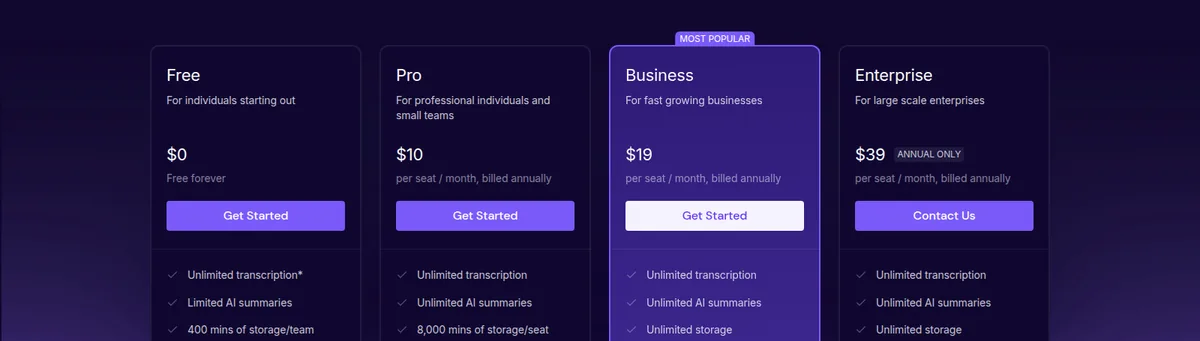
Fireflies publishes four plans. Prices are per seat, and the monthly and annual figures differ enough that the billing choice changes the recommendation.
| Plan | Monthly | Annual monthly | Storage | Recording limit | AI credits |
|---|---|---|---|---|---|
| Free | $0 | $0 | 400 mins/team | 2 hours | 20 |
| Pro | $18.00 | $10.00 | 8,000 mins/seat | 2 hours | 20 |
| Business | $29.00 | $19.00 | Unlimited | 3 hours | 30 |
| Enterprise | Annual only | $39.00 | Unlimited | 4 hours | 50 |
The annual discount is not uniform across the ladder, and it is largest at the entry tier. Pro falls from $18 to $10 per seat, a saving of 44 per cent, which is the figure the vendor advertises. Business falls from $29 to $19, a saving of 34 per cent. Enterprise is quoted only on annual billing at $39.
The three tiers that matter, at a glance
Best for most small agencies Fireflies.ai Pro at $10/seat/month billed annually
Best for team analytics and unlimited storage Fireflies.ai Business at $19/seat/month billed annually
Best for compliance controls Fireflies.ai Enterprise at $39/seat/month, annual only
What each tier actually adds
The Free plan is unusually usable rather than a demo. It includes unlimited transcription, real-time notes and live transcriptions, meeting search, the AskFred assistant, upload and transcription of audio and video files, the desktop and mobile apps, the Chrome extension and API access. Its limits are the summary allowance, 400 minutes of storage per team, a two-hour recording cap and 20 AI credits. A solo consultant recording short client calls can work inside that for a long time.
Pro is the tier most small agencies will buy. It removes the summary cap and raises storage to 8,000 minutes per seat, and it adds video recording, download of transcripts, summaries and recordings, the Personal Assistant and Email Assistant, AI Skills, Voice Agents, action items and task manager, unlimited integrations, three public channels, and API access at 60 requests per minute and 5,000 per day. Everything an agency needs to record a client call, summarise it and push the output into another tool is present here.
Business adds unlimited storage, 30 AI credits instead of 20, a three-hour recording limit instead of two, Multi-language Mode, conversation intelligence, team analytics for admins, public meeting access, user groups and unlimited public channels. Its API allowance is pooled across paid seats up to 1,200 requests per minute, which is a large step up from Pro's 60.
Enterprise is annual only at $39 per seat and adds the controls larger buyers ask for: the rules engine, SSO and SCIM, audit logs through the API, HIPAA compliance, private storage, custom data retention, a transcript and summary only mode, a super admin role and a dedicated account manager. Its API pool rises to 2,400 requests per minute.
Cost per seat for a small agency
The scenario is the same one used across this site: one person per team member, no add-ons and no overage. Fireflies bills per seat, so the team size is the whole calculation.
| Team size | Pro annual | Pro monthly | Business annual | Business monthly |
|---|---|---|---|---|
| 1 person | $10.00 | $18.00 | $19.00 | $29.00 |
| 3 people | $30.00 | $54.00 | $57.00 | $87.00 |
| 5 people | $50.00 | $90.00 | $95.00 | $145.00 |
The gap between Pro and Business is $9 per seat per month on annual billing, which is $27 per month across a three-person team. That is the price of unlimited storage, ten more AI credits, an extra hour of recording per meeting, Multi-language Mode, conversation intelligence, team analytics, public meeting access and user groups.
For a three-person agency, the decision turns on two of those. Team analytics for admins is the feature that shows how the team is handling calls, and it is the reason to move to Business. Multi-language Mode matters only if clients or colleagues work in more than one language. An agency that wants neither is buying storage it may not need, because 8,000 minutes per seat is a large allowance for call recording.
Set against the client list, the figures are small. A three-person agency on Pro annual pays $30 per month, which is $6.00 per client per month across five clients. On Business annual it is $57 per month, or $11.40 per client. Recording client calls is one of the cheapest line items in an agency's software stack.
The seat rule, which is where agencies save money
The vendor's own answer to "what is counted as a seat" is worth quoting in full, because it decides the bill:
Any teammate you added in your Fireflies workspace would be counted as a seat. If you are on paid plan then you would be charged on per seat basis. Teammates are invited from team invite panel. You can share individual meeting recap links with participants or other users without adding them in your team free of charge.
The practical consequence is that an agency does not need to buy a seat for each client contact. A recap link can be shared with the client, and the client can read the summary without being added to the workspace. Only the agency's own people need seats.
Two other published terms belong in the buying decision. Fireflies states that sign-in is only possible through Google Auth or Outlook Auth, so an agency using neither provider for its team accounts should check that before committing. And volume discounts are offered above 50 members, which is well beyond a small agency and confirms that the self-serve tiers are the right route at this size.
What works for client calls
The feature that matters most in client work is recording through the Chrome extension without the Fireflies bot joining the meeting. A visible recorder changes how a client behaves on a call, and for some clients it is a problem in itself. Recording without a bot participant removes that friction, and it is available from the Free plan.
Fireflies also publishes an explicit security and privacy position. It states that data is encrypted at rest and in transit using 256-bit AES and 256-bit SSL/TLS, that its database sits in a virtual private cloud, and that it complies with SOC 2 Type II and GDPR. HIPAA compliance, private storage and custom data retention sit on Enterprise. Zero data retention is stated as a company position: data is not used for AI training or for any purpose outside the customer's direct business needs.
For agencies handling confidential client material, those terms should be read alongside our guides on client confidentiality in AI meeting notes and whether consultants need an AI meeting assistant.
Where Fireflies falls short
The entry tiers share a two-hour recording limit. Pro costs four times the monthly price of a Free seat but keeps the same two-hour cap. A longer workshop or discovery session can run past it, and the tier that raises the limit is Business at three hours. Enterprise reaches four. An agency that runs long sessions should check its typical meeting length before choosing Pro on price.
AI credits are modest on the lower tiers. Free and Pro both include 20 credits, and Business includes 30. The vendor documents what these cover separately, and an agency that leans on AI features heavily should read that before assuming the allowance is generous.
Sign-in is limited to Google or Outlook accounts. This is a real constraint rather than a footnote. Teams using another email provider for their identity cannot sign in the usual way.
Business is where several features an agency might expect are placed. Conversation intelligence, team analytics, public meeting access and user groups are all on Business, not Pro. The Pro tier is complete for recording and summarising, but not for analysing team performance.
Customising the notetaker bot name is a paid add-on, available on Pro and Business, rather than a setting. An agency that wants the recorder to appear under its own brand should price that separately.
How it compares with the alternatives
Fireflies sits in a crowded field, and the honest position is that the right choice depends on team size and on how much the bot's visibility matters.
Against Otter, the comparison in our Fireflies vs Otter guide turns on price per seat and on whether the meeting should show a recorder. Fireflies' advantage is recording without a bot and its CRM and analytics features. Against Fathom, covered in Fathom vs Fireflies for consultants, the difference is pricing model and guarantee rather than core recording. Against Granola, reviewed in our Granola review, the distinction is a notes-first approach that does not join the call at all. The Otter alternatives guide covers the field together.
Fireflies' strongest position is at the entry of the paid ladder. At $10 per seat per month on annual billing with unlimited transcription and summaries, no summary cap and no bot joining the call, it is a low-commitment purchase for a small team, and the seat rule means client contacts do not inflate the bill.
Our verdict
Choose Pro on annual billing for most small agencies. At $10 per seat per month it is a third of the monthly Pro price, it includes unlimited transcription and unlimited AI summaries, and a three-person team pays $30 per month, or $6.00 per client across five clients. The two-hour recording limit and the 20 AI credits are the two constraints to check against real usage.
Move to Business when the agency needs team analytics or unlimited storage. The $9 per seat per month step buys conversation intelligence, team analytics for admins, Multi-language Mode, public meeting access, user groups, a three-hour recording limit and a pooled API allowance up to 1,200 requests per minute. For a three-person team that is $27 per month.
Consider Enterprise only for the compliance controls. SSO, SCIM, HIPAA compliance, private storage, custom data retention and the transcript and summary only mode are the reasons to reach $39 per seat, and it is annual only. A small agency without a healthcare or regulated client does not need this tier.
Do not buy seats for client contacts. The vendor states that recap links can be shared without adding recipients to the team. Buying seats for the people who receive the summary is the most common way an agency overpays for this category of tool.
Check the sign-in requirement first if the team does not use Google or Outlook. It is the one published term that can rule the platform out regardless of price.
The figures behind this review are recorded in our pricing research, and the verification standard is in the methodology.
Frequently asked questions
How much does Fireflies.ai cost?
Fireflies costs $10 per seat per month on Pro when billed annually, or $18 billed monthly. Business costs $19 per seat per month billed annually, or $29 billed monthly. Enterprise is $39 per seat per month and is annual only. The Free plan costs nothing and includes unlimited transcription with limited AI summaries, 400 minutes of storage per team and a two-hour recording limit.
Is Fireflies.ai worth it for a small agency?
It is worth it when the team records client calls and wants summaries without a bot appearing in the meeting. Pro at $10 per seat per month on annual billing includes unlimited transcription and unlimited AI summaries, and recording through the Chrome extension works without the Fireflies bot joining. A three-person team pays $30 per month, which is $6.00 per client across five clients.
Does each client need a Fireflies seat?
No. Fireflies states that any teammate added to the workspace counts as a seat, but that individual meeting recap links can be shared with participants or other users without adding them to the team, free of charge. Only the agency's own people need paid seats, and clients can read the recap without one.
What is the difference between Fireflies Pro and Business?
Business costs $9 more per seat per month on annual billing and adds unlimited storage, 30 AI credits instead of 20, a three-hour recording limit instead of two hours, Multi-language Mode, conversation intelligence, team analytics for admins, public meeting access, user groups and unlimited public channels. Its API allowance is pooled across paid seats up to 1,200 requests per minute.
Does Fireflies have a free plan?
Yes, and it is usable rather than a demo. The Free plan includes unlimited transcription, real-time notes and live transcriptions, meeting search, the AskFred assistant, audio and video file upload, the desktop and mobile apps, the Chrome extension and API access. Its limits are limited AI summaries, 400 minutes of storage per team, a two-hour recording limit and 20 AI credits.
Can Fireflies record a meeting without a bot joining?
Yes. Recording through the Chrome extension without the Fireflies bot joining is a confirmed feature and is available from the Free plan. That matters in client work because a visible recorder changes how participants behave, and for some clients it is a problem in itself.
Is Fireflies.ai secure enough for client meetings?
Fireflies states that data is encrypted at rest and in transit with 256-bit AES and 256-bit SSL/TLS, that its database is hosted in a virtual private cloud, and that it complies with SOC 2 Type II and GDPR. HIPAA compliance, private storage and custom data retention are on the Enterprise tier, which is annual only at $39 per seat per month.
How do I sign in to Fireflies?
Fireflies states that sign-in is only possible through Google Auth or Outlook Auth, which the vendor describes as a simplification and security decision. Single sign-on is available on Enterprise. A team that does not use Google or Outlook for its accounts should confirm this works for it before committing to a paid plan.
Does Fireflies offer a discount?
Yes, on annual billing, and the size depends on the tier. Pro falls from $18 to $10 per seat per month, which is the saving of up to 44 per cent the vendor advertises. Business falls from $29 to $19, a saving of 34 per cent. Volume discounts are offered for purchases above 50 members.