AI Meeting Notes and Client Calls · Updated 20 October 2026
AI Meeting Notes for Small Agencies
Eight AI meeting note tools compared for small agencies on CRM sync, client-call privacy and real cost, with every price read from the vendor.
- 14 min read
- ai meeting notes for small agencies
- Verified against vendor pricing
The short answer
For a small agency, the choice usually comes down to three things rather than eight. Fireflies at $10 a seat a month and Avoma at $19 a recorder seat are the two with the clearest CRM story. Granola at $14 and Fathom at $16 keep client content off a third-party bot, which matters on confidential calls. tl;dv and MeetGeek have the most usable free tiers, and Otter caps its cheaper plans at five billed users.
| What matters most to you | Start with |
|---|---|
| Getting notes into the CRM | Avoma |
| A working free tier first | tl;dv |
| Client confidentiality on the call | Granola (opens in a new tab) |
| The cheapest paid seat | Notta |
| Unlimited transcription on one plan | MeetGeek Business |
| A team of more than five | Fireflies or tl;dv (opens in a new tab) |
| Free recording without a bot | Fathom (opens in a new tab) |
| Otter specifically | Otter Business (opens in a new tab) |
| A permanent free tier with AI summaries | MeetGeek or tl;dv |
Get started with the tools in this guide
Where a vendor offers a free plan or a free trial, it is stated below, so you can try the tool before you pay for it.
-
Start free with Fireflies.ai (opens in a new tab)
Fireflies.ai
Free tier available
-
See Otter.ai pricing (opens in a new tab)
Otter.ai
-
See Fathom pricing (opens in a new tab)
Fathom
-
See Granola pricing (opens in a new tab)
Granola
These links go to the vendor's own site. We may earn a commission if you sign up, at no extra cost to you. How we fund the site. Every figure in this guide was read from the vendor's pricing page on the date stamped above, so confirm the number before you commit.
- Tools compared
- 8
- Cheapest paid seat
- $8.17/mo
- Free tiers with AI notes
- 6 of 8
- Checked
- 20 October 2026
Overview
Choosing AI meeting notes for small agencies usually starts with a feature comparison, and that is the wrong first question. An agency looking for AI meeting notes usually starts by comparing features, and that is the wrong first question. Almost every tool in this category records, transcribes and summarises competently. The differences that decide whether the tool survives its first month are narrower and less obvious: whether the notes end up in the CRM without anyone copying them, whether a third-party bot is sitting in a client call, and what the seat rule does when the team grows.
This guide compares eight tools on those three axes. Every price was read from the vendor's own pricing page on 20 October 2026, and where a vendor publishes retention limits, seat ceilings or free tier allowances, those are quoted rather than paraphrased.
Two related guides sit alongside this one. If the agency is a consultancy rather than a general agency, the consultancy-specific comparison covers the same category with a different set of priorities. If the question is what happens to client content once it has been recorded, client confidentiality in AI meeting notes deals with that directly.
The three questions that decide it
Where do the notes go? A summary sitting in a vendor's dashboard is a summary nobody reads. The tool earns its subscription when the notes land in the CRM against the right account, or in the project tool against the right client. This is the single largest difference between the tools below, and it is also where the tiers diverge: on several products CRM sync is a higher-tier feature rather than a standard one.
Who else is in the room? Some tools send a bot to join the meeting. Others record natively through a browser extension or a desktop app, or capture system audio. For an agency discussing a client's unpublished roadmap, the distinction is not cosmetic, and it is worth checking whether the vendor states its position on training data and retention.
What does it cost at five seats, not one? This is where the advertised price misleads most. Otter caps its Pro plan at five billed users and its Basic plan at five workspace members. Avoma charges only for recorder seats and gives viewers away free. Notta's Pro plan is single-seat. MeetGeek's Business tier removes the transcription limit that Pro imposes. The plan that is cheapest at one seat is frequently not the plan that is cheapest at five, which is the whole subject of the cost scenarios for a five-person agency.
Two operational guides sit underneath this comparison. What the caps actually do covers the minute limits, AI credits, retention windows and seat rules that change the bill after purchase, and whether transcription earns its place sets out the break-even arithmetic and a four week test.
The eight tools
| Tool | Entry paid tier | Annual rate | Free tier | CRM sync tier |
|---|---|---|---|---|
| Notta | Pro | $8.17/month | Yes, 120 min | Business and above |
| Otter.ai | Pro | $8.33/user/month | Yes, 300 min | Pro |
| Fireflies.ai | Pro | $10/seat/month | Yes, unlimited transcription | Pro and above |
| Granola | Business | $14/user/month | Yes, with a 30-day limit | Not published |
| MeetGeek | Pro | $9.99/user/month | Yes, 3 hours/month | Pro and above |
| Fathom | Team | $15/user/month | Yes, summaries capped | Business only |
| tl;dv | Pro | $18/seat/month | Yes, 10 meetings | Pro and above |
| Avoma | Startup | $19/recorder seat/month | No, 14-day trial | Startup |
Annual rates are per seat or per user per month, at the prices published on 20 October 2026. Monthly rates are noted in each section because the gap is large on most of these products.
Notta at $8.17 a month
The cheapest paid seat in the comparison, and the one with the tightest free tier. Notta's free plan allows 120 transcription minutes a month with a maximum of 3 minutes per conversation, which rules it out for real client calls and makes it a way to test the interface rather than to work in.
Pro is $8.17 a month billed annually, or $97.99 for the year, and raises the allowance to 1,800 transcription minutes a month with a 5 hour maximum per recording and 100 AI summaries. Business at $16.67 a month billed annually removes the transcription limit entirely and adds CRM integration covering Salesforce, HubSpot, Pipedrive, Zoho CRM, Zendesk Sell, Salesflare and Freshsales, along with usage reporting and advanced data controls.
The seat rule is the catch. Pro is a single-seat plan, so an agency of five cannot simply buy five Pro seats at $8.17 each and be done. It moves to Business, and Business is priced per seat.
Otter.ai at $8.33 a user a month
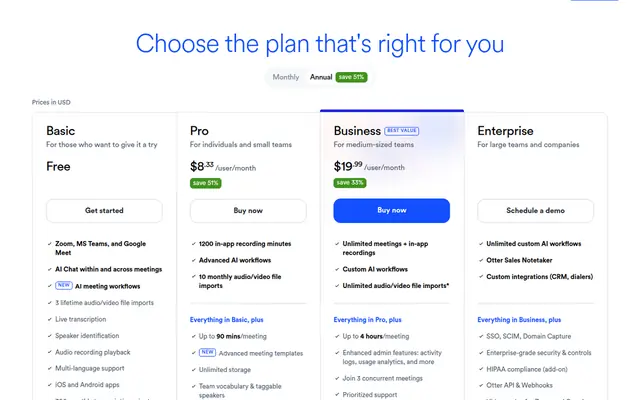
Otter's Basic plan is free and allows 300 transcription minutes a month, a 30 minute maximum per conversation, 25 most recent conversations and a maximum of 5 workspace members. Pro is $8.33 a user a month billed annually, or $16.99 monthly, with 1,200 in-app recording minutes a month, a 90 minute maximum per conversation, unlimited storage and Salesforce, HubSpot and Zapier integrations.
Two limits decide Otter's fit. Pro allows a maximum of 5 billed users, and Basic allows a maximum of 5 workspace members, so the product changes character above five people. Business is $19.99 a user a month billed annually, or $30 monthly, and raises the ceiling to 25 billed users with unlimited meetings, a 4 hour maximum per conversation and 3 concurrent meetings.
For an agency of three to five, Otter Pro is the cheapest route to CRM sync in this comparison. Above five, the plan you actually need is nearly two and a half times the price of the one advertised, which is why the alternatives guide exists: what to replace Otter with.
Fireflies.ai at $10 a seat a month
Fireflies is the tool with an active partnership on this site, so it is worth being explicit about the commercial relationship: the links are affiliate links and the disclosure sits on the page. The pricing comparison below is the same one we apply to every vendor.
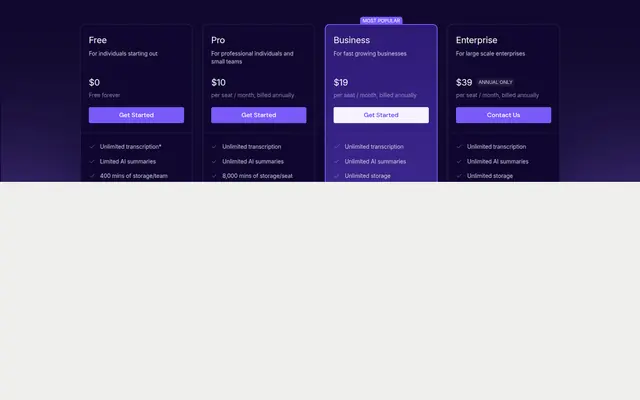
Free is $0 for individuals with unlimited transcription, limited AI summaries, 400 minutes of storage per team, 20 AI credits and a 2 hour recording limit. Pro is $10 a seat a month billed annually, or $18 monthly, and adds unlimited transcription and AI summaries, 8,000 minutes of storage per seat, 720p video recording, 3 public channels and API access at 30 requests a minute and 500 a day. Business at $19 a seat a month billed annually, or $29 monthly, adds unlimited storage, 1080p, conversation intelligence, team analytics and multi-language mode. Enterprise at $39 a seat a month is annual only.
The seat definition is the detail worth reading, because it is unusually generous: any teammate added to the workspace counts as a seat, but individual meeting recap links can be shared with participants without adding them to the team or incurring a charge. For an agency where only two people attend client calls and four others need to read the outcome, that is a material difference. The full breakdown is in the Fireflies review.
Granola at $14 a user a month
Granola is the tool to look at first if the agency's concern is who else is listening. It is built around capturing the meeting from the user's own machine rather than sending a bot into the call, which changes the conversation with a client about recording consent.
Basic is free with unlimited meeting notes, with the limitation that notes older than 30 days require an upgrade, which is a retention rule rather than a capacity one. Business is $14 a user a month. Enterprise starts from $35 a user a month.
CRM sync is not published on the pricing page, so an agency whose primary requirement is automatic CRM updates should verify that directly with the vendor before committing. What Granola does publish is the note-taking workflow itself, which is the most polished of the eight for people who take notes during the call rather than after it. The detail is in the Granola review.
MeetGeek at $9.99 a user a month billed yearly
MeetGeek has the most generous free tier of the eight for a small team. Basic is free forever with 3 hours of transcription a month, 3 months of transcript storage and 1 month of audio storage, plus bot and bot-free recording, mobile and desktop apps, and transcription in 100 or more languages.
Pro is $9.99 a user a month billed yearly, or $15.99 monthly, with 20 hours of transcription a month, a year of transcript storage and extra hours at $0.50. Business is $17 a user a month billed yearly, or $27 monthly, and removes the transcription limit entirely with unlimited transcription and 12 months of video storage. Enterprise is custom.
The integrations list is the strongest part of the offer for an agency: native integrations with HubSpot, Salesforce, Pipedrive, Slack and Notion, plus workflow automation to send meeting insights to CRM or task tools. The caution is that several of those capabilities sit on Business rather than Pro, so an agency that wants the automation should price the Business tier rather than the cheaper one.
Fathom at $15 a user a month
Fathom's free plan is the most usable of the eight for recording itself: unlimited recording and transcripts with AI summaries capped. That makes it the best free option for an agency that wants to try the workflow on real calls without a minutes limit.
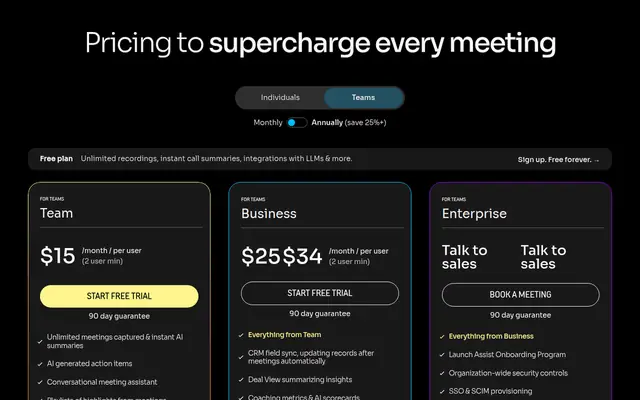
Team is $15 a user a month billed annually, or $19 monthly, with a 2 seat minimum. Premium is $16 a user a month billed annually, or $20 monthly. Business is $25 a user a month and is the tier that adds CRM sync, which is the important line: on Fathom, the feature that makes the tool useful to an agency sits two tiers above the entry price. Paid plans carry a 90 day money-back guarantee.
For an agency weighing Fathom against the market leader, Fathom compared with Fireflies works through the differences.
tl;dv at $18 a seat a month
tl;dv has the free tier to beat for teams, because its limits are counted in meetings rather than minutes. Free is $0 with 10 meetings of AI notes, 10 Ask AI queries, 5 multi-meeting queries, 3 months of data retention, a 3 hour recording limit, 2 simultaneous meetings, 5 uploads and 40 hours a week of web recording.
Pro is $18 a seat a month billed annually and removes the AI limits: unlimited meetings with AI notes, custom AI note templates, AI action item assignment and unlimited single-meeting Ask AI. Business is $29 a seat a month billed annually and is advertised as having no usage-based AI fees, adding scheduled AI reports, playbooks and team-wide automations. Enterprise is custom. Annual billing is advertised at up to 40 per cent off.
The seat rule is favourable: workspace members, recordings and viewers are listed as unlimited on every tier, so the cost scales with the people who need AI features rather than with everyone who reads the notes. That makes tl;dv a strong fit for an agency where a small number of people run calls and a larger number consume the output.
Avoma at $19 a recorder seat a month
Avoma is the most expensive entry point here and the one with the clearest agency workflow. There is no permanent free tier, only a 14 day unrestricted trial of the Organization plan with all add-ons enabled.
Startup is $19 per recorder seat a month billed annually, or $29 monthly, with unlimited AI meeting assistant and scheduling for up to 25 paid seats. Organization is listed at $29 per recorder seat a month billed annually and $39 monthly, with up to 100 paid seats. Enterprise is $39 per recorder seat a month billed annually with a minimum of 10 paid seats.
The reason it appears first for CRM sync is the seat rule combined with the published integration list. Avoma charges only for meeting recorder users and states that viewers and collaborators are always free, and it states that notes can be saved automatically to CRM records with support for Salesforce, HubSpot, Zoho, Pipedrive and Copper. For an agency of ten where three people run client calls, that is three paid seats rather than ten.
The caution is the add-on structure. Conversation Intelligence and Revenue Intelligence are $29 per seat a month each and Lead Router is $19 annual or $25 monthly, all billed annually, so the entry price is not the whole price for a sales-focused agency.
What the free plans actually include
Six of the eight publish a permanent free tier, and the two that do not are Avoma, which offers a 14 day trial, and no other. The differences between the free tiers matter more than the fact of having one.
| Tool | Free allowance | Retention limit | Where it stops |
|---|---|---|---|
| MeetGeek | 3 hours of transcription a month | 3 months of transcripts | Pro removes the hours cap |
| tl;dv | 10 meetings of AI notes | 3 months | Pro removes the AI meeting limit |
| Otter | 300 minutes a month | 25 most recent conversations | 5 workspace members maximum |
| Fathom | Unlimited recording and transcripts | Not stated | AI summaries are capped |
| Fireflies | Unlimited transcription | 400 minutes of storage per team | AI summaries are limited |
| Notta | 120 minutes a month | Not stated | 3 minutes maximum per conversation |
| Granola | Unlimited meeting notes | Notes older than 30 days need an upgrade | Business removes the retention limit |
| Avoma | None | Not applicable | 14 day trial only |
The pattern worth noticing is that free tiers differ in kind rather than degree. MeetGeek and tl;dv limit how much AI work you can do. Fathom and Fireflies limit the summaries rather than the recording. Otter limits the number of people, which is the most restrictive for an agency because it bites immediately. Granola limits how far back you can look. Notta limits the length of a single conversation, which makes it unusable for anything longer than a short call.
Best for CRM sync at the lowest price Avoma $19 per recorder seat a month with viewers free, and a published CRM list
Best free tier for a team tl;dv 10 meetings of AI notes and 40 hours a week of web recording at $0
Best if client confidentiality is the priority Granola $14 per user a month with no bot joining the call
Best value paid seat Notta $8.17 a month billed annually for 1,800 transcription minutes
Best if the team will exceed five people Fireflies $10 a seat with recap links shareable without extra seats
Consultancies that record every client call should read our comparison of meeting transcription software for consultancies, which covers the minute allowances and per conversation caps that decide which tier is enough.
Our verdict
For most small agencies, the answer is one of two tools depending on how the work runs. If client calls are the source of the pipeline and the notes need to reach the CRM, Avoma at $19 per recorder seat is the cleanest fit, because the seat rule matches how an agency actually works: a few people record, everyone else reads. If the agency wants the lowest credible cost with no seat ceiling, Fireflies at $10 a seat with shareable recap links is hard to beat, and tl;dv at $18 is the better choice where the volume is measured in meetings rather than minutes.
Granola is the right answer to a different question, which is who is in the room. An agency that has been asked by a client not to admit third-party software to calls should start there and treat CRM sync as a secondary requirement.
The two traps to avoid are the seat ceiling and the tier gap. Otter's cheaper plans stop at five users, and Fathom's CRM sync sits on Business at $25 a user rather than on Team at $15. Both are visible on the pricing page and both change the answer if the agency checks them before buying rather than after.
Frequently asked questions
What is the best AI meeting notes tool for a small agency?
There is no single best. Avoma at $19 per recorder seat suits agencies where a few people run calls and the notes need to reach the CRM, because viewers are free. Fireflies at $10 a seat suits agencies that want the lowest cost with no user ceiling. Granola at $14 suits agencies that cannot have a bot in client calls.
Do AI meeting note tools integrate with a CRM?
Some do on every paid tier and some do not. Avoma lists Salesforce, HubSpot, Zoho, Pipedrive and Copper on its Startup tier. Fireflies, MeetGeek, tl;dv, Otter and Notta publish CRM integrations on their entry paid tiers. Fathom adds CRM sync only on Business at $25 a user a month. Granola does not publish CRM sync on its pricing page.
Is a bot required to record a meeting?
No, and the distinction matters on client calls. Fathom, Granola, MeetGeek, Fireflies and tl;dv all state that recording can happen without a bot joining, either through a browser extension, a desktop app or native capture. Tools that record through a bot announce themselves in the participant list, which is the part clients notice.
How much do AI meeting notes cost per user?
Entry paid seats range from $8.17 a month on Notta to $19 on Avoma, all billed annually. Otter is $8.33, Fireflies $10, MeetGeek $9.99, Granola $14, Fathom $15 and tl;dv $18. The seat price is only part of it: seat ceilings, CRM sync tiers and transcription limits change the real cost at five users.
Are there free AI meeting note tools?
Six of the eight publish a permanent free tier. MeetGeek allows 3 hours of transcription a month, tl;dv allows 10 meetings of AI notes, Otter allows 300 minutes with a 5 member ceiling, Fathom allows unlimited recording with capped summaries, Fireflies allows unlimited transcription with limited summaries, and Notta allows 120 minutes with a 3 minute cap per conversation. Avoma offers a 14 day trial only.
Which tool has the most generous free plan?
tl;dv and MeetGeek, for different reasons. tl;dv counts its free allowance in meetings rather than minutes, which suits an agency that has a few important calls rather than many short ones. MeetGeek counts in hours and includes 3 months of transcript storage. Otter's free tier looks generous on minutes but stops at five workspace members, which limits it immediately for a team.
Do these tools store recordings on their own servers?
Most do, and the retention terms differ. MeetGeek stores transcripts for 3 months on Basic, a year on Pro and unlimited on Business, with audio for 1 month, 6 months and 12 months respectively. tl;dv keeps data for up to 3 months on Free and offers custom retention on paid tiers. Fireflies allows 400 minutes of storage per team on Free and 8,000 minutes per seat on Pro. An agency handling confidential client material should check the retention and residency terms directly, which is covered in client confidentiality in AI meeting notes.
Should a small agency buy annual or monthly?
Annual, on every tool here, because the gap is large and consistent. Fireflies Pro is $10 a seat annually against $18 monthly. Otter Pro is $8.33 against $16.99. MeetGeek Pro is $9.99 against $15.99. Notta Pro is $8.17 against a monthly rate 40 per cent higher. The trade is paying the year upfront, which is a cash-flow decision rather than a discount.
Fireflies is the tool most agencies land on first, and its credit and storage rules are set out in the Fireflies.ai review for agencies.
Get started with the tools in this guide
-
Start free with Fireflies.ai (opens in a new tab)
Fireflies.ai
Free tier available
-
See Otter.ai pricing (opens in a new tab)
Otter.ai
-
See Fathom pricing (opens in a new tab)
Fathom
-
See Granola pricing (opens in a new tab)
Granola
These links go to the vendor's own site. We may earn a commission if you sign up, at no extra cost to you. How we fund the site. Every figure in this guide was read from the vendor's pricing page on the date stamped above, so confirm the number before you commit.
Related guides
-
 Head to head
AI Meeting Notes for Agencies
Fireflies vs Otter for Client Calls
Which of the two dominant AI meeting note tools fits a small agency, based on verified pricing, seat limits and how each behaves in a client call.
-
 Best overall
AI Meeting Notes for Agencies
Best AI Meeting Notes for Consultants
Four AI meeting note tools compared for consultancies on verified pricing, the free-tier limits that actually bite, and client confidentiality.
-
 Head to head
AI Meeting Notes for Agencies
Fathom vs Fireflies for Consultants
Fathom and Fireflies compared on verified pricing, the free-tier limits that decide real cost, and how each behaves in a client call.