AI Meeting Notes
Fireflies vs Otter for Client Calls
Fireflies and Otter compared on verified pricing, seat limits, recording minutes and how each behaves in a client meeting. Which one fits a small agency.
Updated Verified against vendor pricing 10 October 2026
The short answer
Otter is the cheaper tool per seat and the better buy for a team of five or fewer. Fireflies costs more, but it can record a client call without a bot appearing in the meeting, and it includes CRM sync and conversation analytics that Otter only offers on its higher tiers.
| If you need | Choose |
|---|---|
| To record client calls without a bot joining the meeting | Fireflies |
| The cheapest seats for a team of five or fewer | Otter Pro |
| CRM sync and conversation analytics | Fireflies Business |
| More than five people on client calls | Fireflies |
- Otter Pro annual seat
- $8.33
- Otter Pro billed users
- 5
- Fireflies Business seat
- $19
Overview
For most small agencies handling client calls, Fireflies is the winner, while Otter is the runner-up and the better low-cost choice for teams of five or fewer. That is the practical fireflies vs otter answer for a client-facing team. Fireflies wins when a browser extension can capture the conversation without a notetaker bot appearing in the meeting, or when the agency needs conversation analytics and CRM workflows. Otter wins when the main job is affordable transcription and searchable meeting history.
This fireflies vs otter comparison is for consultants, account teams, design studios and other small agencies that need a dependable record of client conversations. AI meeting notes tools turn a call into a transcript, summary and searchable record, but their pricing is usually per seat and their limits are not interchangeable. A low annual seat price can stop being available as soon as the team grows past a plan cap.
The rest of this page explains how the comparison was made, what each plan includes, and what a small firm actually pays. It then covers the seat and billing traps, situations where the best answer is to stay free or buy nothing, and a direct recommendation. For the wider category, see the AI meeting notes hub. Readers choosing among several tools can also compare the best AI meeting notes for consultancies and Fathom vs Fireflies for consultants.
How we chose
The decision is based on four questions that affect a client-facing workflow more than a generic feature checklist. First, can the team capture a meeting in a way that is workable when another company is on the call? Second, what does each plan actually include for recording minutes, conversation length and integrations? Third, what is the monthly cost when the number of seats is multiplied by a real small-agency team? Fourth, can the plan still be bought when the agency grows beyond a small starter group?
Every price in this article was checked against the vendor's own pricing page on 2026-10-10, the date in the front matter. Annual and monthly figures are shown separately because they produce different decisions. Where the published pricing notes do not state a cap, minimum, or overage policy, this article does not fill the gap with an assumption.
This is not a claim that one transcript is universally more accurate. Both tools can transcribe meetings, so the comparison focuses on bot-free capture, plan eligibility, team cost, CRM connection and single-call length.
Fireflies for client calls
Best for client-facing capture Fireflies bot-free recording and team workflows
Fireflies suits an agency that wants meeting notes to become part of its client process rather than remain in a private transcript archive. Its most important advantage in this comparison is recording through a Chrome browser extension without the Fireflies bot joining the call. That gives a team an option when showing a separate notetaker participant would create an awkward conversation with the client.
The extension does not remove the need to tell the client that the conversation is being recorded. It solves the visible-bot problem, not the responsibility to communicate about recording.
The Free plan is listed at $0 and is limited. Pro is $10 per seat per month with annual billing, or $18 monthly, and the comparison's published plan table lists unlimited meetings. Business is $19 per seat per month annually, or $29 monthly, and is the tier to consider when the agency needs the deeper team workflow. Enterprise is $39 per seat per month in the verified pricing notes.
Fireflies is the stronger fit when the team will review how client conversations happen. The verified feature set includes conversation intelligence, sentiment and talk-time analytics, CRM integrations and an API. The existing plan comparison places conversation analytics and full CRM sync with Business, while CRM integrations are available from Pro. That distinction matters: a team can begin with lower-cost capture, but the more deliberate review and client-record workflow is concentrated in the higher tier.
A five-person agency on Fireflies Pro pays $50 per month with annual billing, calculated as five seats at $10, or $90 month to month. The same five-person agency on Fireflies Business pays $95 per month annually, or $145 monthly. Those are useful scenarios because the Business upgrade adds $45 per month on annual billing for the five seats, not a vague promise that a premium tier is worth it.
Fireflies has honest weaknesses. Its Free plan is described only as limited, so a firm should not plan around an assumed number of free recordings. Pro costs more per seat than Otter Pro annually, and no equivalent Fireflies seat cap or minimum-seat rule is stated here. Confirm those terms before a larger rollout.
The practical Fireflies choice is conditional. Pick Pro for bot-free capture when the Business workflow is unnecessary. Pick Business when CRM sync and conversation analytics will change account management, coaching or follow-up. Do not pay for analytics nobody will review.
Otter for client calls
Best for low-cost searchable transcripts Otter the strongest value for five or fewer billed users
Otter suits a solo consultant or a small agency whose core requirement is a transcript that can be searched after the call. Its app supports recording from desktop, web and mobile, and the product's strongest case in this comparison is the combination of live transcription, searchable history and a lower annual seat price. That makes it easy to justify when the output is primarily notes for the delivery team.
Otter Basic is free. It includes 300 transcription minutes per month, a 30-minute maximum per conversation, the 25 most recent conversations, a maximum of five workspace members and 20 AI chat queries per user. Those limits make Basic a useful test for occasional short calls, but they are not a good match for an agency that wants a complete archive of frequent client work.
Otter Pro costs $8.33 per user per month with annual billing, or $16.99 monthly. It includes 1,200 in-app recording minutes per month, a 90-minute maximum per conversation, unlimited storage, and Salesforce, HubSpot and Zapier connections. Pro allows a maximum of five billed users. That last detail is part of the price, not a footnote, because a team with six people cannot simply add a sixth seat at the same rate.
Otter Business costs $19.99 per user per month annually, or $30 monthly. It includes unlimited meetings and recordings, a four-hour maximum per conversation, three concurrent meetings, a maximum of 25 billed users and admin features. The higher tier is also where the comparison's plan guidance places team-wide access to the more substantial workflow, rather than treating Pro as an unlimited agency plan.
A five-person agency on Otter Pro pays $41.65 per month with annual billing, calculated as five seats at $8.33, or $84.95 monthly at the published month-to-month price. If the same five people need Otter Business, the annual-billing cost is $99.95 per month, or $150 monthly. Otter Pro is therefore the clear price winner for five or fewer billed users when the agency does not need the Business tier.
Otter's weaknesses are concrete. Pro's five-user cap creates a sharp step up, and its 90-minute conversation maximum may matter for long sessions. Automatic capture can also bring a notetaker bot into a meeting, so explain it before the call rather than letting the client discover a third participant.
Otter does have an Enterprise plan with custom pricing, including SSO, SCIM, an API and a HIPAA add-on. Those are reasons to discuss a larger deployment with the vendor, not reasons to assign an invented enterprise price to a small agency budget. There is also a 20 percent Pro discount for students and teachers with a .edu address, listed as $6.67 per month annually, although that is a niche case rather than the basis for a general agency recommendation.
Choose Otter Pro for five or fewer billed users that need the lowest verified paid seat price and searchable transcripts. Choose Business for unlimited meetings, longer conversations or more than five billed users. Otter's low price does not answer a bot-free capture requirement.
Pricing compared
The table below compares the published list prices and the recording allowances that most directly affect client calls. Annual prices are per seat per month unless a plan is free, and monthly prices are the month-to-month figures recorded in the verified notes.
| Plan | Annual price per seat | Monthly price per seat | Recording allowance |
|---|---|---|---|
| Otter Basic | $0 | $0 | 300 minutes per month, 30 minutes per conversation |
| Otter Pro | $8.33 | $16.99 | 1,200 minutes per month, 90 minutes per conversation |
| Otter Business | $19.99 | $30.00 | Unlimited in-app recording, 4 hours per conversation |
| Fireflies Free | $0 | $0 | Limited |
| Fireflies Pro | $10.00 | $18.00 | Unlimited meetings |
| Fireflies Business | $19.00 | $29.00 | Unlimited meetings |
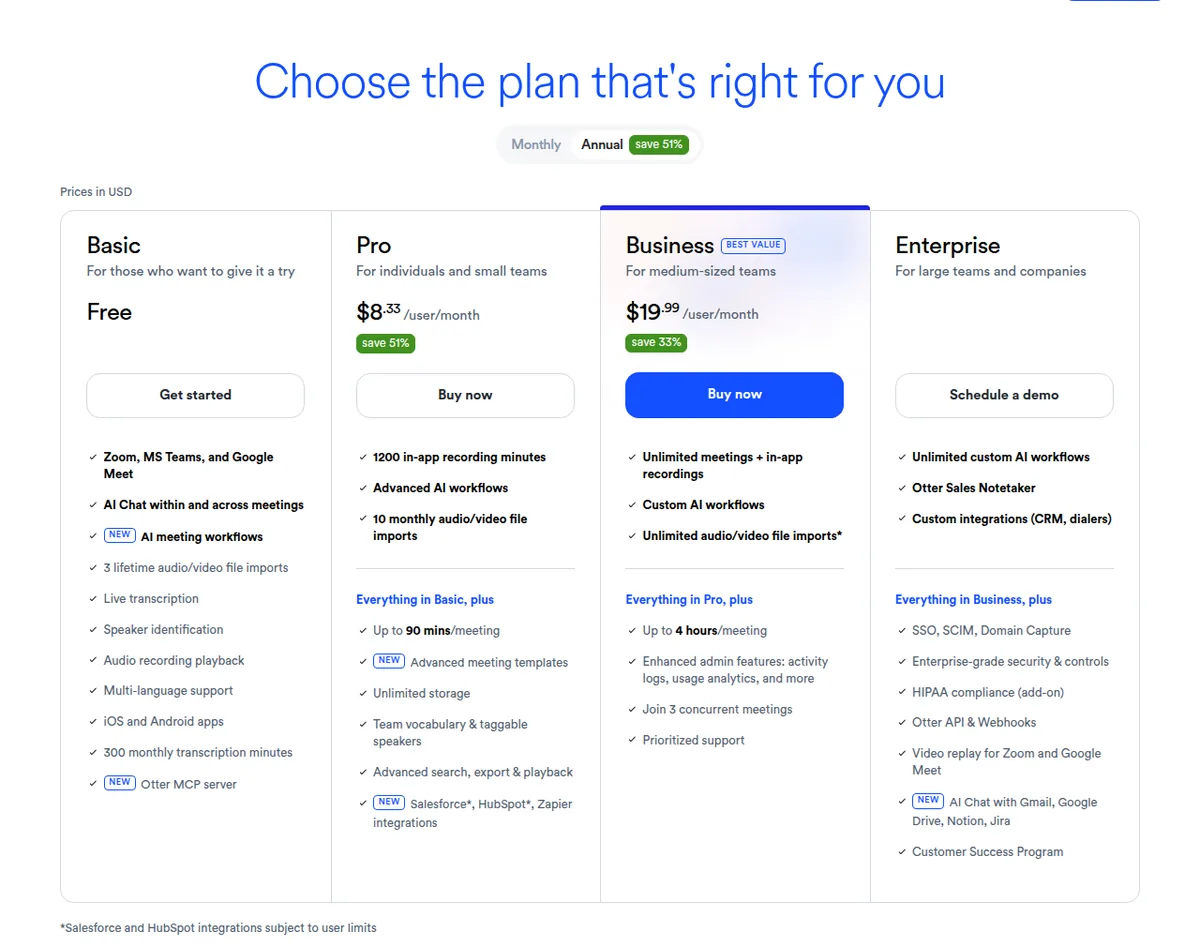
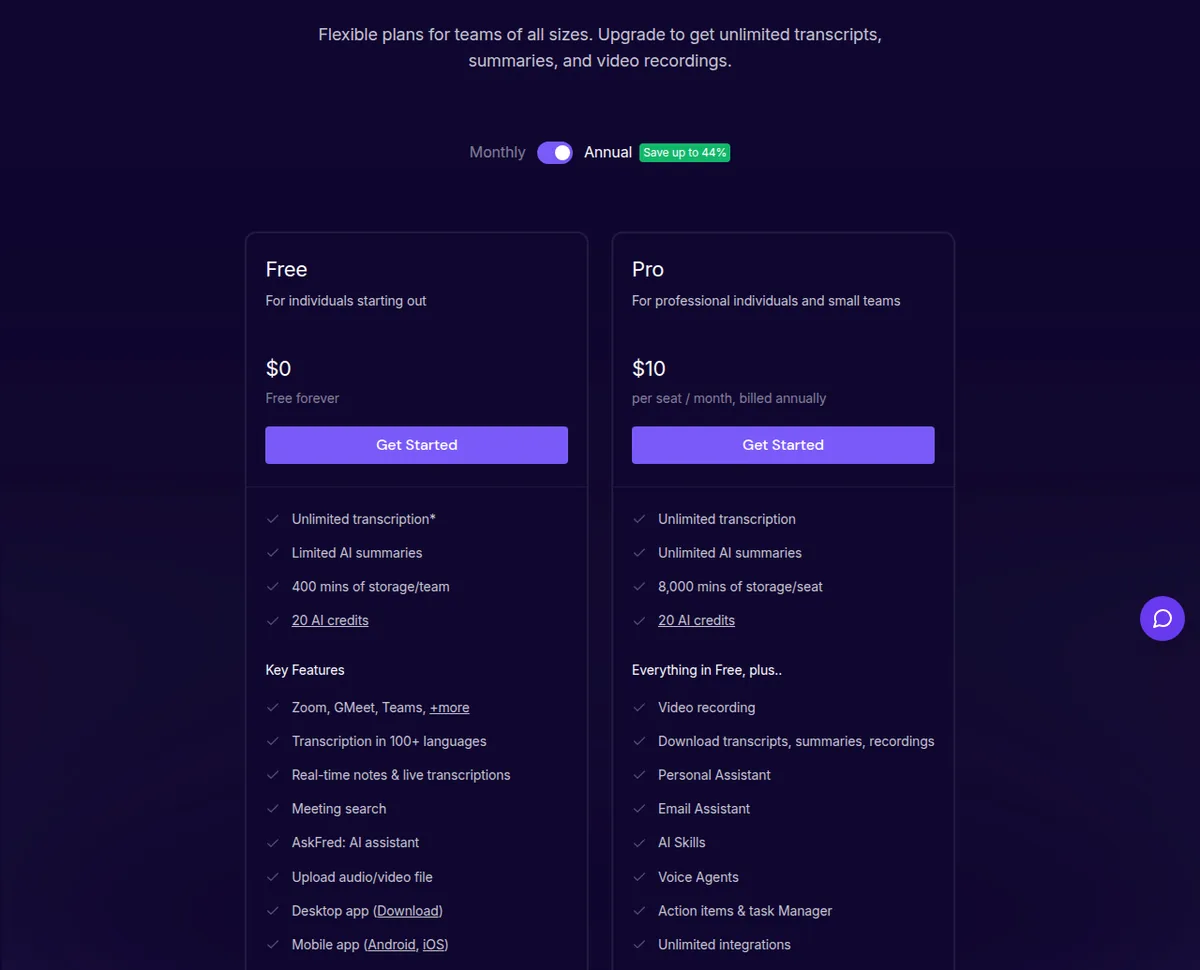
The closest annual comparison is Otter Pro against Fireflies Pro for a team within Otter's five-user cap. Otter is $1.67 cheaper per seat, or $8.35 across five seats, but that saving is not a substitute for bot-free capture when clients require it.
At the next tier, Fireflies Business is $19 per seat annually and Otter Business is $19.99. Fireflies is $4.95 cheaper for five seats and $7.92 cheaper for eight, but the products solve different workflow problems.
The seat and billing traps
The first trap is Otter Pro's eligibility limit. Five billed users is the ceiling, so the $8.33 figure is valid for a team of one through five billed users, not for any agency that wants to start cheaply. At six users, the relevant Otter comparison is Business at $119.94 per month on annual billing, calculated as six times $19.99. Fireflies Business at six seats is $114 per month on annual billing, calculated as six times $19, before any terms not stated in the published notes.
The jump is more visible at eight users. Otter Pro cannot be used for that team, and Otter Business costs $159.92 per month annually. Fireflies Business costs $152 per month annually for eight seats. The result is not that Fireflies always wins on price. It is that an agency must compare purchasable plans for its actual headcount instead of multiplying an unavailable entry-tier price.
The second trap is comparing annual and monthly numbers in different columns. For five seats, Otter Pro is $41.65 monthly when billed annually and $84.95 at the monthly rate. Fireflies Pro is $50 annually and $90 monthly. Otter Business is $99.95 annually and $150 monthly, while Fireflies Business is $95 annually and $145 monthly. A team that expects to use the tool for only a short project may value monthly flexibility differently from a firm that is comfortable with annual billing.
The third trap is assuming every paid tier has the same allowance. Otter Basic has 300 minutes monthly and a 30-minute conversation maximum; Pro has 1,200 minutes and 90 minutes; Business lists unlimited meetings and recordings with a four-hour maximum. Fireflies Pro and Business list unlimited meetings, while Free is simply marked limited.
The fourth trap is silently assuming minimum seats or overage charges. The verified pricing notes do not state a minimum seat requirement for Fireflies or Otter, and they do not publish a per-minute overage price for the limits listed here. That means a budget should not add an invented surcharge, but it also should not assume that excess usage is free. Ask the vendor how a planned workspace handles minutes, recordings and additional seats before committing.
The fifth trap is counting workspace members as billed users. Otter Basic allows five workspace members, while Otter Pro allows five billed users. Confirm who needs a paid seat and whether the workflow counts as a billed user. No comparable Fireflies cap is stated here, so verify rather than promise unlimited access.
Who should not buy either tool
Not every client-call workflow needs a paid AI note taker. The right answer can be to stay on a free tier, run a small test, or buy nothing until the team knows how notes will be used.
- Stay on Otter Basic if calls are occasional, usually under 30 minutes, and 300 transcription minutes per month is enough. The five-member workspace limit and 25 most recent conversations still need to fit the team's working habits.
- Consider Fireflies Free only as a trial when the team can tolerate a plan described as limited. Do not build a recurring client-service promise around an allowance that is not specified in the verified pricing notes.
- Buy nothing for now if the client will not consent to recording or if nobody owns the follow-up process. A transcript that is never checked, corrected or connected to a task creates storage and review work without improving delivery.
- Do not buy Otter Pro for a six-person team just because its annual price is the lowest on the page. The five billed-user cap makes that plan unavailable for the stated headcount.
- Do not buy Fireflies Business solely for a feature checklist. Choose it when CRM sync or conversation analytics will change how the agency works, and choose a less expensive tier when those capabilities will sit unused.
Before committing, pilot who starts recording, how the client is informed, who checks the summary, where it is stored, and what happens when a call exceeds its conversation limit.
Our verdict: fireflies vs otter for small agencies
Choose Fireflies for client-facing work when bot-free browser capture is the deciding requirement, or when CRM sync and conversation analytics justify the Business tier. For five annual-billed seats, Fireflies Business is $95 per month, and for eight it is $152, using the verified $19 per-seat price.
Choose Otter Pro when the team has five or fewer billed users and primarily needs affordable, searchable transcripts. Its annual price of $8.33 per user makes it the value winner at that headcount. Move to Otter Business only when the larger plan's recording allowance, longer conversation limit, concurrent meetings or 25-user ceiling fits the need.
The runner-up is not a bad product. Otter is the more economical default for a small team, while Fireflies is the more useful recommendation for an agency that treats the client-call experience and downstream workflow as part of the service. If neither team will use the notes, analytics or archive, stay free or buy nothing.
Frequently asked questions
Is fireflies vs otter better for client calls?
Fireflies is the better fit when the agency wants browser-extension recording without a notetaker bot joining the meeting, or when it will use conversation analytics and CRM sync. Otter is better for a team of five or fewer whose main need is a lower-cost, searchable transcript.
How much does Otter Pro cost for five users?
Otter Pro costs $41.65 per month for five billed users with annual billing, based on $8.33 per user. At the published monthly rate of $16.99 per user, the same five seats cost $84.95 per month.
How much does Fireflies Business cost for a small agency?
Fireflies Business costs $19 per seat per month with annual billing, or $29 monthly. Five seats therefore cost $95 per month annually or $145 month to month, before any terms not specified in the verified pricing notes.
Can Fireflies record without its bot joining the call?
Yes. Fireflies supports recording through a Chrome browser extension without the Fireflies notetaker bot joining as a participant. The agency still needs to tell the client about the recording and follow the consent rules that apply to the call.
What happens when an agency has six Otter users?
Otter Pro is capped at five billed users, so a six-person agency cannot buy Pro for all six people. Otter Business is the next published tier, costing $119.94 per month for six seats with annual billing.
What does Otter Basic include?
Otter Basic is free and includes 300 transcription minutes per month, a 30-minute maximum per conversation, the 25 most recent conversations, up to five workspace members and 20 AI chat queries per user. Those limits make it suitable for occasional short calls, not automatically for a complete agency archive.
Is Fireflies Business worth it for consultants?
It is worth considering when CRM sync and conversation analytics will be used in the consultant's workflow, or when bot-free capture is important for client experience. It is not a good value if the consultant only needs an occasional transcript and will not use the Business capabilities.
Should a small agency stay on a free plan?
Stay free when call volume fits the published free limits, the team can accept the archive restrictions, and the output will still be reviewed and used. Buy a paid plan when the limits or workflow gaps create a real delivery problem, not simply because the paid feature list is longer.