AI Meeting Notes and Client Calls · Updated 21 October 2026
Is AI Meeting Transcription Worth It?
A break-even calculation and a four-week test protocol for small agencies deciding whether AI meeting transcription earns its subscription.
- 13 min read
- is ai meeting transcription worth it for a small agency
- Verified against vendor pricing
The short answer
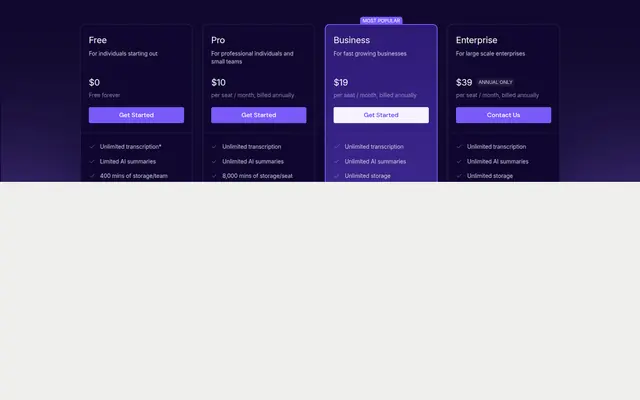
It is worth it when the tool is cheaper than the billable time it gives back, and the arithmetic is smaller than most agencies expect. Fireflies Pro at $10 a seat needs to return 15 minutes a month at a $40 hourly rate and 6 minutes at $100. Across five seats at $50 a month the threshold is 1.25 hours at $40 and 30 minutes at $100. Fathom and Fireflies both allow unlimited recording and transcription, so the decision turns on whether the agency uses the summaries rather than the transcripts.
| What matters most to you | Start with |
|---|---|
| The lowest break-even threshold | Notta Pro |
| Recording without a summary ceiling | Fathom (opens in a new tab) |
| Five seats at the lowest cost | Otter Pro (opens in a new tab) |
| Five seats without a user ceiling | Fireflies Pro (opens in a new tab) |
| Unlimited transcription on a paid tier | Avoma |
| A month of overage rather than an upgrade | MeetGeek Pro |
| Deciding before paying anything | Fathom or Fireflies (opens in a new tab) |
| A five-person agency at $100 an hour | Any of them |
Get started with the tools in this guide
Where a vendor offers a free plan or a free trial, it is stated below, so you can try the tool before you pay for it.
-
Start free with Fireflies.ai (opens in a new tab)
Fireflies.ai
Free tier available
-
See Otter.ai pricing (opens in a new tab)
Otter.ai
-
See Fathom pricing (opens in a new tab)
Fathom
These links go to the vendor's own site. We may earn a commission if you sign up, at no extra cost to you. How we fund the site. Every figure in this guide was read from the vendor's pricing page on the date stamped above, so confirm the number before you commit.
- Cheapest paid seat
- $8.17/mo
- Hours needed at $40 an hour
- 1.25 for five seats
- Tools with unlimited transcription
- 3 of 8
- Checked
- 21 October 2026
Overview
The question of whether AI meeting transcription is worth it for a small agency is usually answered with enthusiasm or with scepticism, and neither answer is much use. The useful version is arithmetic: a tool is worth its subscription when the billable time it returns is worth more than the subscription costs, and that threshold is often far lower than agencies assume.
This guide does two things. First it converts the verified subscription prices into the number of hours that would have to come back each month for the tool to pay for itself, at three billable rates, so the reader can slot in their own rate and read the answer directly. Second it sets out a four-week test protocol, with the specific checkpoints to record each week, because the limits that decide the outcome are operational rather than commercial and they show up in a real week of client work rather than in a feature list.
Every price used here was read from the vendor's own pricing page on 21 October 2026. The limits referenced in the test protocol come from the same pass and are documented in full in the hidden fees guide. Where a threshold is arithmetic on a stated assumption, it is labelled as such rather than presented as a measurement.
What the question actually turns on
Three things decide whether transcription earns its place, and only the third is about the tool.
Whether the notes are read. A transcript that nobody opens is an archive, not a saving. The tools in this category differ most on where the output lands: in a dashboard, in the agency's own search, or written back into the CRM against the right account. If the answer is a dashboard, the saving depends on someone remembering to look.
Whether the summary is good enough to replace the write-up. This is the single largest time item in the workflow and the one most likely to be overestimated. Transcription removes typing, but someone still has to decide what mattered and what the client is now expecting. A tool that produces a usable first draft removes the writing time. A tool that produces a wall of text removes only the typing.
Whether the allowance survives a normal month. A tool that runs out of minutes in week three creates work rather than removing it, because someone has to notice, decide, and either upgrade or fall back to manual notes. That is why the break-even below is paired with the caps from the hidden fees guide rather than presented on its own.
The break-even calculation
The calculation is one division. Take the monthly subscription, divide by the agency's billable hourly rate, and the result is the number of hours the tool must return each month to be cost neutral. Nothing in this section is a claim about how much time any particular tool saves. It is the threshold that the tool has to clear, at annual billing rates verified on 21 October 2026.
| Tool and tier | Monthly cost | Hours at $40/hr | Hours at $60/hr | Hours at $100/hr |
|---|---|---|---|---|
| Notta Pro | $8.17 | 0.20 | 0.14 | 0.08 |
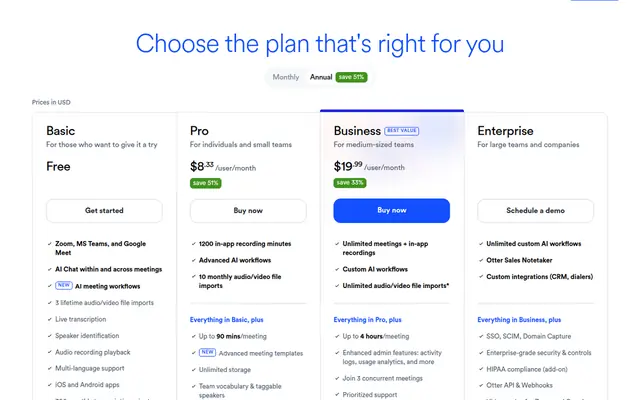
| Otter Pro | $8.33 | 0.21 | 0.14 | 0.08 |
| Fireflies Pro | $10 | 0.25 | 0.17 | 0.10 |
| Granola Business | $14 | 0.35 | 0.23 | 0.14 |
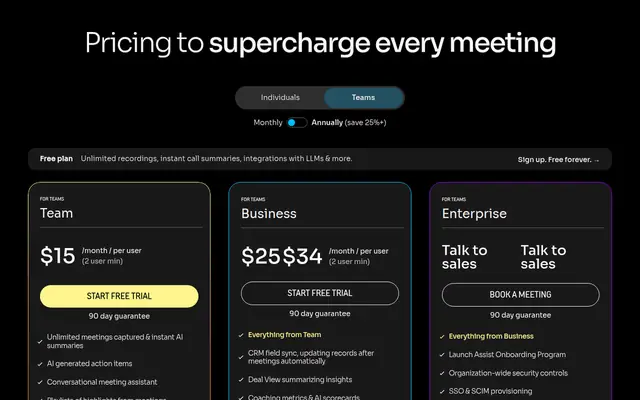
| Fathom Team | $15 | 0.38 | 0.25 | 0.15 |
| Avoma Startup | $19 | 0.48 | 0.32 | 0.19 |
In minutes, those thresholds are more striking. Fireflies Pro needs 15 minutes a month at a $40 rate and 6 minutes at $100. Otter Pro needs 12.5 minutes at $40 and 5 minutes at $100. Avoma Startup, the most expensive entry tier in the table, needs 28.5 minutes at $40 and 11.4 minutes at $100.
The conclusion from the arithmetic alone is that a single-seat subscription is close to free at any professional hourly rate. One avoided meeting write-up per month covers it, and two covers it several times over. The interesting question is therefore not whether one seat pays for itself but whether the agency is buying seats it does not need.
The five-seat version, which is the real decision
Agencies rarely buy one seat. At five seats the thresholds rise in proportion, and the differences between vendors start to matter.
| Configuration | Monthly cost | Hours at $40/hr | Hours at $60/hr | Hours at $100/hr |
|---|---|---|---|---|
| Otter Pro, 5 billed users | $41.65 | 1.04 | 0.69 | 0.42 |
| MeetGeek Pro, 5 users | $49.95 | 1.25 | 0.83 | 0.50 |
| Fireflies Pro, 5 seats | $50.00 | 1.25 | 0.83 | 0.50 |
| Granola Business, 5 users | $70.00 | 1.75 | 1.17 | 0.70 |
| Fathom Team, 5 users | $75.00 | 1.88 | 1.25 | 0.75 |
| Avoma Startup, 5 recorder seats | $95.00 | 2.38 | 1.58 | 0.95 |
Costs are annual rates multiplied by five, at prices published on 21 October 2026. Otter Pro is included at five users because five billed users is exactly its ceiling, which means the configuration is the largest one the tier allows. Avoma is priced at five recorder seats with viewers free, so an agency where two people record and three people read pays for two seats rather than five.
The pattern is that at $100 an hour, no configuration in this table needs more than an hour of returned time each month. At $40 an hour the widest configuration needs two and a half hours. An agency that runs four client calls a week has roughly seventeen hours of meeting time a month, so the question becomes whether transcription returns between four and fifteen per cent of that time. That is a modest bar, and it is the reason the decision usually turns on workflow fit rather than on cost.
There is one configuration where the arithmetic fails. An agency that buys seats for people who never record has bought storage rather than transcription. Avoma is the only tool in this group that prices that distinction explicitly, charging per recorder seat and giving viewers away, which is why its entry rate is the highest in the table and its realistic five-person cost is often the lowest.
A four-week test protocol
The test below is designed to be run before committing to annual billing, using the monthly rate for one month and a free tier where one exists. It produces four observations, one per week, and each one maps to a limit that appears in a vendor's own documentation. Before the annual commitment is made, it is worth reading the cancellation and refund terms for each platform, because the exit route differs more between vendors than the prices do.
Week one: does the free tier survive a normal week? Run the free tier on real client calls, not on internal meetings. Record the number of meetings, the total minutes and, on any week where a single call runs long, whether the conversation hit the per-conversation ceiling. The ceilings to watch are 3 minutes on Notta Free, 30 minutes on Otter Basic and 90 minutes on Otter Pro. Note also the workspace member limit, which is five on Otter Basic and five billed users on Otter Pro.
Week two: does the summary replace the write-up? For each recorded call, compare the generated summary against what the agency would normally send the client. Record whether the summary names the client correctly, whether it captures the decisions rather than the discussion, and how long it takes to turn into something sendable. If that time is close to writing from scratch, the tool has removed the typing and nothing else, which changes the break-even conclusion regardless of price.
Week three: does the output reach the CRM without a person moving it? This is the step that decides whether the tool pays for itself at five seats. Check the integration tier, because CRM sync is not universal: on Fathom it sits on Business rather than Team, and Fathom caps CRM sync at three users per domain on every plan. On Fireflies it starts at Pro. If the notes need to appear against the right client account, an integration gap makes the saving theoretical.
Week four: what does a busy month cost? Push past the allowance deliberately and record what happens. On MeetGeek Pro the overage is published at $0.50 per extra hour past the 20 included, which is the clearest overage rate in this group. On Otter the monthly allowances carry no rollover, so unused minutes from a quiet week do not fund a heavy one. On Fireflies the vendor states that the bot and Chrome extension have no monthly rate limit and that the limits apply to the API, dialers and bulk uploads instead, so an agency importing recordings from a dialer should test that path specifically.
At the end of four weeks the agency has four numbers: the share of calls the free tier covered, the time the summary actually saved, whether the notes reached the CRM unattended, and the cost of the busiest month. A tool that fails the second and third observations should not be bought at any price in this table, because the arithmetic in the break-even section assumes the saving is real.
Where transcription stops being worth it
When the calls are not the deliverable. An agency whose client work happens in documents rather than conversations will not recover meeting time, because there was little meeting time to recover. The break-even arithmetic still works, but the hours it needs are not available.
When a seat is bought for a reader. The exception is Avoma, which charges only for recorder seats. Everywhere else a reader seat costs the same as a recorder seat, and the break-even calculation has to be applied to the whole seat count rather than to the number of people who actually record.
When the retention window is shorter than the client relationship. MeetGeek stores audio for one month on Basic and three months of transcripts, so an agency that needs to produce a recording six months later is not covered by the free tier. Granola keeps 30 days of history on Basic. Notta's own FAQ states that after cancellation a Free user can view only the first three minutes of a transcript. The saving is only real if the material is still there when it is needed.
When the summary needs a person to trust it. If a consultant re-reads the transcript before sending anything, the tool has added a step. That is a legitimate outcome, and it usually means the agency should buy the cheapest transcription tier it can and skip the summary features entirely, which points at Fathom Free or Fireflies Free rather than at a paid tier.
Where the decision turns on how many minutes a month the consultancy actually records, our comparison of meeting transcription software for consultancies sets out the allowance on each plan.
What the free plans actually include
Two of the eight tools can carry a small agency for a month without payment, and they are the two that do not meter recording. Fathom's free tier includes unlimited recordings and transcriptions with instant AI call summaries, and limits the advanced summaries rather than the recording. Fireflies' free tier includes unlimited transcription through the bot and Chrome extension, 20 AI credits, and 400 minutes of storage pooled for the whole team.
Three free tiers are usable but bounded in a way that will be hit inside a normal month. MeetGeek allows 3 hours of transcription a month with 3 months of transcript storage and 1 month of audio storage. Otter allows 300 minutes per user a month with a five-member workspace ceiling and a 30 minute limit on any single conversation. Notta allows 120 minutes a month but caps a single conversation at 3 minutes, which rules out client calls of any length.
Two are not free tiers at all in the sense that matters. Granola's Basic plan does not meter recording and does not meter notes, but it shows only 30 days of history and includes no integrations, so nothing reaches the CRM. Avoma offers a 14 day trial of its Organization plan with every add-on enabled, which is a better evaluation experience than a permanent free tier and a different decision, because the entry subscription does not include those add-ons at $29 per seat each.
For a small agency the honest starting point is therefore one of the two unmetered free tiers, tested for four weeks on real client calls, before any annual commitment is made.
Best free starting point Fathom Unlimited recording and transcription at $0, with summaries limited rather than recording
Lowest break-even threshold Notta Pro $8.17 a month annual, which is 12 minutes at a $40 hourly rate
Best five-seat value with room to grow Fireflies Pro $50 a month for five seats, needing 1.25 hours at $40 an hour
Cheapest five-user configuration Otter Pro $41.65 a month, though five billed users is exactly its ceiling
Best fit when only some people record Avoma $19 a recorder seat with viewers free, so readers cost nothing
Our verdict
Transcription is worth it for most small agencies, and the break-even table shows why the bar is low: at $100 an hour no configuration in this guide needs more than an hour of returned time a month, and at $40 an hour the widest needs two and a half. The decision is therefore rarely about whether the tool can pay for itself and almost always about whether the agency has set it up so that it can.
Fathom is the cleanest starting point for an agency that wants to test the question without paying, because its free tier includes unlimited recording and transcription and its limits fall on advanced summaries rather than on the material. The cap to check before committing is CRM sync at three users per domain.
Fireflies is the better fit once the agency is recording as a habit, because recap links can be shared without buying seats and storage is per seat rather than pooled on paid plans. An agency that imports recordings from a dialer should test that path specifically, because the vendor's own documentation places the rate limits there rather than on the bot.
Avoma is the right answer for an agency that has already worked out that only some people record, and it is the only tool here that prices that reality. Its published $19 entry price is not the whole calculation, because conversation intelligence and revenue intelligence are $29 per seat each on top, but for a five-person agency where two people record, it is often both the cheapest and the most accurately priced option.
The one configuration to avoid is paying for reader seats on a tool that meters transcription, because that combination pays twice for the same call.
Frequently asked questions
Is AI meeting transcription worth it for a small agency?
It is worth it when the monthly subscription is lower than the billable value of the time it returns, and that threshold is small. At a $40 hourly rate Fireflies Pro at $10 a seat needs 15 minutes a month to be cost neutral and 6 minutes at $100. Across five seats the same tool costs $50 a month and needs 1.25 hours at $40 and 30 minutes at $100. Whether the hours come back depends on the workflow rather than the tool, which is why the test protocol above measures the summary and the CRM sync rather than the price.
How many hours a month must be saved for transcription to pay for itself?
Divide the monthly subscription by the billable hourly rate. At $40 an hour, a $10 seat needs 0.25 hours, a $15 seat needs 0.38 hours and a $19 seat needs 0.48 hours. At $100 an hour the same seats need 0.10, 0.15 and 0.19 hours respectively. Across five seats at annual rates, the thresholds run from 1.04 hours on Otter Pro at $41.65 a month to 2.38 hours on five Avoma recorder seats at $95 a month, both measured at a $40 hourly rate.
Which AI meeting notes tool is best for testing before buying?
Fathom and Fireflies both publish free tiers that do not meter recording. Fathom includes unlimited recordings and transcriptions with instant AI call summaries, and limits advanced summaries. Fireflies includes unlimited transcription through the bot and Chrome extension with 20 AI credits and 400 minutes of storage pooled for the team. Avoma offers a 14 day trial of its Organization plan with every add-on enabled, which is a fuller evaluation but not a permanent free tier.
Does AI meeting transcription save more time at a higher hourly rate?
The threshold falls as the hourly rate rises, so a higher rate makes the tool easier to justify rather than harder. Fireflies Pro needs 15 minutes a month at $40 an hour and 6 minutes at $100. The absolute saving does not change with the rate, but the amount of time that has to be recovered for the subscription to be neutral does.
Is it worth buying transcription seats for everyone in the agency?
Only if everyone records. Avoma is the one tool in this group that separates the two roles, charging per recorder seat at $19 to $39 a month and giving viewers and collaborators free, which is why its realistic five-person cost is often lower than its headline rate suggests. Everywhere else a reader seat costs the same as a recorder seat, so the break-even calculation should be applied to the full seat count. Fathom's CRM sync cap of three users per domain is a further reason to check the intended configuration before buying.
What is the cheapest way to run transcription for five people?
At annual billing rates verified on 21 October 2026, Otter Pro is the cheapest five-user configuration in this comparison at $41.65 a month, but five billed users is exactly its ceiling, so it cannot grow. MeetGeek Pro at $49.95 and Fireflies Pro at $50.00 are close behind with no five-user ceiling, and Fireflies allows recap links to be shared without adding seats. Notta's Pro tier is a single seat, so five users require its Business tier instead.
Get started with the tools in this guide
-
Start free with Fireflies.ai (opens in a new tab)
Fireflies.ai
Free tier available
-
See Otter.ai pricing (opens in a new tab)
Otter.ai
-
See Fathom pricing (opens in a new tab)
Fathom
These links go to the vendor's own site. We may earn a commission if you sign up, at no extra cost to you. How we fund the site. Every figure in this guide was read from the vendor's pricing page on the date stamped above, so confirm the number before you commit.
Related guides
-
 Head to head
AI Meeting Notes for Agencies
Fireflies vs Otter for Client Calls
Which of the two dominant AI meeting note tools fits a small agency, based on verified pricing, seat limits and how each behaves in a client call.
-
 Best overall
AI Meeting Notes for Agencies
Best AI Meeting Notes for Consultants
Four AI meeting note tools compared for consultancies on verified pricing, the free-tier limits that actually bite, and client confidentiality.
-
 Head to head
AI Meeting Notes for Agencies
Fathom vs Fireflies for Consultants
Fathom and Fireflies compared on verified pricing, the free-tier limits that decide real cost, and how each behaves in a client call.