Meeting and transcription tools · Updated 8 November 2026
Fireflies.ai vs Granola
Compare Fireflies.ai and Granola for client calls, including capture methods, free limits, per-seat cost, shared notes and team growth.
- 17 min read
- Fireflies.ai vs Granola
- Verified against vendor pricing
The short answer
Granola is the better fit for a consultant who takes calls across Zoom, Google Meet, Teams and other platforms and wants bot-free device capture, provided the consultant starts a note manually. Fireflies.ai is the stronger team archive when automatic calendar capture, recap links, storage tiers and workspace workflows matter more than a consistent bot-free route.
| If you need | Choose |
|---|---|
| Bot-free capture across several meeting platforms | Granola (opens in a new tab) |
| Automatic calendar capture and a structured meeting archive | Fireflies.ai (opens in a new tab) |
| The lowest named paid seat price | Fireflies.ai Pro (opens in a new tab) |
| A free test with unlimited note creation | Granola Basic (opens in a new tab) |
| Shared notes without making each client a billable member | Either |
Get started with the tools in this guide
Where a vendor offers a free plan or a free trial, it is stated below, so you can try the tool before you pay for it.
-
Start free with Fireflies.ai (opens in a new tab)
Fireflies.ai
Free tier available
-
See Granola pricing (opens in a new tab)
Granola
These links go to the vendor's own site. We may earn a commission if you sign up, at no extra cost to you. How we fund the site. Every figure in this guide was read from the vendor's pricing page on the date stamped above, so confirm the number before you commit.
- Best cross-platform capture
- Granola
- Fireflies Pro annual seat
- $10
- Granola Business seat
- $14
- Fireflies Free storage
- 400 min/seat
Overview
For a consultant who takes client calls on Zoom, Google Meet, Microsoft Teams and other software, Granola is the better first choice. Its desktop app captures device audio without a bot joining the meeting, and the same method works across meeting applications. The trade-off is deliberate capture: Granola does not start transcribing until the user opens a meeting note, clicks a notification or starts a New Note. Fireflies.ai vs Granola is therefore less about which summary reads better and more about whether the consultant values consistent cross-platform capture or automatic workspace capture.
Fireflies.ai is the stronger choice for a consultancy that wants a meeting archive built around calendar events, automatic joining, team channels, recap links and storage allowances. Its Chrome extension can capture Google Meet audio without the Fireflies bot, but the official help page describes the extension for Google Meet in Chrome. The same page directs Zoom and Teams users to the Fireflies Notetaker bot. Granola uses device audio for those platforms instead, so its capture method is broader when a client-facing bot is unwelcome.
This page is for solo consultants and small consultancies that record or transcribe client conversations. It covers the capture decision, the real free tiers, plan-by-plan cost, team-note sharing, five-person scenarios and the point where each product stops being a sensible fit. The wider Meeting and transcription tools hub covers adjacent buying questions. The best AI meeting notes for consultancies is the broader shortlist, while this page stays a direct two-way decision.
Fireflies.ai is an affiliate partner. That disclosure does not change the prices, limits or recommendation. Granola is discussed as a comparison product only.
What we compared
The first criterion is how a call enters the system. A consultant may work from a Google Meet link in Chrome one hour, a Zoom call the next, a Teams meeting after that and an in-person or phone conversation later. A tool that depends on a particular bot or browser route can be acceptable for one workflow and awkward for the next. The comparison separates automatic calendar capture, bot capture, browser capture and device capture rather than putting them in one generic recording row.
The second criterion is the free tier. A free product may have unlimited note creation but a short history, a small transcript allowance, a storage cap or a limited AI credit pool. Those are different constraints. The phrase unlimited should be attached to the exact thing the vendor says is unlimited, not to the whole plan.
The third criterion is the bill as a consultancy grows. A one-person practice may need one seat. A five-person consultancy may need five workspaces members, while clients may need only a recap link. At ten people, the annual versus monthly difference and the paid-plan boundary matter more than the initial signup price.
Every price and plan limit in this article was checked against official Fireflies.ai and Granola pricing or help pages on 8 November 2026. Figures remain in the form each vendor publishes, and missing numbers are not estimated.
Fireflies.ai for consultants
Best for automatic team capture Fireflies.ai calendar auto-join, recap links and a structured workspace
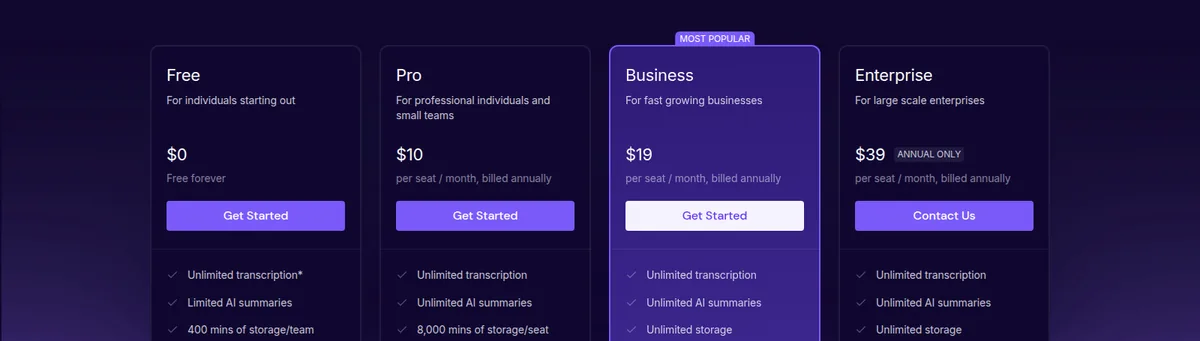
Fireflies.ai suits a consultant who wants meetings to flow into a shared workspace with minimal post-call handling. The product can automatically join eligible calendar meetings when Auto-join is enabled. On the Free plan, the vendor says this can unlock unlimited transcriptions, although AI summaries still depend on the relevant credit allowance. A consultant who wants every call captured without remembering to press a button will understand the appeal immediately.
The cross-platform qualification matters. Fireflies' Chrome extension captures Google Meet audio without adding the Fireflies bot. With Auto-capture off, the user clicks Record with extension or starts recording manually. With Auto-capture on, the extension automatically detects Google Meet calls in Chrome. The official extension help page says the extension does not record video and that Zoom or Teams users should use the Notetaker bot. That makes Fireflies flexible, but not equally bot-free across the several platforms a consultant may use.
Free is $0. The current help pages list three signup-source transcription credits for a web account, five for a Chrome-extension signup, ten for a new mobile user and five for an existing mobile user. The transcription guide says Free defaults to three meeting transcriptions, with one credit used to transcribe and summarize a meeting. Auto-join changes the calculation: credits are used for summaries rather than transcription, which gives unlimited transcriptions. Free storage is 400 minutes per seat, covering recordings, uploads and dialer calls.
There is an important current-page conflict around AI credits. The Free-plan page says 20 AI credits per month, while the AI-credit guide describes 20 plan credits as a one-time allowance. Both are official Fireflies pages read on 8 November 2026. The safe buying conclusion is that Free can support a real pilot, but a consultant should not promise a recurring advanced-AI quota until Fireflies clarifies which wording applies to the account. Uploaded files are also limited to 100MB and 150 minutes per file on Free, and downloading transcripts requires a paid plan.
Pro costs $10 per user/month billed annually or $18 per user/month. It includes unlimited transcription and AI summaries, up to 8,000 minutes of storage per seat and a two-hour recording limit per meeting. A five-person consultancy therefore pays $50 per month on the annual billing rate, or $90 per month on monthly billing. That is a seat calculation, not a volume-discount claim. It is the sensible Fireflies entry point when the practice wants repeated summaries, downloads and a substantial archive rather than a short test.
Business costs $19 per user/month on annual billing or $29 per user/month monthly. It provides unlimited transcription, unlimited storage, unlimited AI summaries and a three-hour recording limit per meeting. It adds conversation intelligence, team insights, user groups, unlimited public and private channels, integration permissions, API access and Autofill CRM for supported systems. A five-person consultancy pays $95 per month annually, or $145 monthly. The extra $45 over Pro's annual-rate bill is buying archive headroom and team workflow, not merely a nicer plan label.
Fireflies is strong at shared team notes. Teammates added to the workspace are seats, but a client who receives an individual recap link does not have to become a workspace member. Free supports sharing with external guests and collaborative workspace features. Business adds user groups and broader channel controls. That gives a consultancy a practical split: pay for the people who work in the archive, and send clients a reviewed recap rather than inviting every client into the billable workspace.
The weaknesses are just as specific. Fireflies can be the wrong choice when the consultant cannot accept a bot on Zoom or Teams and does not want to restrict the workflow to Google Meet in Chrome. Pro can be outgrown by a team that needs more than 8,000 stored minutes per seat or meetings longer than two hours. Business solves those limits, but it raises the bill to $19 annually billed monthly equivalent or $29 monthly per user.
Granola for consultants
Best for cross-platform bot-free capture Granola device audio across Zoom, Meet, Teams and other software
Granola suits a consultant who moves between meeting platforms and wants one capture method that does not add a notetaker participant. Its desktop app captures device audio, so the official help page says it works with Zoom, Google Meet, Microsoft Teams and other meeting software. No bot joins the call. The same route can also handle an in-person conversation, a voice memo or other computer audio, subject to the device setup.
That does not mean Granola records invisibly or starts by itself. Granola only starts capturing after the user clicks a notification, opens a meeting note once the scheduled start time has passed or clicks New Note. If the user has already opened an upcoming meeting note, it starts at the scheduled meeting time. The consultant must still tell participants about transcription and use the agreed consent process. The operational difference is that Granola requires a deliberate note-start action, while Fireflies can automatically join eligible calendar meetings.
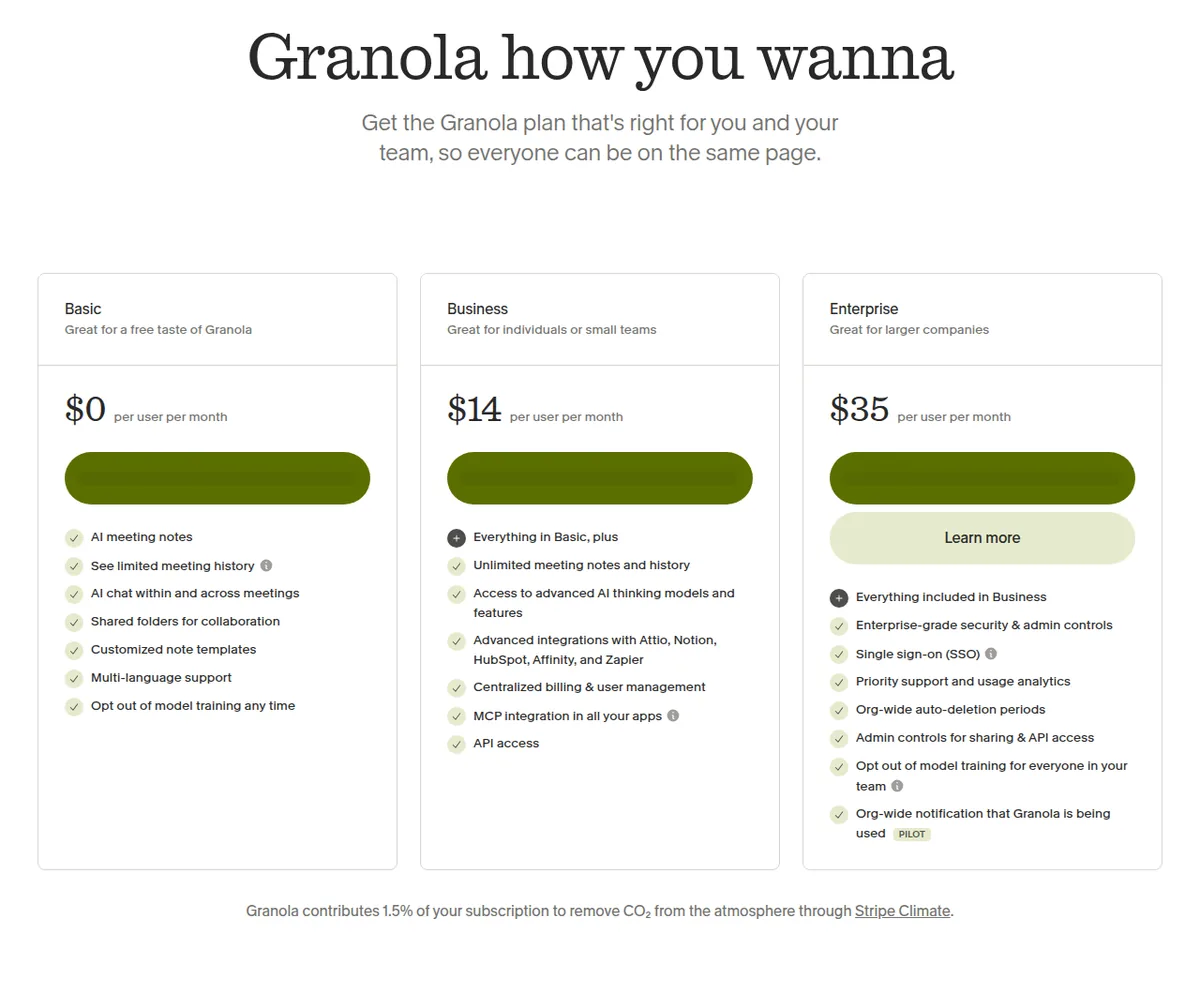
Basic is $0 per user per month. It includes AI meeting notes, AI chat, shared folders, templates, voice typing and multilingual support. The central limit is history, not a published daily recording quota. Basic offers the last 30 days of meeting history in the app. Older notes are stored but inaccessible in the app until upgrade, and Granola says a CSV export can provide titles and summaries for the full history.
Basic also supports bot-free device-audio capture, which makes it a credible client-call pilot. It is not a free long-term client archive if the consultancy needs to revisit notes after a month. This is the first point where an agency outgrows Granola: not necessarily because it has created too many notes, but because older client work needs to remain searchable in the application.
Business costs $14 per user per month. The billing help page says Business is billed monthly. It includes unlimited meeting notes and history, advanced AI models and features, integrations with Attio, Notion, HubSpot, Affinity and Zapier, centralized billing and user management, MCP and API access. A five-person consultancy pays $70 per month. A ten-person consultancy pays $140 per month. These are monthly seat calculations because Granola does not publish an annual Business price.
Granola's team model is straightforward but easy to misread. Billing is per workspace, and every active member is a paid seat, including admins. Pending invitations do not count until the person joins. A shared note link does not add the recipient to the workspace or create a billable seat. Notes are private by default, then can be shared directly or placed in a team folder. A new member does not automatically see private notes.
Enterprise is $35 per user per month on the public pricing page, with the billing help page describing it as from $35 per user per month. Enterprise adds organisation-wide controls, SSO, usage analytics, admin controls for sharing and API access, priority support and configurable organisation-wide deletion periods. The billing help page says annual billing is available on Enterprise contracts only, while Basic and Business are billed monthly.
Granola's main weakness is workflow discipline. The consultant must open a note or start New Note, and the web interface cannot capture meetings. A missed note-start action means a missed transcript. Granola also does not support importing pre-recorded audio files for transcription. A consultancy that routinely uploads old recordings or wants a bot to join meetings without a human opening the note may outgrow Granola's capture model before it outgrows its price.
What the free tier actually includes
The free tiers solve different problems. Fireflies Free is a capture and transcript experiment with an explicit storage allowance. Granola Basic is a note-taking and device-capture experiment with a 30-day in-app history boundary.
Fireflies Free costs $0. A standard website signup starts with three transcription credits, while the current help page lists five for Chrome-extension signup, ten for a new mobile user and five for an existing mobile user. The default is three meeting transcriptions, with one credit used to transcribe and summarize a meeting. Auto-join can unlock unlimited transcriptions by shifting the credit use to summaries. That does not make AI summaries, storage or transcript downloads unlimited.
Fireflies Free stores 400 minutes per seat. The allowance is for recordings, uploads and dialer calls, and the help page says older files must be deleted when the limit is reached. Free uploads are capped at 100MB and 150 minutes per file. The Free-plan page says 20 AI credits per month, but the separate AI-credit guide says the Free allowance is 20 one-time credits shared by the team. The conflict should be treated as a buying question, not silently converted into a monthly promise.
Granola Basic costs $0 per user per month. It includes AI meeting notes, AI chat, shared folders, templates, voice typing and multilingual support, plus bot-free device-audio capture. There is no published daily transcription limit on the billing help page. The practical limit is 30 days of meeting history in the app. Older notes are stored but inaccessible in the app until upgrade, and a CSV export can provide titles and summaries.
Granola Basic is therefore better for a consultant who needs a clean multi-platform pilot and immediate follow-up than for an agency promising a searchable record of every client relationship. It can be shared selectively because notes are private by default. A client who only receives a note link does not become a paid workspace member.
The free choice is simple. Choose Fireflies Free when automatic capture and a limited transcription archive are the test. Choose Granola Basic when the test is whether device capture works across several platforms and whether the consultant will remember to start a note. Upgrade Granola when the 30-day history boundary becomes a real delivery problem. Upgrade Fireflies when the transcription, storage, summary or download limits interfere with recurring client work.
Fireflies.ai and Granola compared
The table below uses exact prices and published limits read on 8 November 2026. A blank annual price means the vendor did not publish one on the official page reviewed.
| Plan | Published price | Capture method | Free or archive boundary | Shared-note rule |
|---|---|---|---|---|
| Fireflies Free | $0 | Auto-join can capture eligible meetings; Chrome extension can be automatic or manual for Google Meet | 3 default meeting transcriptions, 400 minutes per seat, 100MB and 150 minutes per upload file; Auto-join can unlock unlimited transcripts | External guests can receive recaps without joining the workspace |
| Fireflies Pro | $10 per user/month billed annually, or $18 monthly | Notetaker route plus Chrome extension without bot for Google Meet | 8,000 minutes per seat, 2-hour recording limit, unlimited transcription and AI summaries | Workspace teammates are seats; recap recipients need not be teammates |
| Fireflies Business | $19 per user/month billed annually, or $29 monthly | Automatic calendar and bot workflows, plus Chrome extension route | Unlimited storage, 3-hour recording limit, unlimited transcription and summaries | User groups, public and private channels, integration permissions |
| Granola Basic | $0 per user/month | Device-audio capture, started after the user opens or starts a note | 30 days of in-app history; no published daily transcription limit | Notes private by default; a shared note recipient is not a billable member |
| Granola Business | $14 per user/month, billed monthly | Device-audio capture across meeting software | Unlimited meeting notes and history | Active workspace members are paid seats; shared folders and selective note access |
| Granola Enterprise | $35 per user/month on public pricing page | Device-audio capture across meeting software | Unlimited meeting notes and history | Organisation-wide controls, admin sharing and deletion policies |
The seat and billing traps
The first trap is treating a recap recipient as a seat. Fireflies charges for teammates added to its workspace, but the pricing FAQ says individual recap links can be shared without adding participants or other users to the team. Granola follows a similar boundary: a shared note does not make the recipient a workspace member or billable seat. A client list should not be multiplied into the subscription unless clients genuinely need workspace access.
The second trap is Granola's word per workspace. Every active member shares the same plan, and every active member is a paid seat, including admins. A five-person Business workspace is $70 per monthly charge. Splitting the workspace into a paid workspace for the delivery team and a free personal workspace can reduce seats, but notes and folders are not shared across workspaces. That is an operational trade-off, not a free seat workaround.
The third trap is comparing annual Fireflies rates with monthly Granola rates without saying so. Fireflies Pro is $10 per user per month billed annually or $18 monthly. Five Pro seats cost $50 at the annual rate or $90 monthly. Granola Business is $14 per user per month and is billed monthly, so five seats cost $70. For a five-person consultancy comfortable with annual Fireflies billing, Pro is $20 cheaper per month than Granola Business. The saving disappears if the consultancy needs Fireflies Business, where five seats cost $95 annually billed monthly equivalent or $145 monthly.
The fourth trap is storage terminology. Fireflies Pro states 8,000 minutes of storage per seat. Fireflies Business states unlimited storage. Granola Basic states 30 days of in-app history, while Granola Business states unlimited history. These are not interchangeable definitions. A consultant should ask whether the real requirement is minutes, old-note access, imported files, recordings, transcripts or summaries.
The fifth trap is the capture path. Fireflies Auto-join can automatically join eligible calendar meetings, and its Chrome extension can automatically capture Google Meet when enabled. Granola does not automatically transcribe without the user first opening a note, although an already opened upcoming note can start at the scheduled time. A consultant who is often moving between calls may prefer Granola's cross-platform method, but only if starting the note becomes a reliable habit.
The final trap is assuming an integration label means the same thing. Fireflies Business documents Autofill CRM and integration permissions. Granola Business lists integrations and API access, while the help pages describe sharing notes into tools such as Slack, Notion, HubSpot, Affinity, Attio and Zapier. An agency should test the exact handoff with sample data before connecting a client workspace. The meeting notes hidden fees guide covers the wider category of credits, storage and seat traps.
Who should not buy this
Do not buy either product before deciding whether client calls may be captured. A bot-free method changes what participants see, but it does not remove the need to explain transcription and obtain the consent required for the engagement. The AI meeting notes privacy guide sets out the questions around capture, access, retention and deletion.
Do not buy Granola Basic as a permanent archive if the consultancy regularly revisits client work after 30 days. The notes are stored, but the app hides older history until upgrade. A CSV export is not the same as a searchable meeting workspace.
Do not buy Fireflies Free as a guaranteed recurring summary service. The default transcription allowance is bounded, storage is 400 minutes per seat and the official pages conflict on whether 20 Free AI credits are monthly or one-time. Auto-join can make transcripts unlimited, but summaries still depend on the relevant credit rules.
Do not buy Fireflies Pro if meetings regularly exceed two hours, if the archive needs more than 8,000 stored minutes per seat or if Zoom and Teams calls must be bot-free. Move the comparison to Fireflies Business only when its unlimited storage, three-hour recording limit or team workflow will be used.
Buy nothing when the team has no owner for reviewing names, dates, commitments and action items. A polished note that is not checked can create a second source of truth rather than a dependable client record. A shared document and named manual note-taker may be the better process until the consultancy can explain what happens after every call.
Our verdict: Fireflies.ai vs Granola for consultants
Choose Granola for a consultant or small consultancy that regularly moves among Zoom, Google Meet, Teams and other meeting software, and wants bot-free device-audio capture across that mix. Basic is a practical $0 pilot with a 30-day in-app history. Business is $14 per user per month, billed monthly, so five active members cost $70 per month. The consultant must open a note or start New Note, and that manual action is the price of a more consistent cross-platform capture route.
Choose Fireflies.ai when automatic calendar capture, a structured shared archive, recap links, storage tiers and team workflows matter more than avoiding a bot on every platform. Pro is $10 per user per month billed annually or $18 monthly, and five seats cost $50 or $90 per month. Business is $19 annually billed monthly equivalent or $29 monthly, and five seats cost $95 or $145. Fireflies is the better operational fit for a team that wants meetings to arrive in a workspace without relying on every consultant to start a note.
The agency outgrows Granola Basic sooner when older client notes need to remain searchable or when integrations and central administration become necessary. It outgrows Fireflies Pro sooner when the archive exceeds 8,000 minutes per seat, a call runs longer than two hours or the team needs Business-only controls. In both cases, the next plan is a deliberate workflow purchase, not an automatic reward for adding seats.
For the wider five-person arithmetic, see the meeting notes software cost comparison. For Fireflies plan details, see the Fireflies.ai review for agencies. For Granola's capture and history rules, see the Granola review for consultants. The Fathom vs Fireflies comparison is useful when the shortlist expands beyond this two-way decision. The recommendation follows the site's methodology, including dated checks of vendor pricing and plan limits.
Frequently asked questions
Is Fireflies.ai vs Granola better for consultants?
Granola is better when a consultant takes calls across several platforms and wants bot-free device-audio capture, provided the consultant starts a note. Fireflies.ai is better when automatic calendar capture, team channels, recap links and a structured archive matter more than a bot-free route on every platform.
How much does Fireflies.ai cost for five users?
Fireflies Pro costs $50 per month for five users at the $10 per user/month annual billing rate, or $90 monthly at $18 per user/month. Fireflies Business costs $95 per month at the $19 annual billing rate, or $145 monthly at $29 per user/month.
How much does Granola cost for five users?
Granola Business costs $14 per user per month, billed monthly. Five active workspace members therefore cost $70 per monthly charge. Granola publishes no Business annual price on the official pages read on 8 November 2026.
Does Fireflies automatically join client meetings?
Fireflies can automatically join eligible calendar meetings when Auto-join is enabled. Its Chrome extension can automatically capture Google Meet in Chrome when Auto-capture is on, or the user can record manually when it is off. The official extension help page directs Zoom and Teams users to the Notetaker bot.
Does Granola record meetings automatically?
No, not without a user starting the note workflow. Granola begins after the user clicks a notification, opens a meeting note after the scheduled start, or clicks New Note. If an upcoming note is already open, it can start at the scheduled meeting time.
What does Fireflies Free actually include?
Fireflies Free is $0 and starts with signup-source transcription credits, normally three meeting transcriptions by default. Auto-join can unlock unlimited transcriptions, but Free still has 400 minutes of storage per seat, upload limits of 100MB and 150 minutes per file, and bounded summary or AI-credit rules. The current Free page and AI-credit guide disagree on whether 20 Free AI credits are monthly or one-time, so that allowance needs confirmation.
What does Granola Basic actually include?
Granola Basic is $0 per user per month and includes AI meeting notes, AI chat, shared folders, templates, voice typing, multilingual support and bot-free device-audio capture. The key limit is 30 days of in-app meeting history. Granola says older notes are stored but inaccessible in the app until upgrade, and it publishes no daily transcription limit.
Can either tool share notes with clients without charging a client seat?
Yes, both vendors publish a route for selective external sharing. Fireflies says recap links can be shared without adding a participant or other user to the workspace. Granola says a shared note recipient does not become a workspace member or billable seat, and can see only the note that was shared.
Which product does a small agency outgrow sooner?
Granola Basic is usually outgrown first when a team needs searchable history beyond 30 days, integrations or central administration. Fireflies Pro is outgrown when the team needs more than 8,000 stored minutes per seat, meetings longer than two hours or Business-only team controls. Those are plan-fit conclusions based on the published limits, not vendor growth statistics.
Which tool is better for calls on several platforms?
Granola has the clearer cross-platform bot-free method because its desktop app captures device audio from Zoom, Google Meet, Teams and other meeting software. Fireflies can cover several platforms through its bot, and its Chrome extension provides bot-free audio for Google Meet in Chrome. The choice is between Granola's user-started device capture and Fireflies' more automatic workspace capture.
Official pricing pages
Prices and plan limits were read on 8 November 2026 from the official Fireflies.ai pricing page, Fireflies Free-plan guide, Fireflies transcription-credits guide, Fireflies Pro guide, Fireflies Business guide, Fireflies Enterprise guide and Fireflies Chrome-extension guide. The Granola figures were read from the official Granola pricing page, Granola billing guide, Granola transcription guide, and Granola sharing guide. Vendor pages can change, so the date beside each figure is part of this comparison.
Get started with the tools in this guide
-
Start free with Fireflies.ai (opens in a new tab)
Fireflies.ai
Free tier available
-
See Granola pricing (opens in a new tab)
Granola
These links go to the vendor's own site. We may earn a commission if you sign up, at no extra cost to you. How we fund the site. Every figure in this guide was read from the vendor's pricing page on the date stamped above, so confirm the number before you commit.
Related guides
-
 Head to head
AI Meeting Notes for Agencies
Fireflies vs Otter for Client Calls
Which of the two dominant AI meeting note tools fits a small agency, based on verified pricing, seat limits and how each behaves in a client call.
-
 Best overall
AI Meeting Notes for Agencies
Best AI Meeting Notes for Consultants
Four AI meeting note tools compared for consultancies on verified pricing, the free-tier limits that actually bite, and client confidentiality.
-
 Head to head
AI Meeting Notes for Agencies
Fathom vs Fireflies for Consultants
Fathom and Fireflies compared on verified pricing, the free-tier limits that decide real cost, and how each behaves in a client call.