Email Marketing for Agencies · Updated 3 November 2026
AI Email Tools for Small Agencies
Kit, MailerLite and Brevo put different AI features behind different tiers. This comparison shows what an agency gets, plus the real list and send limits.
- 16 min read
- AI email marketing tools for agencies
- Verified against vendor pricing
The short answer
Kit gives every plan an AI subject line generator, with five Free uses and unlimited paid use. MailerLite puts AI writing and smart sending on Comfort and Power, while Free gets limited subject line credits. Brevo includes Aura on Free, lists its dedicated AI content generator on Starter, and puts AI send-time optimization on Standard. Prices and limits were read on 3 November 2026.
| If you need | Reach for |
|---|---|
| The most useful AI on a free plan | Kit (opens in a new tab) |
| AI copy inside the editor | MailerLite Comfort (opens in a new tab) |
| Low-cost AI campaign drafting | Brevo Starter |
| AI send-time optimisation | Brevo Standard |
| A small list with no fixed email quota | Kit Creator (opens in a new tab) |
Get started with the tools in this guide
Where a vendor offers a free plan or a free trial, it is stated below, so you can try the tool before you pay for it.
-
Start free with Kit (opens in a new tab)
Kit
Free plan up to 10,000 subscribers
-
Start free with MailerLite (opens in a new tab)
MailerLite
Free plan up to 250 subscribers
These links go to the vendor's own site. We may earn a commission if you sign up, at no extra cost to you. How we fund the site. Every figure in this guide was read from the vendor's pricing page on the date stamped above, so confirm the number before you commit.
- Platforms read
- 3
- Free plans checked
- 3
- AI feature gates mapped
- Subject lines, copy, send time and analytics
- Read date
- 3 November 2026
Best free AI starting point Kit Free Its subject line generator is not locked away from free users, although the allowance is five uses and Kit does not publish a numeric monthly send cap
Best native copy assistant MailerLite Comfort The writing assistant creates or rewrites campaign text, but it is a paid feature with limited credits on Comfort and more credits on Power
Best priced campaign generator Brevo Starter It is the first Brevo tier whose pricing card explicitly lists the AI content generator, while the lower Free plan is capped at 300 sends per day
The feature most often gated Smart sending MailerLite lists it on Comfort and Power, and Brevo lists AI send time optimization on Standard, not on the entry Free plan
The limit to check before the AI demo Sends Kit publishes no numeric monthly send cap, MailerLite Free allows 2,500 monthly emails, and Brevo Free allows 300 daily sends
Overview
AI email marketing tools for agencies are not one category of feature. A platform may generate a subject line, write a paragraph, design an entire campaign, choose a send time, or analyse a segment. Those jobs are often split between tiers, so an agency that sees an AI badge on a pricing page still needs to ask what the badge actually does.
This comparison reads the official pricing and help pages for Kit, MailerLite and Brevo on 3 November 2026. It focuses on a small agency managing its own list or several client campaigns, not on an enterprise marketing department. The practical questions are simple: what can the AI create, what can it optimise, what is included in Free, and what list or send limit forces the next upgrade?
The answer is unusually uneven. Kit gives Free users a real but narrow AI subject line tool. MailerLite has the clearest native copy assistant, but the writing tool begins on Comfort. Brevo has a wide AI layer called Aura, yet its pricing page separates the dedicated content generator from AI send-time optimisation. That makes Brevo attractive for a team that wants campaign automation, but it requires more careful interpretation of the word AI.
The three platforms at a glance
The table below keeps the pricing units separate. Kit counts active subscribers and publishes a broadcast allowance but no numeric monthly send cap on the pages read. MailerLite combines active-subscriber pricing with monthly email allowances. Brevo lets the buyer select a monthly email volume, and that choice sets the contact tier on the paid plans.
| Platform | Free allowance | First relevant paid tier | AI subject lines | AI email copy | AI timing or analysis |
|---|---|---|---|---|---|
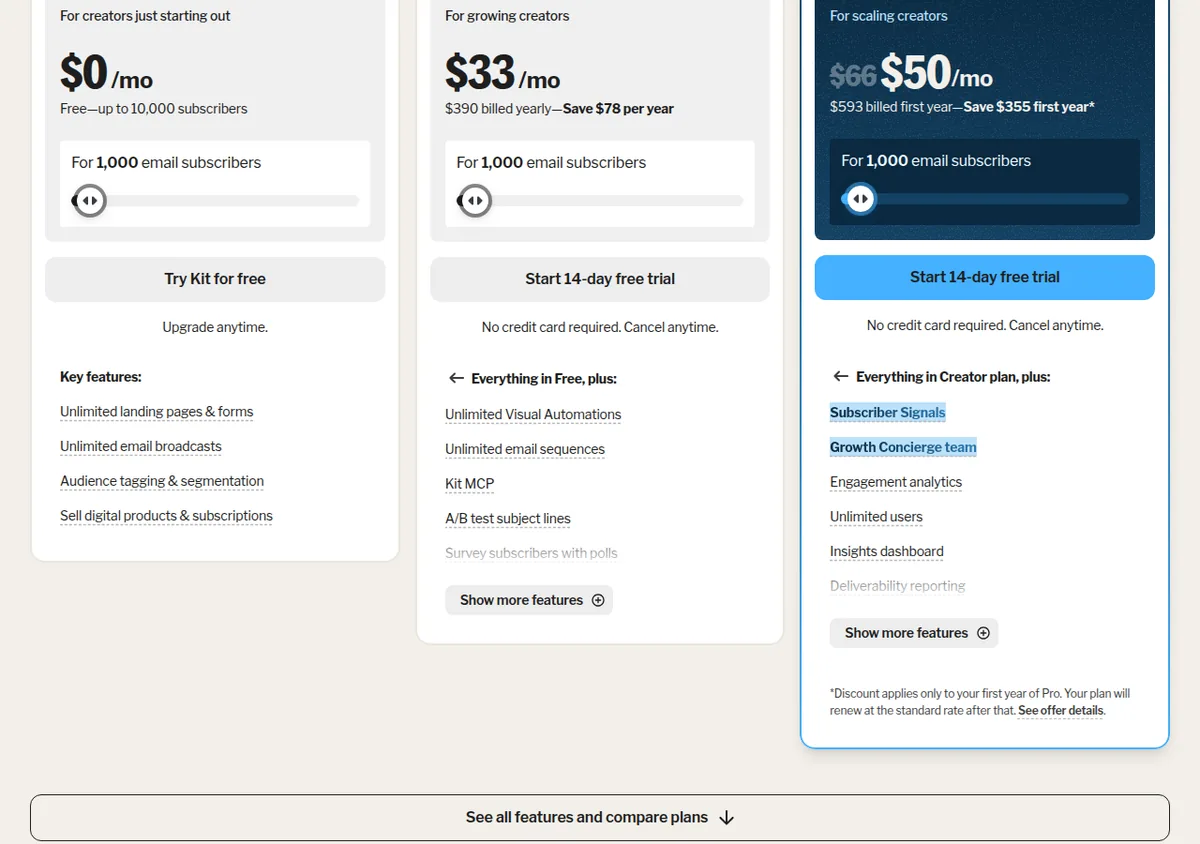
| Kit | 0.00 per month, up to 10,000 subscribers, unlimited broadcasts, five AI subject-line uses, read 3 November 2026 | Creator at 33.00 per month billed yearly, or 390.00 billed yearly at 1,000 subscribers, read 3 November 2026 | Free five uses, paid unlimited | Native body-copy generation not verified on the official pages read | Pro adds engagement analytics and Signals, but no numeric send cap is published |
| MailerLite | 0.00 per month, 250 subscribers and 2,500 monthly emails, read 3 November 2026 | Comfort from 12.00 per month and 5,000 monthly emails at the entry display, read 3 November 2026 | All plans, limited Free credits and more paid credits | Comfort and Power, limited Comfort credits and the most on Power | Smart sending on Comfort and Power |
| Brevo | 0.00 per month, 100,000 contacts and 300 daily email sends, read 3 November 2026 | Starter from 9.00 per month, 5,000 monthly emails and 500 contacts at the first tier, read 3 November 2026 | Aura is on Free, while the paid pricing card lists the AI content generator on Starter | Dedicated AI content generator listed on Starter; Free Aura access is broader but not mapped action by action | AI send time optimization on Standard from 18.00 per month, read 3 November 2026 |
What the free plan actually includes
Kit Free costs 0.00 per month, read 3 November 2026. It supports up to 10,000 subscribers and unlimited email broadcasts. The official pricing page does not publish a numeric monthly send cap. The AI subject line generator is available five times. Each use creates a set of five subject line suggestions, and refreshing that set consumes another use. Free also includes unlimited landing pages and forms, tagging, segmentation and the ability to sell digital products or subscriptions. The trade-off for an agency is team access: the pricing comparison lists one user on Free.
MailerLite Free costs 0.00 per month, read 3 November 2026. It supports 250 subscribers and 2,500 monthly emails, with two user seats. The plan includes campaign sending, three visual automations, one website, one landing page, three signup forms and pop-ups, A/B testing, and the MCP server. Its AI subject line generator is available with a limited amount of credits. The AI writing assistant is not included on Free. The premium feature trial lasts 14 days, with no credit card required, and the account remains free after the trial if the agency does not upgrade.
Brevo Free costs 0.00 per month forever, read 3 November 2026. It stores up to 100,000 contacts, but sends only 300 emails per day. Unused sends do not roll over. One marketing seat is included, and up to 2,000 unique contacts can enter active automations. The Free plan includes basic reporting, email campaigns, a drag-and-drop editor and Aura, Brevo's AI-powered assistant. It always carries the Brevo sticker, and it does not include email A/B testing, advanced reporting, landing pages or popups.
The Free comparison is therefore about different constraints. Kit's hard number is the five-use AI allowance and one user. MailerLite's hard numbers are 250 subscribers and 2,500 monthly emails. Brevo's contact storage looks large, but 300 daily sends means a full broadcast to more than 300 recipients cannot go out in one day on Free. An agency should not choose Brevo Free for a client newsletter merely because the contact allowance says 100,000.
Kit: the subject line tool is free, the body copy is not a stated feature
Kit is the cleanest option for an agency that already writes its own emails and wants help at the subject line step. Its official help article says the AI subject line generator reads a Broadcast and produces five suggestions. It is available for Broadcasts, not Sequences. Free users can try it five times. Paid plans have unlimited access.
That is a more useful free feature than a vague “AI assistant” label. A strategist can draft a real client email, ask for alternatives, and keep the final decision with the account owner. It is enough to judge whether the suggestions fit the client's voice before committing to a paid account. It is not enough for an agency that wants to generate a complete campaign from a brief every day.
The free list allowance is strong. Kit Free is 0.00 per month for up to 10,000 subscribers, read 3 November 2026, and includes unlimited broadcasts. Kit's pricing page does not state a numeric monthly send allowance, so the honest comparison is not “unlimited sends.” It is “unlimited broadcasts, with no numeric monthly send cap published on the page read.” That distinction avoids turning a missing number into a promise.
Creator is displayed at 33.00 per month when billed yearly, or 390.00 billed yearly at the 1,000-subscriber view, read 3 November 2026. The plan has unlimited subscribers in the comparison table and includes visual automations, sequences, Kit MCP, integrations, support and the removal of Kit branding. Pro is displayed at 66.00 per month at the 1,000-subscriber view, read 3 November 2026, with unlimited subscribers. Pro adds engagement analytics, Subscriber Signals, unlimited users, deliverability reporting, collaborative editing and a newsletter referral system.
Kit's 14-day free trial is available for the paid plans, with no credit card required, read 3 November 2026. There is no need to use the trial to unlock the basic AI subject line test, because Free includes five uses. The trial is more useful for checking automations, team work and the paid analytics layer.
The boundary is content generation. Kit's AI product page describes email writing tools that generate and test subject lines, plus Kit MCP and an app ecosystem. The pricing and help pages fetched for this article do not verify a native AI email body generator tied to Free, Creator or Pro. An agency can connect external AI tools through Kit MCP on paid tiers, but that is different from saying Kit's editor includes native body-copy generation. This article does not make that unsupported claim.
Kit's best agency use is a light-touch editorial workflow: the strategist writes the offer and proof, Kit produces subject-line options, and the human keeps responsibility for the client voice. Choose Creator when automations and several team workflows matter. Choose Pro for analytics, collaboration and deeper audience signals, not because the subject line generator suddenly becomes available.
MailerLite: the clearest native AI copy tier
MailerLite makes the most explicit split between AI writing and AI subject lines. Its HeyLite documentation says the AI writing assistant is available on Comfort and Power. Comfort gets a limited amount of credits, while Power gets the most credits. The assistant works inside the drag-and-drop campaign editor, landing page editor and pop-up editor. It can generate titles, paragraphs and calls to action, and it can rewrite existing text.
The subject line generator is less restricted. MailerLite says it is available on all plans, including Free. Free has a limited amount of credits, while Comfort and Power have the most credits. The tool creates several suggestions from the campaign context, and the official help page warns that both prompts and responses consume credits. That means Free is suitable for a small agency learning the workflow, but not for an account that needs unlimited drafting across several clients.
Comfort starts at 12.00 per month, read 3 November 2026. The entry display states 5,000 monthly emails and three user seats. Comfort also adds 50 automations, ten websites, five digital products or bookings, paid newsletters, RSS campaigns, the subject line generator, the AI writing assistant and smart sending. Power starts at 25.00 per month, read 3 November 2026. It adds unlimited monthly emails, unlimited user seats, unlimited automations, unlimited sites, unlimited forms and 24/7 live chat and email support.
MailerLite prices paid accounts by active subscribers and usage tiers. The official pricing page explains that billing is based on active subscribers, and the product pages show the email volume for the entry display. They do not provide one universal subscriber cap for all Comfort or Power accounts in the pages read. A small agency should therefore treat 12.00 and 25.00 as starting prices, not as the final bill for a growing client list. The list tier selected at checkout is the number that matters.
Free costs 0.00 per month, read 3 November 2026, and allows 250 subscribers plus 2,500 monthly emails. That cap is easy to understand. A list of 200 people receiving four newsletters in a month uses 800 sends, leaving room for a welcome sequence. A list of 250 people receiving ten campaigns uses the whole 2,500 allowance. MailerLite's Free plan is therefore practical for a small pilot, but not for a busy agency sending the same campaign to several client audiences.
Smart sending is the other important gate. MailerLite describes it as an AI system that examines subscriber opens, clicks, signup date and time zone to send at an individually tailored time. It is on Comfort and Power, not Free. The feature has a different value from copy generation. It can improve the operating workflow after the copy is approved, but it needs enough historical activity to be useful. An agency should not pay for smart sending merely to solve a copy bottleneck.
Brevo: separate Aura, content generation and send-time AI
Brevo requires the most careful reading because its AI appears in several places. The Free plan includes Aura, which Brevo describes as an AI-powered assistant. The Aura help page says its Marketing agent can generate a full email campaign design, write subject lines, create or refine campaign content, translate templates, send at the best time, and segment audiences. The pricing page, however, names the “AI content generator” as a Starter feature and “AI send time optimization” as a Standard feature.
Those statements are not necessarily contradictory, but they do not provide a complete matrix for every Aura action on every tier. The reliable buying conclusion is narrower. Free definitely includes Aura. Starter definitely lists the dedicated AI content generator. Standard definitely lists AI send time optimization. The official pages fetched do not clearly say that every Marketing agent action exposed through Aura is unrestricted on Free. An agency should check the account's current feature prompt before promising a client a specific Free workflow.
Brevo Free is 0.00 per month forever, read 3 November 2026. It stores up to 100,000 contacts and permits 300 email sends per day. A campaign to 900 contacts can be sent only to 300 recipients on the scheduled day, with manual requeueing needed for the rest. That is the practical limit, even though the contact storage number is large. Free also caps active automation entry at 2,000 unique contacts and includes one marketing seat.
Starter begins at 9.00 per month, read 3 November 2026. The first official pricing tier is 5,000 monthly emails and 500 contacts. The next listed tiers are 10,000 emails with 1,500 contacts and 15,000 emails with 2,500 contacts. Starter lists the AI content generator, advanced segmentation, forms, basic reporting, MCP for ChatGPT and Claude, and no Brevo logo as a paid feature set. The price is attractive for a small list, but the contact limit moves with the selected send tier.
Standard begins at 18.00 per month, read 3 November 2026. The first tier also shows 5,000 monthly emails and 500 contacts, read 3 November 2026. Standard includes the Starter features plus unlimited multi-step marketing automation, A/B testing, advanced reporting, one landing page and AI send time optimization. It is the first Brevo tier in this comparison where the send-time feature is explicitly priced into the plan rather than left to a general assistant.
Brevo's official pages do not publish a paid-plan trial length for the Marketing plans read on 3 November 2026. Free is a permanent plan, not a trial. That missing trial length is itself useful information. Do not put a 14-day or 30-day Brevo trial into a client recommendation unless the vendor presents that term in the account or a current offer.
The cost of the send limit, not just the AI limit
The natural temptation is to compare 0.00, 9.00 and 12.00, then choose the lowest paid tier with an AI label. That misses the campaign arithmetic. A client list of 400 contacts cannot be handled in one day by Brevo Free's 300-send limit. A MailerLite Free account can hold only 250 subscribers, even though its 2,500 monthly send allowance looks generous. Kit Free can hold 10,000 subscribers, but the official page does not state a numeric monthly send cap.
Count each audience that will receive each campaign, then add welcome emails, resends, automated reminders and test messages. Brevo counts daily sends on Free and monthly email volume on paid tiers. MailerLite counts monthly emails and active subscribers. Kit presents subscriber tiers and broadcast access rather than a numeric monthly email allowance on the fetched page. The AI draft may be free, but delivery still consumes the platform allowance.
A practical choice for a small agency
Choose Kit Free when the agency wants a large free list, unlimited broadcasts as stated on the pricing page, and occasional subject line help. Choose Creator or Pro when automations, reporting, collaboration or subscriber insight justify paying. Do not choose Kit expecting a verified native body-copy generator or a published numeric monthly send quota. Choose MailerLite when AI writing inside the editor is the priority, and Brevo when contact-based pricing, transactional messaging or a named campaign content generator matters. Brevo Free is useful for testing Aura, but not for sending a full campaign to more than 300 recipients in one day.
For the broader agency comparison, the best email marketing platform for agencies covers client audiences, seats and platform fit. The MailerLite versus Kit comparison puts those two plans side by side. The Kit review explains that product's list and workflow model, while the MailerLite review goes deeper into its pricing tiers and feature boundaries.
Frequently asked questions
Which AI email marketing tools for agencies have a free plan?
All three platforms read on 3 November 2026 publish a free plan. Kit Free supports up to 10,000 subscribers and unlimited broadcasts, with five uses of its AI subject line generator. MailerLite Free supports 250 subscribers and 2,500 monthly emails, with limited AI subject line credits. Brevo Free stores up to 100,000 contacts, sends 300 emails per day and includes Aura, its AI-powered assistant.
Which tool generates email copy inside the editor?
MailerLite is the clearest verified choice. Its AI writing assistant is available on Comfort and Power, where it can generate or rewrite titles, paragraphs and calls to action inside the campaign editor. Brevo's Starter pricing card lists an AI content generator. Kit's official pages read for this comparison verify subject line generation, Kit MCP and AI apps, but not a native body-copy generator by plan.
Does Kit have an AI subject line generator on Free?
Yes. Kit's official help page says Free users can use the AI subject line generator five times. Each use produces a set of five suggestions, and each refreshed set uses another turn. Paid Kit plans have unlimited access. The tool works on Broadcasts, not Sequences.
Is MailerLite's AI writing assistant included on Free?
No. MailerLite lists the AI writing assistant on Comfort and Power. Comfort has a limited credit allocation, while Power has the most credits. Free does include a limited amount of credits for the AI subject line generator, so subject suggestions and body-copy generation have different gates.
Which MailerLite plan includes smart sending?
Comfort and Power include Smart sending, according to MailerLite's HeyLite documentation read on 3 November 2026. The feature uses subscriber opens, clicks, signup date and time zone to choose an individual send time. It is not included on Free.
Does Brevo Free include AI content generation?
Brevo Free definitely includes Aura, the platform's AI-powered assistant. Brevo's Aura help page describes Marketing agent actions that include subject lines and campaign content. However, the pricing page explicitly lists the dedicated AI content generator on Starter, and the fetched official pages do not provide a complete Free-versus-paid matrix for every Aura action. Treat Starter as the confirmed named content-generator tier rather than assuming every Aura action is unrestricted on Free.
What is Brevo Free's real sending limit?
Brevo Free allows 300 email sends per day, read 3 November 2026. Unused sends do not roll over. A campaign sent to more than 300 recipients delivers to only 300 on the scheduled day, and the remaining recipients require manual requeueing. The plan stores up to 100,000 contacts, but that large contact allowance does not remove the daily send limit.
Is Kit or MailerLite cheaper for a small agency?
Kit Free costs 0.00 per month for up to 10,000 subscribers, read 3 November 2026, but its official pricing page does not publish a numeric monthly send cap. MailerLite Free costs 0.00 per month for 250 subscribers and 2,500 monthly emails, read 3 November 2026. Kit Creator is displayed at 33.00 per month billed yearly, or 390.00 billed yearly at 1,000 subscribers, while MailerLite Comfort starts at 12.00 per month. The final MailerLite bill depends on active-subscriber tier, so the starting price alone does not settle the comparison.
Is there a paid Brevo trial?
A paid-plan trial length was not verified on the official Brevo Marketing pricing and help pages read on 3 November 2026. Brevo Free is a permanent plan with no time limit, not a trial. Do not state a paid trial length unless Brevo shows one for the account or current offer being evaluated.
Our verdict
For a small agency that wants to try AI without paying first, Kit Free is the strongest starting point on the published limits. It supports up to 10,000 subscribers, includes unlimited broadcasts, and gives five uses of the AI subject line generator at 0.00 per month, all read on 3 November 2026. It does not provide a verified native body-copy generator, and it does not publish a numeric monthly send cap on the pricing page. That makes it a good editorial assistant, not a complete AI campaign factory.
MailerLite is the better recommendation when the agency's main job is producing campaign copy. Comfort starts at 12.00 per month and includes the AI writing assistant and Smart sending, read on 3 November 2026. Free is a useful test, but its 250-subscriber and 2,500-email limits arrive quickly once several client audiences share an account. Power at 25.00 per month adds the highest AI credit allocation and unlimited monthly emails, read on 3 November 2026, but the active-subscriber price tier still needs checking.
Brevo is the most interesting low-cost paid option for a team that wants a named AI content generator. Starter starts at 9.00 per month with a first tier of 5,000 monthly emails and 500 contacts, read on 3 November 2026. Standard starts at 18.00 per month with the same first send and contact tier, then adds AI send time optimization. Free is generous with contact storage and Aura access, but 300 daily sends and the missing complete Aura feature matrix make it a poor choice for an agency that needs predictable free campaign delivery.
The practical answer is therefore feature-led. Choose Kit for free subject line assistance and a large starter list. Choose MailerLite for native AI copy generation. Choose Brevo Starter for a low priced, explicitly named content generator, and Brevo Standard when send-time optimisation matters. In every case, price the list and send limits alongside the AI feature. That is where the next bill begins.
If the decision is about client accounts rather than AI alone, the email tools for multiple client accounts comparison covers the agency structure, and the email marketing hub holds the rest of the cluster.
Get started with the tools in this guide
-
Start free with Kit (opens in a new tab)
Kit
Free plan up to 10,000 subscribers
-
Start free with MailerLite (opens in a new tab)
MailerLite
Free plan up to 250 subscribers
These links go to the vendor's own site. We may earn a commission if you sign up, at no extra cost to you. How we fund the site. Every figure in this guide was read from the vendor's pricing page on the date stamped above, so confirm the number before you commit.
Related guides
-
 Comparison
Email Marketing for Agencies
Kit vs GetResponse for Agencies
Kit and GetResponse compared on verified pricing, included user seats, and how each handles running campaigns for several clients from one account.
-
Email Marketing for Agencies
Email Marketing Software for Consultancies
The four features consultancies are told they need an enterprise plan for, and which platforms actually charge for them, checked against eight vendor pricing pages on 22 October 2026.
-
Email Marketing for Agencies
Low-Cost Email Marketing for Consultancies
A three-point cost model for consultancies at 500, 2,500 and 10,000 contacts, with the per-contact and per-email normalisation that contact-based pricing hides.