CRM for Agencies and Consultancies · Updated 16 October 2026
HubSpot Credits for Small Agencies
HubSpot credits cost $0.01 each and expire at the end of every month, because unused credits do not carry over. Here is what an agency should budget.
- 10 min read
- hubspot credits
- Verified against vendor pricing
The short answer
HubSpot credits pay for features and AI agents that perform work, and they cost $0.010 each. Paid plans include a monthly allowance, Starter is listed with 500 credits, and unused credits expire at the end of each month rather than carrying over.
| If you need | Position |
|---|---|
| To predict spend exactly | Capacity pack |
| To pay only for what runs | Pay-as-You-Go |
| A starting allowance | Included with paid plans |
| To avoid a surprise bill | Set a spend cap |
| A free CRM | HubSpot free tier (opens in a new tab) |
| A plan with a verified seat price | HubSpot Starter (opens in a new tab) |
| Nothing AI-based at all | Do not buy extra credits |
Get started with the tools in this guide
Where a vendor offers a free plan or a free trial, it is stated below, so you can try the tool before you pay for it.
-
Start free with HubSpot (opens in a new tab)
HubSpot
Free CRM for up to 2 users and 1,000 contacts, with no expiry
These links go to the vendor's own site. We may earn a commission if you sign up, at no extra cost to you. How we fund the site. Every figure in this guide was read from the vendor's pricing page on the date stamped above, so confirm the number before you commit.
- Price per credit
- $0.010
- Capacity pack
- $10 per 1,000
- Starter allowance
- 500 credits/mo
- Expiry
- Unused credits expire monthly
Overview
HubSpot credits are the part of HubSpot pricing that agencies discover last. The seats are predictable and the hubs are documented, but credits work differently from both: they are consumed when a feature or an agent actually performs work, they cost $0.010 each, and any allowance an agency does not use expires at the end of the month rather than carrying over.
That expiry rule is the single most important fact in this guide. It means a plan that includes credits is not building up a balance, and an agency that pays for a large capacity pack in a quiet month loses the unused portion rather than banking it. Budgeting for credits is therefore closer to budgeting for electricity than to buying software seats.
Everything here was read from HubSpot's own credits page and CRM pricing page on 16 October 2026. Where HubSpot does not state a figure, this guide says so rather than estimating. The plans themselves are compared in our HubSpot Starter vs Professional analysis, and the head-to-head against the other common option is in HubSpot vs Pipedrive for agencies.
What a credit actually buys
HubSpot's own description is that credits are used when "features and agents do work for you" across the platform, including AI agents and automation. The charge is applied when a specific action completes, which is why HubSpot describes the model as paying only when the work is done.
That is a genuine shift from seat-based pricing, and it has three consequences:
Idle seats still cost money, idle credits do not. A seat is billed whether or not the person logs in. A credit is only spent when an action runs, so an agency using AI features occasionally pays for those occasions rather than for access.
The cost scales with usage, not with headcount. An agency can add people without adding credit cost, provided the added people do not use credit-based features more heavily. Credits are one of several charges that sit outside the plan price, and CRM software hidden fees covers the rest.
Usage is capped by design, not by hope. HubSpot provides account-level, feature-level and activity-level credit limits, along with feature pausing and real-time usage reporting. An agency can therefore decide in advance that a particular feature is allowed to spend a fixed amount and no more.
What credits cost
| Purchase route | Price | What it gives |
|---|---|---|
| Capacity pack | $10 per 1,000 credits | A fixed monthly limit at a flat rate |
| Pay-as-You-Go | $0.010 per credit | Charged per credit beyond the monthly limit |
| Included allowance | Varies by product and tier | Starter is listed with 500 credits |
The two paid routes are not a quality difference, they are a predictability difference. A capacity pack gives a fixed monthly credit limit at a flat rate, which suits an agency that wants a number it can put in a budget. Pay-as-You-Go charges each credit used beyond the monthly limit at the then-current rate, which suits an agency whose usage is genuinely uneven.
The arithmetic worth doing once. Starter is listed with 500 credits, and 500 credits at $0.010 is about $5 at list price. So the included allowance on the entry paid plan is not a large hidden benefit; it is a small starting balance that covers a modest amount of AI activity. Any agency planning to lean on credit-based agents should treat the allowance as a trial quantity rather than a budget.
The guardrail that prevents a runaway bill. If an agency has purchased additional credits, HubSpot states it sets the account-level credit limit up to 50 per cent beyond the total monthly credits, so usage cannot silently multiply. The limit is adjustable, and notifications arrive as the limit approaches. This is the mechanism to configure before turning credit features on, not after the first invoice.
What the free plan actually covers
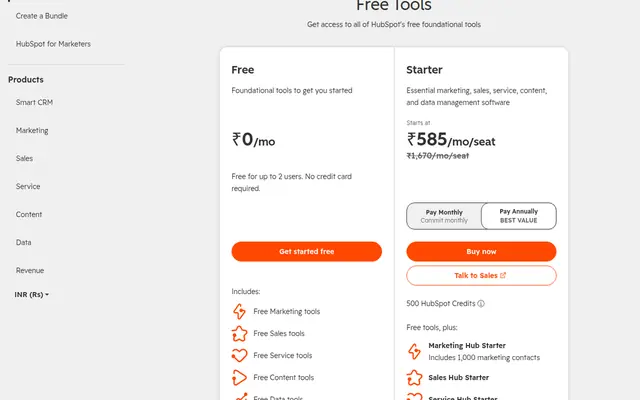
HubSpot's free tier is $0 and free for up to 2 users, with no credit card required, and it includes foundational tools across Marketing, Sales, Service, Content, Data and Revenue.
What it does not include is a credit allowance. HubSpot states that all paid HubSpot plans include monthly credits, and it does not state a credit inclusion for the free tier. The credits page confirms the pattern: plans include credits, and more can be added.
| Tier | Users | Price | Credits |
|---|---|---|---|
| Free | Up to 2 | $0 | None stated |
| Starter | Per seat | $7 a seat a month annually, or $20 monthly | 500 listed |
The honest reading. The free tier is a genuine and useful CRM, but its two-user limit is the real constraint for an agency, not its lack of credits. A three-person agency cannot run on the free tier at all, because the limit is stated at two users. Our free CRM guide for consultants works through the alternatives. Credits become relevant once an agency is paying, and by then the allowance is small enough that the spend controls matter more than the allowance itself.
The two decisions that matter
Best way to control spend Capacity pack $10 per 1,000 credits with a fixed monthly limit
Best way to start Included allowance Observe one month before buying anything extra
What uses credits, and where the rates live
HubSpot states that credits are consumed when its agents, automation and other credit-based features complete an action, and it publishes the per-action rates in a separate Product and Services Catalog rather than on the credits page.
That separation matters for budgeting. This guide deliberately does not restate per-action rates, because HubSpot does not publish them on the credits page and a rate copied from a third party can be out of date within a billing cycle. The correct process for an agency is:
- Open the rate sheet for the specific feature being evaluated.
- Multiply the per-action rate by the expected monthly volume.
- Compare the result against the included allowance.
- Set a feature-level credit limit at or below the answer.
Doing this for one feature is enough to see whether credits are a rounding error or a real line item, and it takes less time than reading the whole rate sheet.
Where credits sit next to the seat bill
The credit line is small next to the seat line, and an agency should get the order right rather than optimise the wrong number.
HubSpot Starter is listed at $7 per seat per month when billed annually and $20 per seat per month on monthly billing. For a three-person agency that is $21 a month annually or $60 a month month to month, a difference of $39 every month, or $468 over a year, purely from the billing period.
Set that against the credit side. The 500 credits included with Starter are worth roughly $5 at the $0.010 list rate. Even an agency that buys an extra capacity pack every single month is comparing a $120 a year credit habit against a $468 a year billing-period decision.
The practical consequence. An agency that switches from monthly to annual billing and tidies up its credit controls is optimising the larger number first. An agency that spends an afternoon negotiating a credit pack while paying monthly has optimised the smaller one.
Where credits can still surprise you. Usage-based pricing scales with activity, not headcount, so a single workflow that runs often can consume an allowance quickly. That is precisely why HubSpot provides feature-level and activity-level limits: they let an agency cap one expensive workflow without turning off the rest.
What HubSpot does not publish
Per-action rates on the credits page. HubSpot states that credits are consumed when actions complete, but the individual rates live in a separate Product and Services Catalog. This guide does not restate them, because a third-party figure can be stale within a billing cycle.
A credit allowance for the free tier. The credits page states that paid plans include credits. It does not state an inclusion for the free tier, and this guide does not invent one.
A single figure for what a workflow costs. Because rates vary by feature and by action, HubSpot publishes a rate sheet rather than a price list. Budgeting credits means looking up the specific action.
Whether the 500 Starter credits are per account or per seat. The pricing page lists Starter with 500 credits alongside a per-seat price. This guide treats the allowance as a plan-level figure and does not multiply it by seat count, because HubSpot does not state that it scales.
How an agency should budget credits
Start with the included allowance and a pause on everything else. The paid plan already includes credits, so the first month reveals actual usage without any additional commitment.
Set feature-level limits before turning features on. HubSpot supports limits at account, feature and activity level. An agency that sets a feature limit on day one cannot be surprised by it.
Choose capacity packs when usage is steady, Pay-as-You-Go when it is not. A pack is a flat monthly rate for a fixed limit; Pay-as-You-Go charges per credit beyond the limit. Seasonal agencies are usually better served by the flexible route, and agencies running a constant workflow by the pack.
Remember that unused credits expire. There is no carry-over, so buying a large pack "to be safe" in a quiet month wastes the difference. Buy to the level actually used.
Recheck the plan boundary annually. HubSpot allows spend to be moved from seats to credits, and it also changes what each tier includes over time. A configuration that made sense last year is worth re-testing rather than renewing by default.
Our verdict
Use the included allowance first and set spend caps before enabling anything. Every paid plan already includes credits, so month one should be an observation month rather than a purchasing decision. Set a feature-level limit at the same time, because the guardrail costs nothing and the surprise invoice does not.
Buy capacity packs only when usage is predictable. At $10 per 1,000 credits, a pack is the cleanest way to put a fixed figure in a budget. The monthly expiry is what makes this a commitment rather than a saving, so buy to the level used.
Do not expect the free tier to include credits. HubSpot's free CRM is $0 for up to two users and includes foundational tools, but credits are stated as a paid-plan inclusion. An agency on the free tier that wants credit-based agents has to be on a paid plan first.
Treat the 500 Starter credits as a starting balance. They are worth about $5 at list price. That is enough to test a workflow and not enough to run one, which is the honest framing for planning purposes.
Compare the whole bill, not the credit line. Starter is $7 a seat a month when billed annually against $20 monthly, a gap of $13 per seat per month that dwarfs a small credit allowance. The billing period is where most of the money is, and the comparison to the other main option is in our HubSpot vs Pipedrive analysis.
Frequently asked questions
What are HubSpot credits?
HubSpot credits are units used when HubSpot's features and agents perform work, including AI agents and automation. Credits are consumed only when a specific action completes, so the model charges for completed work rather than for access. All paid HubSpot plans include a monthly allowance, and more can be bought through capacity packs or Pay-as-You-Go.
How much do HubSpot credits cost?
HubSpot states that credits cost $0.010 per credit. They can be bought upfront in capacity packs of 1,000 credits for $10, which gives a fixed monthly limit at a flat rate, or on Pay-as-You-Go, where each credit used beyond the monthly limit is charged at the current rate.
Do unused HubSpot credits roll over?
No. HubSpot states that credits refresh each month and that unused credits expire at the end of the month and do not carry over. This is the most important budgeting detail, because it means a large capacity pack bought in a quiet month cannot be banked for a busy one.
How many credits does the HubSpot Starter plan include?
HubSpot's CRM pricing page lists Starter with 500 credits. At $0.010 per credit that allowance is worth about $5 at list price, so it should be treated as a starting balance for testing rather than a budget for running a workflow.
Does the free HubSpot tier include credits?
HubSpot states that all paid plans include monthly credits, and it does not state a credit inclusion for the free tier, which is $0 and free for up to two users. The practical constraint on the free tier for an agency is the two-user limit rather than the absence of credits.
Can I prevent a surprise credit bill?
Yes. HubSpot sets the account-level credit limit up to 50 per cent beyond your total monthly credits once additional credits have been purchased, and limits can be adjusted at account, feature and activity level. Notifications arrive as the limit approaches and features can be paused, which means the guardrail is available before usage rather than only after it.
Where are the per-action credit rates published?
HubSpot publishes the rates in its Product and Services Catalog, referred to as the rate sheet, rather than on the credits page. This guide does not restate individual per-action rates because they can change within a billing cycle, and an agency should confirm the rate for the feature it is evaluating before multiplying it by expected volume.
Should a small agency move spend from seats to credits?
That is a configuration HubSpot supports, and it is worth testing rather than assuming. Credits scale with usage while seats scale with headcount, so an agency with a few heavy users and several occasional ones may find credits cheaper, while one with a steady team using mostly non-credit features will not.
Get started with the tools in this guide
-
Start free with HubSpot (opens in a new tab)
HubSpot
Free CRM for up to 2 users and 1,000 contacts, with no expiry
These links go to the vendor's own site. We may earn a commission if you sign up, at no extra cost to you. How we fund the site. Every figure in this guide was read from the vendor's pricing page on the date stamped above, so confirm the number before you commit.
Related guides
-
 Best overall
CRM for Small Agencies
Best CRM for Design Studios
CRM options for design studios compared on verified seat pricing and setup effort, including which free tiers actually hold up for a small team.
-
 Free tier
CRM for Small Agencies
Best Free CRM for Consultants
Which free CRM plans hold up for a consultant, what each one actually limits, and the point where a free tier starts costing you time.
-
CRM for Small Agencies
Best CRM for Small Marketing Agencies
A verified comparison of five CRMs for small marketing agencies, focused on proposals, retainers, referrals, adoption speed and the real per-seat bill.