Email Marketing for Agencies · Updated 23 October 2026
Email Marketing Software Hidden Fees
Branding charges, seat limits, contact blocks and overage rules across eight email platforms, read from the vendors on 23 October 2026.
- 17 min read
- email marketing software hidden fees
- Verified against vendor pricing
The short answer
The four fees that appear after signup are branding removal, extra seats, contact overage blocks and sending-ceiling upgrades. The largest single add-on in this comparison is Brevo's logo removal at $12 a month, which more than doubles its $9 Starter plan. The hardest ceiling is Brevo Starter's one-seat maximum, which blocks a two-person practice outright. The most aggressive overage mechanism is Mailchimp's add-on contact block, billed on the peak contact total for the month rather than the closing total.
| Fee that appears later | Where it bites hardest |
|---|---|
| Branding removal | Brevo Starter |
| Extra seats | Brevo Starter |
| Extra seats, priced | Brevo, seats two to ten |
| Contact overage | Mailchimp |
| Contact overage | Kit (opens in a new tab) |
| Sending ceiling | MailerLite Comfort (opens in a new tab) |
| Sending ceiling | EmailOctopus Starter |
| Transaction fee | AWeber Lite (opens in a new tab) |
| Currency and tax | GetResponse (opens in a new tab) |
| Multi-account | MailerLite (opens in a new tab) |
Get started with the tools in this guide
Where a vendor offers a free plan or a free trial, it is stated below, so you can try the tool before you pay for it.
-
Start free with Kit (opens in a new tab)
Kit
Free plan up to 10,000 subscribers
-
See GetResponse pricing (opens in a new tab)
GetResponse
-
Start free with MailerLite (opens in a new tab)
MailerLite
Free plan up to 250 subscribers
-
Start free with AWeber (opens in a new tab)
AWeber
14-day free trial, no card required
These links go to the vendor's own site. We may earn a commission if you sign up, at no extra cost to you. How we fund the site. Every figure in this guide was read from the vendor's pricing page on the date stamped above, so confirm the number before you commit.
- Platforms checked
- 8
- Largest single add-on
- Brevo logo removal $12/mo
- Hardest seat ceiling
- Brevo Starter, 1 seat
- Read from vendors
- 23 October 2026
Largest single add-on Brevo $12 a month for logo removal, more than doubling a $9 Starter plan
Hardest seat ceiling Brevo Starter One seat minimum and one seat maximum, so a second writer is impossible at any price
Most expensive overage mechanism Mailchimp Add-on contact blocks billed on the peak contact total for the month
Most asymmetric upgrade path Kit Automatic upgrade on passing a tier, manual support request to come back down
Cheapest way to avoid every fee Kit Free and EmailOctopus Starter $0 with no branding charge, no seat charge and no overage block
Only unresolved vendor contradiction Mailchimp The pricing page says sending pauses, the help article says it does not
Overview
Every email platform publishes a monthly price, and the phrase email marketing software hidden fees exists because every email platform charges more than that price once a practice starts using it properly. The gap is rarely a trick. It is a set of four mechanisms that are documented individually and never added up on the page where the buying decision is made: branding removal, extra seats, contact overage handling, and sending ceilings that turn a traffic spike into either a plan upgrade or a week of silence.
This guide adds them up. It covers eight platforms at the list sizes a small agency and consultancy actually reaches, and it prices each fee against the plan it attaches to, because a $12 add-on means something different against a $9 plan than against a $350 one.
Every figure was read from the vendor's own pricing or help pages. Three platforms were re-read on 23 October 2026 for this guide: Mailchimp, Kit and MailerLite. The remaining figures carry the verification date recorded in the project's pricing file, and where a vendor changed a figure between checks, both readings are shown rather than the newer one alone.
One finding is worth stating before anything else, because it is the only place in this comparison where two pages published by the same vendor disagree. Mailchimp's pricing page states that sending will be paused if the contact or email send limit is exceeded. Mailchimp's help article on additional charges states the opposite: that the service will not be interrupted and that an additional charge appears on the bill instead. Both pages were read on the same day. The guide reports the conflict rather than choosing the more convenient reading, and a practice that depends on uninterrupted sending should confirm the position with Mailchimp before relying on either page.
The companion guides cover the tier question and the cost question. The consultancy platform guide tests which features vendors place above the entry tier, and the contact cost guide prices the same platforms at 500, 2,500 and 10,000 contacts. If the fee that has actually appeared is a seat charge, the multi-client account comparison covers the seat ceilings plan by plan. If the fee is the reason a practice is reconsidering the commitment itself, the no-contract guide covers exit costs and refund windows platform by platform.
How these fees were checked
Each platform was read on its own pricing page and, where the pricing page is silent, on its own help documentation. Where a vendor publishes a machine-readable pricing document generated from its own pricing system, that document was used in preference to the marketing page, because it carries the exact seat minimums and maximums that the marketing page omits. Where a figure is not published as readable text, this guide says so instead of estimating it.
No fee on this page is inferred from a competitor's description of the vendor, and no figure comes from a review site. Every number has a date beside it in the project's pricing record, and the record is the reason the two Mailchimp readings could be compared at all.
Branding removal is the first surprise
Every platform in this comparison puts its own logo on the emails a practice sends until the plan is upgraded past the entry tier. On most of them the upgrade is a plan step rather than a line item, but on Brevo it is a priced add-on, and that changes the arithmetic.
Brevo charges $12 a month, or $129.60 a year, to remove its logo at Starter level, and includes the removal on higher tiers. A practice on the $9 Starter plan that wants unbranded client-facing email is therefore looking at $21 a month rather than $9, which is a 133% increase on the entry price. Read against Brevo's own tier ladder, the logo removal alone costs more than the step from Starter to Standard at the 500 contact tier, where the plan itself rises from $9 to $18.
The pattern on the other platforms is a plan step rather than an add-on. Kit includes branding removal from Creator upward and not on Free. MailerLite includes it from Comfort upward. EmailOctopus includes it on Pro. AWeber includes it on Plus and not on Lite. Mailchimp includes it from Essentials upward. For a consultancy, the practical question is whether the first paid tier already removes the branding, because if it does not, the real entry price is the next tier up.
Extra seats, and the plan that allows only one
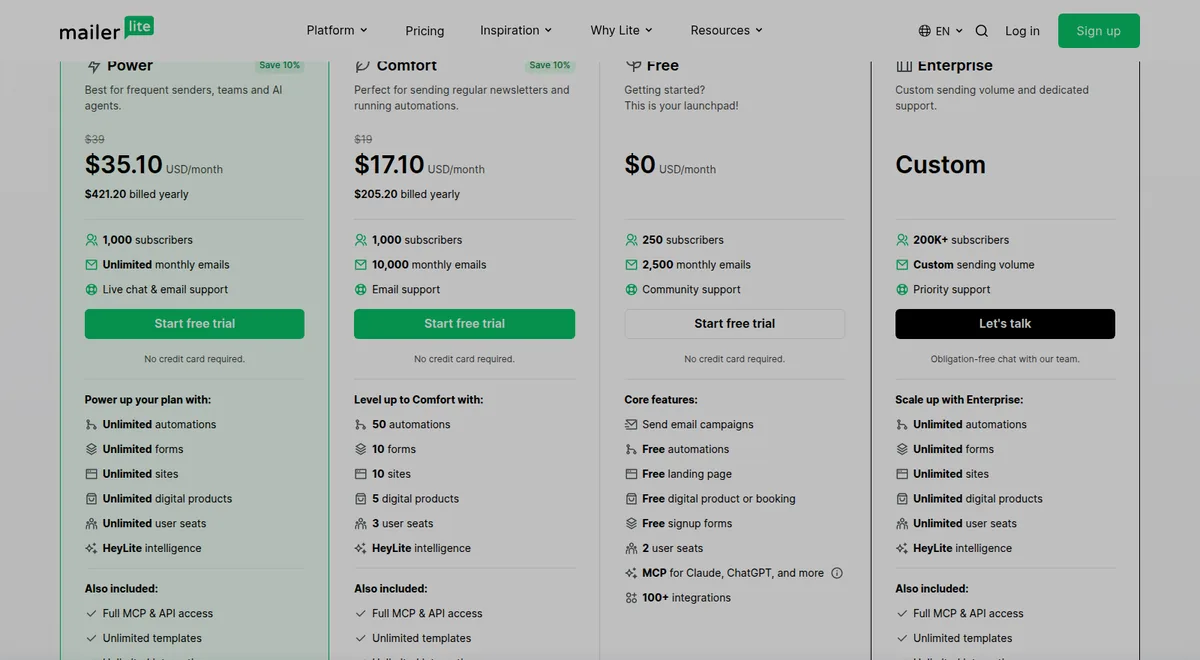
Seat counts are the second surprise, and they matter more to an agency than to a solo sender because more than one person writes.
The hardest ceiling in this comparison belongs to Brevo Starter, which allows a minimum of one seat and a maximum of one seat. A two-person practice cannot add a second writer to the $9 plan at all, at any price. The only routes are a higher Brevo tier, where additional marketing seats cost $12 a month each for seats two to ten, or a different platform. Our Brevo alternatives for consultancies works through which platforms give a small team multiple seats without charging per head.
The other platforms scale more gently. MailerLite includes two seats on Free, three on Comfort and unlimited seats on Power. AWeber includes three users on Lite and unlimited users on Plus. Mailchimp includes one seat on Free, three on Essentials and five on Standard. EmailOctopus includes unlimited seats on Pro, which at $9 a month billed yearly is the cheapest unlimited-seat plan in the comparison. GetResponse and Moosend both allow the number of seats that appears in their plan tables, with Moosend listing two on the trial, five on Pro and ten or more on Enterprise.
The practical test is simple. Count the people who will write an email in the next twelve months, not the people who will press send this month. A plan with a two-seat ceiling costs the price of the next tier up, and that is the number to compare.
What happens when the contact limit is exceeded
Four platforms handle an over-limit account in four different ways, and two of them are genuinely hostile to a practice that grows in bursts.
Mailchimp charges an add-on contact block. Exceeding the contact or send limit does not move the account to a new tier. It adds a smaller extra set of contacts, called an add-on contact block, to the monthly bill, and exceeding by more than one block's worth means multiple blocks are charged. The size and price of a block depend on the plan and the pricing tier, and the worked example Mailchimp publishes is the Standard plan, where one block of 1,000 additional contacts carries 12,000 additional sends because the Standard send limit is twelve times the contact limit.
The mechanism that makes this expensive is not the block itself but the billing basis. Mailchimp states that the monthly bill is calculated on the peak contact total during the billing period, so the bill reflects the highest number of contacts stored in the account that month even if the total falls afterwards. A practice that imports a conference list in week one and cleans it in week three pays for the peak. Archived and cleaned contacts do not count toward the limit, so archiving before the end of the cycle is the one lever that works, but it has to happen before the peak rather than after it.
Kit upgrades the account automatically. When a plan's subscriber limit is passed, Kit moves the account to the next subscriber tier and states that the account will not skip a beat. Nothing is interrupted, which is the good half. The other half is that the move is one-directional in practice: Kit states that its team has to downgrade plans manually and that a practice which deletes subscribers should email support so the subscription can be adjusted. A list that spikes and settles therefore stays on the higher tier until someone asks, and the saving is not automatic.
MailerLite counts cumulatively within the cycle. Billing is based on active subscribers, with unsubscribed and bounced addresses excluded, but MailerLite uses a cumulative count inside each billing cycle, so any address that was active at any point in the cycle counts even if it is deleted later. The count resets monthly on the billing anniversary. On a paid account, exceeding the limit raises the subscriber limit automatically and charges the card for the next tier, with an in-account warning as the limit approaches. On the free plan the outcome is harder: exceeding 250 active subscribers locks sending for campaigns and automations until the account is upgraded or active subscribers are removed.
EmailOctopus moves the account to the matching plan. When a contact list grows past its current plan, EmailOctopus moves the account automatically to the plan that matches the new size and sends an email when it does. That is the least surprising of the four behaviours, and it is worth noting precisely because it is unusual.
Sending ceilings behave like fees
A sending ceiling is not a charge, but it produces the same effect as one, because the only remedies are to buy a higher tier or to stop sending.
MailerLite's Comfort plan allows ten times the ceiling of the subscriber tier rather than ten times the actual contact count. MailerLite's own example is the up-to-1,000 tier, which gives 10,000 emails a month whether the list holds 200 subscribers or 900. A practice with 900 contacts can therefore send eleven times a month, and a practice with 200 contacts on the same tier can send fifty times, for the same money. Power removes the ceiling entirely, subject to a fair use policy.
EmailOctopus's free plan allows 2,500 subscribers and 10,000 emails a month, which is twenty sends per contact at 500 contacts and four at 2,500. A weekly newsletter to 2,500 people needs roughly 10,000 sends a month, which the free plan covers exactly, and a practice sending twice a week does not.
Brevo sells contacts and emails as one ladder rather than two, so a 10,000 contact allowance comes with only the 20,001 to 30,000 email tier, which is about two to three sends per contact a month. A practice emailing weekly at 10,000 contacts needs 40,000 sends, which moves it up the Brevo volume ladder and raises the price above the $39 that the contact count alone implies.
Kit and GetResponse are the exceptions. Kit states there are no sending limits on any plan, and GetResponse publishes unlimited monthly sends on its paid plans. For a practice whose sending is irregular and heavy, those two remove an entire category of surprise.
Transaction fees on revenue
AWeber charges a percentage of ecommerce transactions rather than a subscription fee, at 1.0% on Lite and 0.6% on Plus. On a consultancy selling a paid download, a course or a productised service through the platform, that percentage is not a rounding error. At $1,000 a month of transactions through the platform, the Lite fee is $10 and the Plus fee is $6, and the subscription gap between Lite and Plus at 500 subscribers is $15. The comparison changes depending on how much the practice sells, which is why AWeber's Plus tier is usually the better purchase for anyone selling anything at all.
Currency, tax and the multi-account question
GetResponse publishes its prices in EUR and states that accounts are charged in USD or EUR depending on the account, and that displayed prices may vary with exchange rates. Brevo publishes prices in seventeen currencies, so both the base plan and the email credits can be read in the billing currency. Mailchimp notes that taxes may apply where applicable, and MailerLite states that all prices may be subject to applicable taxes. For a UK company, a USD figure and a GBP charge are not the same number, and the difference belongs in the comparison rather than in a footnote.
The multi-account question is the one that catches agencies hardest. MailerLite publishes no multi-account or reseller arrangement and states plainly that each account needs its own separate plan and billing. A practice running separate lists for three clients is therefore buying three subscriptions on that platform, which changes the arithmetic against a platform that prices by total contacts and does not care how many lists are inside the account. AWeber Lite allows one email list and Plus allows unlimited lists, so the same trap exists there in a different form. Brevo, GetResponse and EmailOctopus price by contacts or email volume rather than by list, so the number of lists is not the constraint on those three.
Two vendor pages that contradict each other
This is the one finding in this guide that is a warning rather than a price.
Mailchimp's pricing page states that sending will be paused if the contact limit or email send limit is exceeded. Mailchimp's help article on additional charges states that the service will not be interrupted, and that an additional charge appears on the monthly bill instead. Both statements were read from Mailchimp on 23 October 2026.
The two positions imply very different risk. Under the help article's position, an over-limit month is a billing event. Under the pricing page's position, it is an outage, and an outage during a client campaign is a commercial problem rather than an accounting one. A practice that depends on uninterrupted sending should treat the discrepancy as unresolved and confirm the current behaviour with Mailchimp support rather than assuming either reading.
The upgrade is automatic and the downgrade is not
The asymmetry between upgrading and downgrading runs through almost every platform in this comparison, and it is the mechanism most likely to cost a small practice money over a year.
Upgrades happen immediately. Kit upgrades the subscriber tier automatically the moment a limit is passed. MailerLite raises the subscriber limit automatically and charges the card for the next tier. EmailOctopus moves the account to the matching plan and emails to confirm. In every case the practice does not have to decide anything, and the higher price arrives without being chosen.
Downgrades are slower by design. Kit requires an email to support to move down after a list is cleaned. MailerLite requires the current billing cycle, monthly or annual, to end before the lesser plan starts. Mailchimp makes a monthly downgrade effective at the end of the monthly billing period and states plainly that no refund is given for previously billed charges. EmailOctopus asks that auto-renew be cancelled before the next billing period. Kit is again the outlier in the practice's favour: it offers a refund within the first 30 days of signup on either a monthly or an annual plan, which is the most generous refund position in this comparison.
The practical consequence is that a spike in list size costs money immediately and a fall in list size costs money for one more cycle at best. A practice that expects a bursty list should plan for the burst to be billed at its peak, and should check the downgrade path before signing up rather than after.
What the free plan actually includes
The free plans are where the fee discussion either ends or does not, so it is worth being precise about what each one actually gives a practice.
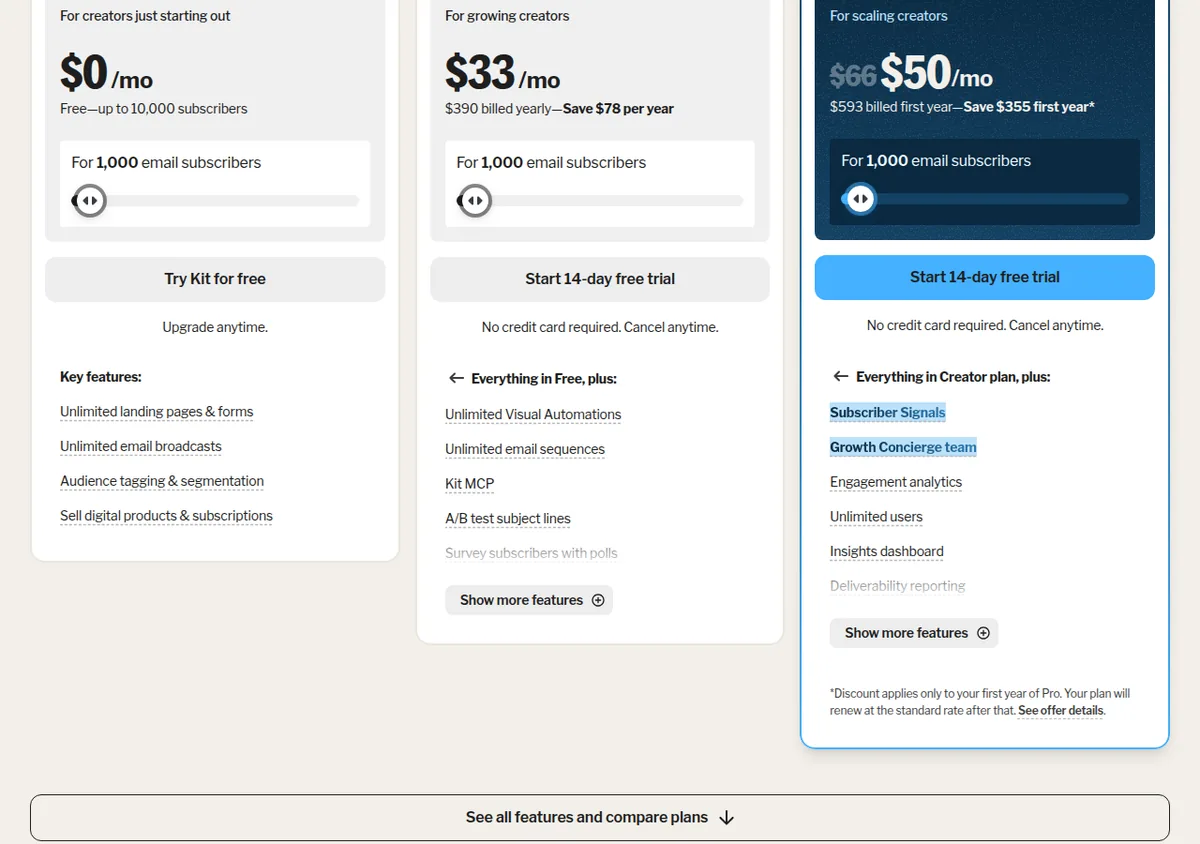
Kit's free plan allows up to 10,000 subscribers at $0, with unlimited landing pages and forms, unlimited email broadcasts, audience tagging and segmentation, and the ability to sell digital products and subscriptions. There are no sending limits on any Kit plan, so the free plan's ceiling is subscribers and nothing else. It does not include branding removal, automations, email sequences or integrations.
EmailOctopus's free plan allows 2,500 subscribers and 10,000 emails a month with no time limit, and includes unlimited seats. It does not include branding removal or automation.
MailerLite's free plan allows 250 subscribers, 2,500 monthly emails and two user seats, with campaigns, automations, a landing page, one digital product or booking, signup forms, MCP access and more than 100 integrations. Exceeding 250 active subscribers locks sending for campaigns and automations rather than charging for an upgrade.
Mailchimp's free plan allows 250 contacts and 500 sends a month on the published entry tier, with one seat. Brevo's free plan is a daily sending allowance rather than a subscriber allowance. GetResponse's free plan allows 2,500 contacts with a monthly email ceiling and a single automation workflow. Moosend has no permanent free plan at all, only a 30-day trial, and AWeber's free plan allows 500 subscribers with a monthly send ceiling.
The pattern is that the free plans differ less in price than in what they charge for growth. Kit and EmailOctopus charge nothing until a subscriber or send threshold is passed and then charge for the next tier. MailerLite and Mailchimp stop the account at the threshold. Brevo meters by day. A practice that expects to grow steadily should prefer the first pattern, because the transition is a price change rather than an outage.
Our verdict
The cheapest way to avoid every fee in this guide is to stay on a free plan that removes the fee mechanism rather than discounting it. Kit's free plan covers 10,000 subscribers with no sending limit and no overage block, and EmailOctopus's free plan covers 2,500 subscribers with unlimited seats. Neither charges for branding removal because neither removes the branding, which is the trade.
On paid plans, the two figures to check before signing up are the seat ceiling and the overage mechanism, because those are the two that produce an involuntary charge. Brevo Starter fails the seat test outright for a two-person practice. Mailchimp's add-on contact block combined with peak contact total billing is the most expensive overage mechanism in the comparison for a practice with a bursty list. MailerLite's cumulative active subscriber counting is the strictest definition of a contact in the comparison.
For predictability, EmailOctopus is the strongest of the eight: automatic movement to the matching plan when the list grows, unlimited seats on Pro, and a published contact-and-email free tier with no time limit. For a practice that sells through its email, AWeber Plus at $30 a month for 500 subscribers halves the transaction fee against Lite and removes the one-list and three-user caps. For a practice that wants no sending ceiling at all, Kit and GetResponse are the only two platforms in this comparison that do not impose one.
Frequently asked questions
What are the most common hidden fees in email marketing software?
Branding removal, extra seats, contact overage charges and sending-ceiling upgrades. Branding removal is the most common first surprise because it appears on the entry tier of every platform in this comparison. Brevo charges $12 a month, or $129.60 a year, to remove its logo at Starter level, which more than doubles its $9 base plan. Extra seats are the second, and Brevo Starter allows a maximum of one seat, so a two-person practice cannot use it at all.
Does Mailchimp charge for going over the contact limit?
Mailchimp charges for an add-on contact block rather than moving the account to a new tier. The size and price of a block depend on the plan and pricing tier, and exceeding by more than one block's worth means multiple blocks are charged. Mailchimp states that the monthly bill is based on the peak contact total during the billing period, so the bill reflects the highest number of contacts stored that month even if the total falls afterwards. Archived and cleaned contacts do not count toward the limit.
Why do the Mailchimp pages disagree about overages?
Mailchimp's pricing page states that sending is paused if the contact or send limit is exceeded, while its help article on additional charges states that the service is not interrupted and an additional charge appears instead. Both were read on 23 October 2026. The discrepancy is unresolved on the vendor's own documentation, and a practice that depends on uninterrupted sending should confirm the current behaviour with Mailchimp support.
How much does an extra user seat cost?
It depends entirely on the platform. Brevo charges $12 a month, or $129.60 a year, per additional marketing seat for seats two to ten, and its Starter plan allows only one seat in total. MailerLite includes two seats on Free, three on Comfort and unlimited seats on Power. AWeber includes three users on Lite and unlimited on Plus. Mailchimp includes one seat on Free, three on Essentials and five on Standard. EmailOctopus includes unlimited seats on Pro at $9 a month billed yearly.
What happens when a list grows past the plan limit?
Four different behaviours exist. Mailchimp charges an add-on contact block without changing the tier. Kit upgrades the account automatically to the next subscriber tier and states that its team has to downgrade plans manually, so coming back down requires an email to support. MailerLite raises the subscriber limit automatically and charges the card for the next tier on paid accounts, and locks sending entirely on the free plan above 250 active subscribers. EmailOctopus moves the account to the matching plan and emails to confirm.
Is there a refund if a practice cancels early?
Kit offers a refund within the first 30 days of signup on either a monthly or an annual plan, which is the most generous position in this comparison. Mailchimp states plainly that no refund is given for previously billed charges, and that a monthly downgrade takes effect at the end of the monthly billing period. MailerLite requires the current billing cycle, monthly or annual, to end before a lesser plan starts, and an annual to monthly switch only takes effect once the annual plan expires.
Can one account cover several client lists without extra cost?
On some platforms. AWeber Lite allows one email list and Plus allows unlimited lists. Mailchimp allows one audience on Free, three on Essentials and five on Standard. Brevo, GetResponse and EmailOctopus price by contacts or email volume rather than by list, so the number of lists inside the account is not the constraint. MailerLite publishes no multi-account arrangement at all and states that each account needs its own separate plan and billing.
A single fixed list size shows how the pricing units diverge, which is set out in email marketing cost at 5,000 subscribers.
Get started with the tools in this guide
-
Start free with Kit (opens in a new tab)
Kit
Free plan up to 10,000 subscribers
-
See GetResponse pricing (opens in a new tab)
GetResponse
-
Start free with MailerLite (opens in a new tab)
MailerLite
Free plan up to 250 subscribers
-
Start free with AWeber (opens in a new tab)
AWeber
14-day free trial, no card required
These links go to the vendor's own site. We may earn a commission if you sign up, at no extra cost to you. How we fund the site. Every figure in this guide was read from the vendor's pricing page on the date stamped above, so confirm the number before you commit.
Related guides
-
 Comparison
Email Marketing for Agencies
Kit vs GetResponse for Agencies
Kit and GetResponse compared on verified pricing, included user seats, and how each handles running campaigns for several clients from one account.
-
Email Marketing for Agencies
Email Marketing Software for Consultancies
The four features consultancies are told they need an enterprise plan for, and which platforms actually charge for them, checked against eight vendor pricing pages on 22 October 2026.
-
Email Marketing for Agencies
Low-Cost Email Marketing for Consultancies
A three-point cost model for consultancies at 500, 2,500 and 10,000 contacts, with the per-contact and per-email normalisation that contact-based pricing hides.